


Overview
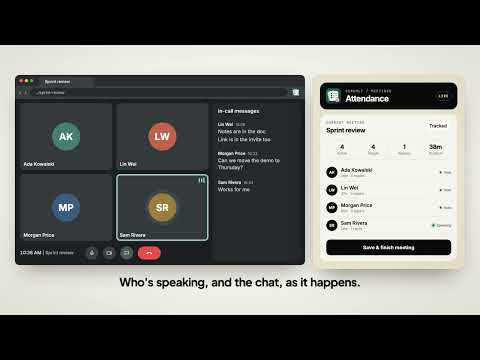
See who joined your online meetings, how long they stayed, who dropped and came back, and the chat, with a summary after the call.
Know who came to your meeting, and for how long. Scrumly Meeting Attendance keeps an attendance sheet for the online meetings you join in Chrome. When the call ends, a summary opens with everyone's time in the call, when they joined and left, who dropped and came back, and what people wrote in the chat. WORKS WHERE YOU MEET Works with Google Meet, Zoom, Microsoft Teams and other meeting apps that run in Chrome. Tracking starts once you are in the call. No bot joins your meeting and nobody has to install anything else. FEATURES • Time in call for every participant, with join and leave times • Rejoins: see who dropped and how long they were away • A timeline of each person's stay across the meeting • Estimated speaking time from the meeting app's own speaking indicators • The group chat, saved next to the attendance on your device • Copy the summary as text or download it as CSV • Track every meeting, or only the meetings you mark with "Track this" • Optional: connect your Scrumly account to see attendance across meetings in the Scrumly dashboard PRIVATE BY DESIGN Attendance and chat are stored in your browser. Chat never leaves your device: download it or delete it whenever you like, or turn chat saving off. Finished meetings are removed from the device after 30 days. Nothing is sent anywhere unless you choose to connect a Scrumly account, and then only names, profile photos and attendance times are synced, never chat. The extension never accesses audio, video, screen shares or recordings, and never uses your microphone or camera. HOW TO USE 1. Join a meeting in Chrome. 2. Open the extension to see live attendance, or let it run in the background. 3. Hang up. The meeting summary opens with attendance, rejoins and chat. Make sure you are allowed to record attendance in the meetings you track, and let other participants know where your organisation's rules or local law require it. Scrumly Meeting Attendance is an independent product and is not made by or affiliated with the companies behind the meeting apps it works with. Product names are trademarks of their respective owners.
0 out of 5No ratings
Details
- Version3.0.1
- UpdatedOctober 13, 2026
- Size85.42KiB
- LanguagesEnglish
- Developer
- Non-traderThis developer has not identified itself as a trader. For consumers in the European Union, please note that consumer rights do not apply to contracts between you and this developer.
Privacy

Scrumly Meeting Attendance has disclosed the following information regarding the collection and usage of your data. More detailed information can be found in the developer's privacy policy.
Scrumly Meeting Attendance handles the following:
This developer declares that your data is
- Not being sold to third parties, outside of the approved use cases
- Not being used or transferred for purposes that are unrelated to the item's core functionality
- Not being used or transferred to determine creditworthiness or for lending purposes
Support
For help with questions, suggestions, or problems, visit the developer's support site