


Overview
Professional screenplay formatting for Google Docs. Keyboard shortcuts & smart auto-format.
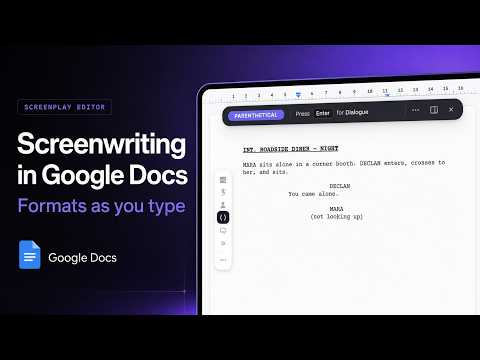
Turn Google Docs™ into a professional screenwriting tool. THE FINAL DRAFT FLOW, INSIDE GOOGLE DOCS™ You type a character name, you press Enter, and you are already in dialogue. You press Tab, and you are in a parenthetical. You press Enter again and you are back in action. Scene headings, action, character, dialogue, parentheticals and transitions format themselves while you write, exactly like Final Draft or Arc Studio, and you never open a menu. Type "int." and the line becomes a scene heading. Every element sits one keystroke away with Option and a number, or one click on the rail in the margin. A small pill follows your cursor and tells you which element you are writing, so you always know where you stand. WHAT ELSE YOU GET Format an existing draft: paste a messy script, run Format Document, and it snaps into industry layout in seconds. Scene numbers renumber themselves when you insert a scene in the middle. Screenplay Preview shows your script as a real printed page while you write. Scene Board puts every scene on a card, you drag to restructure, and the document follows. Export to Final Draft in standard .fdx, ready to send to a producer. Production Breakdown lists cast, props, wardrobe and effects scene by scene, and exports to a spreadsheet. WHY WRITERS SWITCH Your producer and your co-writer are already in Google Docs™. Comments, suggestions and live co-writing keep working. No proprietary file format holds your script hostage. No 249 dollar licence. Your scripts stay in your Google Drive™, and we never read, store or access your content. FOR TEACHERS AND FILM SCHOOLS It works in a classroom without an IT project. Your students already have Google Docs™, it runs on Chromebooks, and there is nothing to install on school machines. Write to hugopthomas@gmail.com about a licence for your programme. PRICE Free to start. Pro costs 7.99 dollars a month or 69 dollars a year, and one subscription covers both the extension and the Google Docs™ add-on. Made by a film director who writes his own features in Google Docs™.
5 out of 512 ratings
Details
- Version3.9.399
- UpdatedOctober 9, 2026
- Size6.52MiB
- Languages52 languages
- DeveloperWebsite
Email
hugopthomas@gmail.com - Non-traderThis developer has not identified itself as a trader. For consumers in the European Union, please note that consumer rights do not apply to contracts between you and this developer.
Privacy

Screenplay Editor has disclosed the following information regarding the collection and usage of your data. More detailed information can be found in the developer's privacy policy.
Screenplay Editor handles the following:
This developer declares that your data is
- Not being sold to third parties, outside of the approved use cases
- Not being used or transferred for purposes that are unrelated to the item's core functionality
- Not being used or transferred to determine creditworthiness or for lending purposes
Support
For help with questions, suggestions, or problems, visit the developer's support site