

ScrollKeeper for browsers
3 ratings
)
Overview
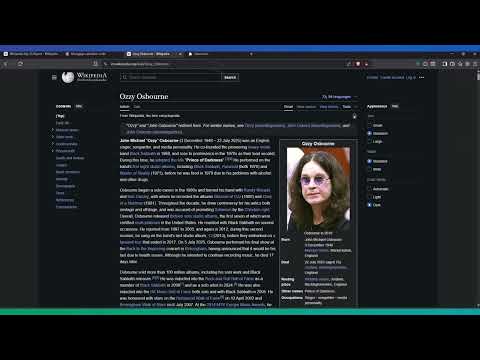
Save and jump to scroll positions with hotkeys, titles, and a visual list of bookmarks in the popup.
✨ ScrollKeeper – Save & Jump to Scroll Positions 🚀 📜 Never lose your spot on long pages again! ScrollKeeper lets you save, name, and jump back to multiple scroll positions on any webpage — instantly, with beautiful visual markers and smooth navigation. 🔥 Key Features: 📌 Save up to 9 scroll positions per page using keyboard shortcuts or right-click menu ⚡ Quick navigation – jump to saved spots instantly without endless scrolling 🎯 Visual markers – gradient-styled numbered badges directly on the page 🏷 Custom titles – label each bookmark for better organization 💾 Cross-session persistence – your bookmarks stay even after closing the browser 🖱 Popup management – view, edit, delete, and toggle bookmarks from the extension menu 👁 Visibility toggle – hide/show all bookmarks with one click or shortcut 🎨 Beautiful Visuals: 🌈 Gradient markers & connection lines ✨ Smooth animations & hover effects 📏 Responsive design for all screen sizes 🔍 Clear, color-coded titles for quick identification ⌨ Keyboard Shortcuts (Windows/Linux): Save bookmark: Win + 1-9 Jump to bookmark: Alt + 1-9 Go back: Win + 0 ⌨ Keyboard Shortcuts (Mac): Save bookmark: Option + 1-9 Jump to bookmark: 1-9 Go back: Option + 0 --------- 🆕 What’s New (v1.0.2): 🌟 New visibility toggle to hide/show all bookmarks via shortcut or popup ⚙ Improved cross-platform shortcut handling 🐞 Fixed positioning issues on resize & dynamic content 🎨 Minor UI enhancements for a cleaner look 💡 Perfect for: Articles 📚 | Research 🔍 | Coding Docs 💻 | Long Chats 💬 📥 Install now and make scrolling smart, fast, and frustration-free!
5 out of 53 ratings
Details
- Version1.0.2
- UpdatedAugust 16, 2025
- Offered byLaneZero
- Size32.71KiB
- LanguagesEnglish (United States)
- Developer
Email
LaneZeroX@proton.me - Non-traderThis developer has not identified itself as a trader. For consumers in the European Union, please note that consumer rights do not apply to contracts between you and this developer.
Privacy

This developer declares that your data is
- Not being sold to third parties, outside of the approved use cases
- Not being used or transferred for purposes that are unrelated to the item's core functionality
- Not being used or transferred to determine creditworthiness or for lending purposes
Support
For help with questions, suggestions, or problems, visit the developer's support site