

Scroller for ChatGPT
1 rating
)
Overview
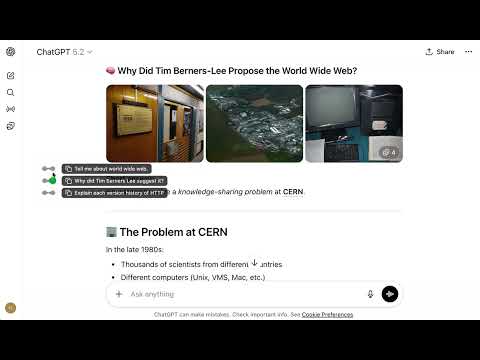
A browser extension that adds a timeline-style scroll rail to ChatGPT, making long conversations easier to navigate.
Scroller for ChatGPT adds a lightweight timeline on ChatGPT pages so you can move through long chats quickly and stay oriented. ➤ What it does - Shows conversation turns as a clean vertical timeline - Lets you click any dot to jump directly to that message - Highlights your current reading position while scrolling - Groups question/answer turns for easier scanning - Shows preview text for user prompts - Lets you copy a full question + answer pair in one click from the timeline preview ➤ Keyboard shortcuts - ArrowDown or j: jump to the next message - ArrowUp or k: jump to the previous message - Shortcuts are disabled while typing in input fields/editors. ➤ Why it helps - Faster movement in long conversations - Less manual scrolling - Easier context switching between earlier and later parts of a chat ➤ Privacy-focused by design - Works only on chatgpt.com - Processes content locally in your browser - No remote code - No analytics or data selling
5 out of 51 rating
Details
- Version0.2.0
- UpdatedMarch 3, 2026
- Size94.75KiB
- LanguagesEnglish
- Developer
Email
eupthere@gmail.com - Non-traderThis developer has not identified itself as a trader. For consumers in the European Union, please note that consumer rights do not apply to contracts between you and this developer.
Privacy

This developer declares that your data is
- Not being sold to third parties, outside of the approved use cases
- Not being used or transferred for purposes that are unrelated to the item's core functionality
- Not being used or transferred to determine creditworthiness or for lending purposes
Support
For help with questions, suggestions, or problems, visit the developer's support site