

Scrollback – Navigate ChatGPT & Claude Conversations
5.02 ratings
21users
2026latest update
ExtensionTools

Overview
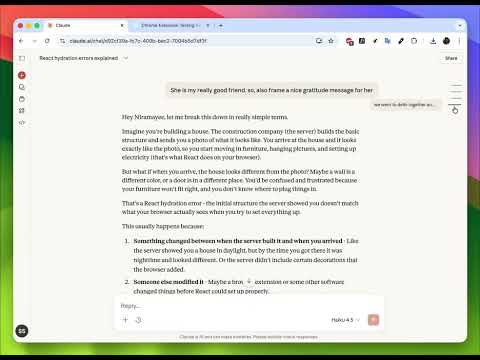
Instant navigation for long ChatGPT and Claude chats
Navigate long ChatGPT and Claude conversations with subtle anchor links. Scrollback adds lightweight, hover-based anchors to AI chat messages so you can instantly jump to any part of a conversation without endless scrolling. No tracking, no data collection, no backend. Key features: • 🧭 Quickly navigate long ChatGPT conversations • ⚡ Jump between Claude messages with one click • 🎨 Clean, minimalist anchor links that stay hidden until needed • 🪶 Fast, lightweight, and privacy-first • 🔒 No accounts, no analytics, no external requests Perfect for power users, developers, designers, and researchers who rely on AI chats and want faster navigation without breaking their workflow.
5 out of 52 ratings
Details
- Version1.0
- UpdatedJanuary 2, 2026
- Offered bySaurabh
- Size63.04KiB
- LanguagesEnglish
- Developer
Email
saurabh3093@gmail.com - Non-traderThis developer has not identified itself as a trader. For consumers in the European Union, please note that consumer rights do not apply to contracts between you and this developer.
Privacy

Manage extensions and learn how they're being used in your organization
The developer has disclosed that it will not collect or use your data. To learn more, see the developer’s privacy policy.
This developer declares that your data is
- Not being sold to third parties, outside of the approved use cases
- Not being used or transferred for purposes that are unrelated to the item's core functionality
- Not being used or transferred to determine creditworthiness or for lending purposes