

Scroll Feet — Doomscrolling, Measured

Overview
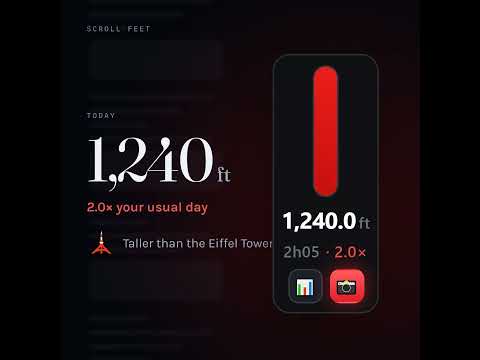
Your scrolling, measured in real feet. Green under your usual day, red when you doomscroll past it. One-click share.
Scroll Feet puts a small meter in the corner of every page showing how far you have scrolled today - measured in real, physical feet. Not per page. Not per tab. One running total for your whole browser, across every site, that keeps climbing as you move around and picks up where it left off after a restart. It resets once a day at 08:30. GREEN OR RED Your "usual" is the middle of your last 30 real days - a median, not an average, so one enormous Sunday does not quietly raise the bar you are judged against, and a day you barely touched the phone does not lower it. Below your usual, the meter is green. Above it, the meter turns red and a Share button appears - one click copies an image of your meter to the clipboard, ready to paste into a post. Full red is twice your usual. REAL FEET, NOT GUESSED FEET Browsers cannot read your monitor's true pixel density, so the number would otherwise be a guess. Open the popup and either type your display's PPI or use "Calibrate with a ruler" - hold a ruler to the screen, type what you measured. After that, an inch on screen is an inch in the world. WHAT IT DOES NOT DO No account. No sign-up. It never reads what is on your screen or which sites you visit - only how far the page moved. Everything is stored on your own machine and the meter works with no connection at all. One thing is optional and does leave: if you switch on ranking, the day's distance goes to our server with a random id the extension invents for itself. No email, no account, nothing that says who you are, and nothing at all unless you turn it on. FREE, AND AN OPTIONAL PAID PART The meter, the daily total, the green/red comparison and sharing are free forever. Premium makes it yours. 737,280 ways to wear the meter: pick one of twelve ready-made looks, or build your own from shapes, palettes, patterns, effects and frames - a lightning bolt, a coffee mug, a cat, a crown. Your share images carry your look too. Premium also keeps your whole history: this week, this month and your entire lifetime total, with charts of the climb and the landmarks you have passed - the Statue of Liberty, the Eiffel Tower, Everest. And premium tells you where you land: opt in and see what share of everyone tracking today scrolled more than you did. Firefox, Chrome and Android are all ranked in the same pool. And premium keeps growing: new looks and features land there as they're made, at no extra cost. $5/month or $36/year. The free part is not a trial and does not expire.
0 out of 5No ratings
Details
- Version1.2.64
- UpdatedOctober 8, 2026
- Offered bySet Mind
- Size63.54KiB
- LanguagesEnglish
- DeveloperMAXWELL RYAN DECKER
3426 S Melvina St Millcreek, UT 84106-2948 USEmail
mail@setmind.netPhone
+1 385-259-4150 - TraderThis developer has identified itself as a trader per the definition from the European Union and committed to only offer products or services that comply with EU laws.
Privacy

Scroll Feet — Doomscrolling, Measured has disclosed the following information regarding the collection and usage of your data. More detailed information can be found in the developer's privacy policy.
Scroll Feet — Doomscrolling, Measured handles the following:
This developer declares that your data is
- Not being sold to third parties, outside of the approved use cases
- Not being used or transferred for purposes that are unrelated to the item's core functionality
- Not being used or transferred to determine creditworthiness or for lending purposes
Support
For help with questions, suggestions, or problems, visit the developer's support site