

Scroll-Driven Animations Debugger
6 ocen
)
Przegląd
A DevTools extension to visualize and debug Scroll-Driven Animations
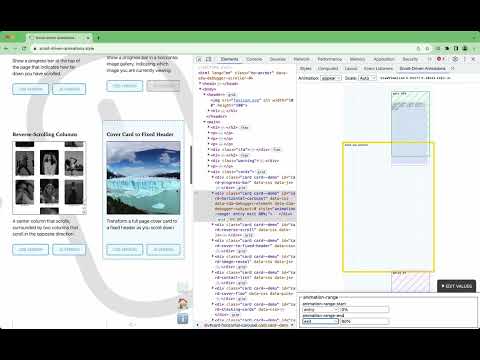
Use this DevTools extension to debug and visualize Scroll-Driven Animations. - Visualize the Scroll-Driven Animations’s scroller, element, and subject. - Suppports both ScrollTimeline and ViewTimeline. - Works with both CSS-based and WAAPI-based Scroll-Driven Animations. - Plays nice with `position: sticky`. - Visualize the `animation-range-start` and `animation-range-end`. - Edit the `animation-range-start` and `animation-range-end` values. Once installed, a new pane “Scroll-Driven Animations” gets added to Chrome DevTools’s Elements Panel. To use it, inspect an Element using Chrome DevTools as you’d normally do. Select the “Scroll-Driven Animations” panel to see a visualization of Scroll-Driven Animations that were added to that element. The visualization is a live representation of the scroller, animated element, and – in case of a ViewTimeline – tracked subject: as you scroll in the document, the visualization also updates. Use the top toolbar to switch between multiple animations _(if more than one)_ or to set the visualization’s scale factor. Typically you don’t need to set the scale factor, as the visualization automatically adapts itself to the available space. Also included in the top toolbar are an indicator telling you which type of scroll timeline you are dealing with, and some progress numbers: total scroll progress, effect progress, actual scroll offset _(in pixels)_. Use the “Edit Values” toggle at the bottom to bring up a range editor. Once the editor is shown, the visualization also shows indicators for the start and end range. In case of a ScrollTimeline these are two lines on the scroller’s contents. In case of a ViewTimeline these are two boxes representing the areas for the set `animation-range-*` values. Change the values using the dropdown and/or the inputs. Note that the inputs do not live-update _(for now)_; after changing click somewhere outside the field to update the value.
5 na 56 ocen
Szczegóły
- Wersja1.1.1
- Zaktualizowano9 września 2026
- SprzedawcaBramus Van Damme
- Rozmiar105KiB
- JęzykiEnglish
- Deweloper
E-mail
bramus@bram.us - Osoba niebędąca przedsiębiorcąTen deweloper nie określił, że jest przedsiębiorcą. Pamiętaj, że prawa konsumentów nie obowiązują w przypadku umów zawartych między tym deweloperem a konsumentami z Unii Europejskiej.
Prywatność

Ten wydawca oświadcza, że Twoje dane
- nie są sprzedawane osobom trzecim (z wyjątkiem uzasadnionych przypadków)
- nie są używane ani przesyłane w celach niezwiązanych z podstawową funkcją produktu,
- nie są używane ani przesyłane w celu ustalenia zdolności kredytowej lub udzielania pożyczek.
Pomoc
Jeśli masz pytania, sugestie lub problemy, wejdź na stronę pomocy dla deweloperów