

Scriptilux PDF – ChatGPT to PDF Export
2 ratings
)
Overview
Save ChatGPT conversations as high-fidelity PDFs with accurate rendering of equations, code, tables, images, and visual content.
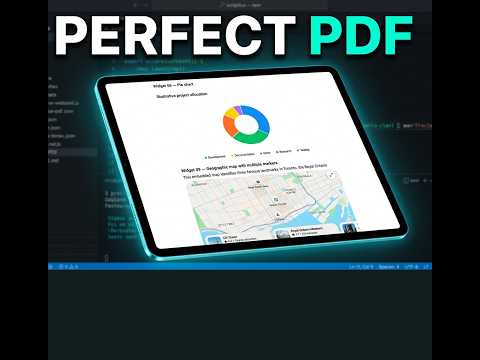
Scriptilux PDF — Export ChatGPT Conversations to Superior-Quality PDFs Preserve ChatGPT's Intelligent UI components, mathematical formulas, code, images, tables, and long conversations with exceptional visual fidelity. Turn your valuable ChatGPT conversations into professional, searchable, selectable-text PDF documents that you can save, study, print, share, and reference whenever you need them. Scriptilux PDF helps you preserve the knowledge and technical details in your ChatGPT conversations — without sacrificing formatting or readability. EXCEPTIONAL SUPPORT FOR CHATGPT INTELLIGENT UI Modern ChatGPT conversations contain much more than ordinary text. They can include interactive charts, mathematical graphs, maps, image galleries, diagrams, visualizations, and sophisticated interface components. Scriptilux PDF is designed to preserve supported ChatGPT Intelligent UI components as high-quality visual representations within your PDF documents. Supported content includes: • Intelligent UI components: Charts, graphs, maps, visualizations, and other supported widgets. • Mathematical and scientific formulas: Fractions, matrices, equations, mathematical notation, and displayed formulas. • Programming code: Preserved indentation, syntax highlighting, formatting, and options for handling long lines and scrollable code blocks. • Images and illustrations: Uploaded images, images included in ChatGPT responses, and AI-generated images, where accessible. • Tables and structured content: Well-organized tables, lists, quotations, headings, and formatted explanations. • Complex conversations: Technical discussions combining text, equations, images, code, and graphical content. Unlike basic screenshot-based exports, Scriptilux PDF preserves supported conversation text as real, selectable, searchable text, while maintaining the appearance of complex visual content. BUILT FOR LONG AND TECHNICAL CONVERSATIONS ChatGPT discussions can grow into substantial technical documents containing explanations, research, equations, programming examples, and supporting illustrations. Scriptilux PDF helps transform these conversations into structured, readable PDF documents. EXPORT EXACTLY WHAT YOU NEED You don't always need to save an entire conversation. Choose from flexible export options: • The complete discovered conversation • Individually selected messages • A specified range of messages • Everything from a selected message onward • The latest ChatGPT assistant response • Messages from only one speaker Create focused documents containing only the information relevant to your work. PROFESSIONAL PDF FORMATTING AND CUSTOMIZATION Make every exported conversation look like a polished document rather than a browser printout. Choose from four formatting styles: • Clean Document — Professional, readable formatting • Chat Style — Preserves the conversational structure • Compact — Space-efficient layout • Academic — Suitable for scientific, educational, and technical content Customize your PDF with: • A4, US Letter, or US Legal paper • Portrait or landscape orientation • Adjustable margins and font sizes • Configurable code formatting • Image quality settings • Document titles and original conversation links • Clickable Table of Contents • Page numbers • Custom headers and footers • Reusable settings profiles Your exported PDF can be searched, printed, shared, and stored for long-term reference. PRIVACY - LOCAL BY DESIGN Your conversations may contain important research, proprietary information, code, or personal notes. Scriptilux PDF prepares documents locally in your browser, without requiring a separate Scriptilux account or remote PDF rendering service. • No separate account required • No advertising or extension analytics • Preferences stored locally • Conversation content processed in browser memory during export • Images retrieved from accessible original sources when necessary • Optional visual snapshots captured locally and cropped in memory • No conversation screenshots or images uploaded to a separate Scriptilux service Your browser's built-in print system handles the final PDF creation. SAVE YOUR CHATGPT CONVERSATION IN THREE SIMPLE STEPS 1. Open ChatGPT Navigate to a conversation at chatgpt.com and click the Save as PDF button. 2. Choose and preview Select the conversation content, document style, paper size, and other preferences. Prepare the document and review the preview. Recommended starting settings: • Profile: Reading • Paper: US Letter • Margins: Normal • Body font: 11 pt 3. Save your PDF Click Print / Save PDF, then select Save as PDF in Chrome's print dialog. Your PDF is ready to keep, search, print, or share. FREE AND UNLIMITED Scriptilux PDF Version 1 is currently free to use, with unlimited PDF exports. Preserve your most valuable ChatGPT conversations in beautifully formatted documents without usage limits. GOOD TO KNOW TECHNICAL NOTES • Requires Google Chrome 131 or newer and access to conversations on chatgpt.com. • Supported interactive visual elements are exported as static representations. • Supported hidden carousel items can be captured. • Unavailable images and unsupported content are reported. • Final PDF pagination is controlled by Chrome's print system. Scriptilux PDF is an independent product and is not affiliated with, sponsored by, or endorsed by OpenAI.
5 out of 52 ratings
Details
- Version1.0.26
- UpdatedOctober 25, 2026
- Offered byQuantEngine
- Size478KiB
- LanguagesEnglish
- Developer
Email
quantengine@gmail.com - Non-traderThis developer has not identified itself as a trader. For consumers in the European Union, please note that consumer rights do not apply to contracts between you and this developer.
Privacy

This developer declares that your data is
- Not being sold to third parties, outside of the approved use cases
- Not being used or transferred for purposes that are unrelated to the item's core functionality
- Not being used or transferred to determine creditworthiness or for lending purposes