

유튜브 자동 구간반복·맥락 해석 영어학습
14 ratings
)
Overview
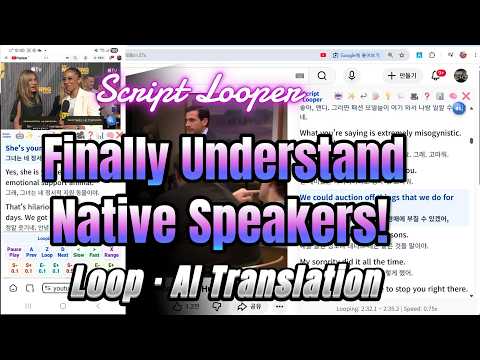
문장·구간 반복, 속도·싱크 조정, 문장·이디엄·문법 맥락 해석/설명을 원클릭·원터치로. PC·안드로이드·아이폰 지원.
Script Looper — 원어 유튜브 방송 활용 외국어 습득 특급 도우미 [바로 쓰는 방법 — 작동 요약] 1) Script Looper 확장프로그램 추가 구글에서 Script Looper 검색→크롬 웹스토어에서 추가→자막 유튜브 큐레이션 블로그(https://drenglish.tistory.com/)에서 유튜브 동영상 선택 또는 자막 있는 동영상 검색하여 선택 * 작년(2025년) 중반 이후 업로드된 동영상들은 자동생성된 자막도 정확하여 활용 가능 2) 원클릭 해석병기 스크립트 패널 생성 자막 패널 상단의 🤖(ChatGPT 번역) 또는 ✨(Gemini 번역) 버튼을 누르면 자막별 맥락 해석이 병기된 스크립트가 자동으로 생성됩니다. - 영상이 길면 5분 단위 구간 번호를 선택하여 구간별로 진행하도록 하였습니다. 해석 병기 스크립트 하단의 "응답복사"(⧉) 클릭 후, 유튜브를 열고 자막패널 상단의 📋(번역결과 붙여넣기) 버튼을 클릭하면 스크립트 패널 자막에 해석이 병기됩니다. * ChatGPT와 Gemini 로그인 필요 (무료 및 유료 계정 모두 가능) 3) 단축키 원터치 반복재생·속도조절·싱크조정 - 스크립트 패널에서 자막 클릭→Z키: 자막 구간 영상을 무한 반복재생 On/Off - A/D키: 이전/다음 자막으로 이동하여 무한 반복재생 - Space: 재생/일시정지 - <, >: 재생 속도 조절(예: 0.75배속, 0.5배속 등) - 1~4/Q~R: 재생하여 들으면서 소리의 시작 및 끝점을 자막에 맞게 조정(±0.1초/±0.5초) 4) 원클릭 묻기 및 맥락 설명 - 스페이스바를 눌러 일시정지→모르는 부분 드래그→"묻기" 팝업 클릭: 단어·이디엄·구동사·속어·문법 등에 대하여 문맥 기반 설명 및 예문(3개) 즉시 생성 5) 선택구간 무한반복 자막 패널에서 자막 일부 또는 여러 자막을 드래그한 뒤 X키를 누르면 선택한 범위 전체가 하이라이트되며 자동 반복재생됩니다. X키를 다시 누르면 반복재생이 해제됩니다. ========================================================= [컴퓨터 및 모바일 기기 모두에서 작동] ◆ 컴퓨터 (Chrome) 구글에서 Script Looper 검색→크롬 웹스토어에서 추가→유튜브에서 자막있는 동영상을 열어 바로 이용 가능 ◆ 모바일 기기 ● 안드로이드(갤럭시 폰 등) 1. Play 스토어에서 Lemur Browser를 검색하여 Lemur Browser-Extensions를 다운로드합니다. 2. 브라우저 홈화면 하단 우측의 “정사각형 네개” 버튼을 탭→Extensions→Chrome Web Store=>Script Looper를 검색하여 설치(추가)합니다. 3. 홈화면 아무 곳에나 탭하면 나타나는 +버튼을 탭하여 북마크된 유튜브, 블로그 및 ChatGPT + 탭 ● iOS(아이폰 등) 1. App Store에서 Orion Browser를 검색하여 Orion Browser by Kagi를 다운로드합니다. 2. 브라우저 홈화면 하단 우측의 “점 세개 있는 원” 버튼을 탭→Extensions→우측 하단의 + 버튼 탭→Install Chrome extension→Script Looper를 검색하여 설치(추가)합니다. ● 공통 홈화면의 유튜브 또는 Script Looper Tistory 블로그에 접속하여 자막있는 동영상을 열면 유튜브 영상, 각종 버튼, 스크립트 패널, 단축키 패드 등이 있는 화면이 열립니다. * 스크립트 패널, 단축키 패드 등이 보이지 않으면 데스크탑 모드 체크 - 안드로이드: 우측의 “가로줄 세개”버튼 탭→"Desktop Mode" 체크 - iOS: 하단 유튜브 주소 좌측의 유튜브 로고 탭→" Request Desktop Website" 체크 * 번역이나 묻기 답변이 정상적으로 진행되지 않으면 새로고침 또는 Script Looper 껐다 킴 - 새로고침: 안드로이드) 우측하단 “가로줄 세개” 버튼 탭→Refresh 탭. iOS) 우측하단 새로고침 버튼 탭 - Script Looper 껐다 켜기: 안드로이드) 우측 하단 “네모 네개” 버튼 탭→Extensions. iOS) 우측 하단 “점 세개 원” 버튼 탭→Extensions * 묻기 팝업을 탭했는데 ChatGPT 화면이 안 열리면→ 홈화면에서 ChatGPT 탭 ※ Lemur Browser와 Orion Browser는 모바일 기기에서 크롬 확장프로그램을 설치하여 활용할 수 있는 브라우저입니다. ========================================================= [핵심 가치 — 왜 Script Looper 확장프로그램인가] 🤖 직청직해 걸림돌 제거: 자유자재 구간반복·속도조절, AI 맥락 해석·설명 🔄 끊김 없는 인풋 지원: 원터치 반복재생, 원클릭 전체해석·질의응답 📱 언제 어디서든 습득: PC는 물론 스마트폰으로도 완벽 구동 — 세계 유일 모바일 완전 지원 🚀 이론·경험 기반 솔루션: 학습 No, 습득 Yes — 시험용·회화책 녹음자료 No, 원어민 유튜브 방송 Yes ✨ 국비 유학생 출신 개발자가 "직접 공부하려고" 만든, 지구최강 유튜브 방송 활용 외국어 습득 구글 확장프로그램입니다. 미국 국비 유학, 국제기구 주재관 근무 등 화려한 이력 뒤에는 항상 영어 직청직해와 프리토킹에 대한 갈증이 있었습니다. 기존의 유명 툴들은 자동 구간반복 재생기능이 없고, 자막구간 분할이 유튜브 자막 그대로이며, 싱크 조정이 불가능하고, 해석이 부실하며, 사전검색이 불편하여 연습 흐름이 끊기기 일쑤였습니다. 더욱이 이들 모두 PC에서만 작동하는 한계가 있습니다. 이 모든 한계를 타파하고자 지난 1년여간 스스로 수없이 활용하며 수정하는 과정을 거쳐 명품을 완성했습니다. Script Looper는 학습자의 한(恨)과 최신 AI 기술이 만나 탄생한 외국어 리스닝·스피킹 습득 특급 도우미입니다. ========================================================= [차별점 — 기존 툴에는 없는 핵심 기능들] 1. 원클릭 AI 맥락 해석 & 스크립트 패널 생성 🤖(ChatGPT)/✨(Gemini) 아이콘을 클릭하면 맥락 해석이 자막별로 병기된 스크립트 창이 자동으로 뜹니다. 유튜브 제공 자막들을 문장·의미단위 등의 구간으로 재분할하여 시청각적 몰입감을 높였습니다. 2. 원어민 속도를 정복하는 단축키 원터치 자동 구간반복 및 속도 조절 [Z, A/D, Space, < >] 스크립트 창에서 자막을 클릭하고 Z 키를 누르면 유튜브의 해당부분이 무한 반복재생됩니다. A/D 키를 누르면 이전/다음 자막이 무한 반복재생됩니다. 재생 중인 자막은 하이라이트되고 상단 30% 위치로 자동 스크롤되어 시선이 분산되지 않습니다. 속도 조절도 <, > 키로 손쉽게 할 수 있습니다. 3. 답답함을 해소하는 단축키 터치 싱크 조정 [1~4, Q~R] 자막과 소리구간 싱크가 어긋나면 연습 효율이 뚝 떨어집니다. 소리를 들으며 단축키로 0.1초/0.5초 단위로 소리 구간을 조정하여 싱크를 바로바로 맞춰보세요. (전 세계 타사 툴에는 없는 Script Looper만의 필살기!) 4. 딥러닝을 위한 원클릭 묻기 및 AI 맥락 답변 모르는 부분이 있으면 Space를 눌러 일시 정지한 후 드래그하면 나타나는 "묻기" 팝업을 클릭하세요. AI가 단어, 이디엄, 구동사, 속어, 문법 등에 대하여 문맥에 맞는 예문(3개) 포함 상세 설명을 즉시 생성해 줍니다. 5. 선택구간 무한반복 [X] 자막 패널에서 자막 일부 또는 여러 자막을 드래그한 뒤 X키를 누르면 선택한 범위 전체가 하이라이트되며 자동 반복재생됩니다. X키를 다시 누르면 반복재생이 해제됩니다. 6. 모든 언어 지원 🌍 영어는 기본! 자막이 있는 유튜브 영상이 있으면 일본어, 스페인어, 프랑스어 등 전 세계 대부분의 언어 습득에 활용할 수 있습니다. 한편, 외국인도 활용할 수 있도록 21개국 언어 지원이 됩니다. 예를 들어 베트남어 브라우저로 접속하면 해석, 설명 등이 베트남어로 생성됩니다. 7. 세계 유일 모바일 완전 지원 🌐📱 기존 외국어 습득 확장프로그램들은 예외 없이 PC 환경에만 작동됩니다. Script Looper는 PC(Chrome)는 물론 안드로이드(갤럭시 폰 등)와 iOS(아이폰 등) 기기에서도 완벽하게 구동되는 세계 유일의 모바일 완전 지원 확장프로그램입니다. 집에서도, 출퇴근길에도, 등하굣길에도 — 언제 어디서든 스마트폰 하나로 PC와 동일한 고품질 트레이닝이 가능합니다. ========================================================= [스크립트 패널 주요 버튼] ❓ 도움말 | 💡 FAQ | 💬 Forum(소통 게시판) | 🤖 ChatGPT 번역 | ✨Gemini 번역 |📋 / ↩ 번역결과 붙여넣기·원문 복귀 | 📝 자막유튜브 블로그 | 🎥 개발자 유튜브 채널 | ❌ 스크립트 패널 닫기 | SL: 스크립트 패널 열기 ========================================================= [무엇으로 공부할지 고민하지 마세요 — 콘텐츠 생태계] 자막 유튜브 큐레이션 블로그 📝: 시트콤, 애니, 뉴스, 토크쇼, 각종 강의 등 다양한 영어 채널 또는 영상들을 카테고리별로 정리해 놓았습니다. 자신의 목적, 취향, 수준 등을 감안하여 선택하고 클릭하여 연습하세요. 직청직해와 프리토킹 역량의 유지·강화는 물론 뉴스를 시청하며 최신 정보도 접하고 강의 등 수강하며 지식·지혜도 함양할 수 있습니다. Q&A, 개선 의견, 경험 공유 등 소통 게시판(Forum)도 적극 활용하세요. * 자막 유튜브 큐레이션 블로그: https://drenglish.tistory.com/ 개발자 유튜브 채널 🎥: 개발자가 직접 Script Looper로 연습하는 라이브 영상도 있습니다. 함께 공부하며 실력 향상을 체감하고 소통도 해 보세요. * 개발자 유튜브 채널: https://www.youtube.com/@ScriptLooper-English ========================================================= [Comprehensible Input — 이해 가능한 소리 인풋] 이해 가능한 소리 인풋(Comprehensible Input)이 누적되면 귀가 뻥 뚫리고 말문도 확 트입니다. 학습(Learning)과 습득(Acquisition)은 완전히 다릅니다. 단어·문법·독해 위주의 학습만으로는 듣고 말하기 습득이 요원하다는 사실은 지난 수십 년간 전 국민이 입증하였습니다. 진정한 실용 외국어 정복은 이해 가능한 소리 인풋을 부단히 축적하는 습득으로 달성됩니다. Script Looper는 아이가 말을 배우듯 이해 가능한 소리에 몰입하여 자연스럽게 습득할 수 있도록 모든 기능적 편의를 제공합니다. ========================================================= [개발자의 수십 년 경험과 시행착오의 결정체] 저는 일찌감치 회화책의 스튜디오 녹음 자료나 시험용 문제가 아닌 실제 원어 방송을 이용해야 실용영어 정복이 가능하다는 원리를 경험 기반 깨닫고 실천했습니다. 그래서 때늦은 40대 중반에야 듣기 연습을 시작했지만 토익 조기 고득점과 국비 유학에 국제기구 주재관 근무도 했고, 관련 저서도 출간했습니다. * e 리스닝, 그게 뭐지?(2002, 능률교육): 이런저런 미국 사이트의 들리지도 않는 원어민 동영상들로 연습하였는데 시험문제 풀기 위주로 준비한 동료들보다 토익 고득점한 경험을 살려 동영상 있는 미국 사이트들을 소개한 저서 출간 * 유튜브 활용 실용영어 체득의 정석(2022, 지식과 감성): Script Looper 이전에 많이 활용하여 큰 도움을 받은 유튜브 이용 영어습득 솔루션인 랭귀지 리액터 Language Reactor를 소개한 저서 출간 그러다가 AI 및 바이브 코딩 등장 이후 기존 툴들의 제약으로 이해 가능한 소리 인풋 절대량이 부족하여 지지부진한 문제를 타파하기 위하여, 이런저런 걸림돌에 의한 연습의 끊김을 최소화하고 인풋을 극대화할 수 있는 Script Looper를 개발했습니다.
4.3 out of 514 ratings
Details
- Version2.4.2
- UpdatedJune 13, 2026
- Offered by김신호
- Size568KiB
- Languages21 languages
- Developer
Email
pkim8225@gmail.com - Non-traderThis developer has not identified itself as a trader. For consumers in the European Union, please note that consumer rights do not apply to contracts between you and this developer.
Privacy

This developer declares that your data is
- Not being sold to third parties, outside of the approved use cases
- Not being used or transferred for purposes that are unrelated to the item's core functionality
- Not being used or transferred to determine creditworthiness or for lending purposes
Support
For help with questions, suggestions, or problems, please open this page on your desktop browser