Script Looper - Auto Loop YouTube & AI Explanations
5 ratings
)


Overview
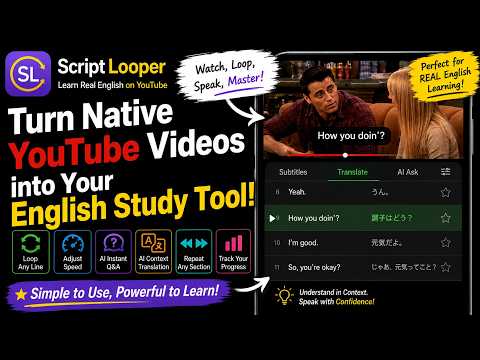
🎧 Script Looper - Auto loop YouTube subtitles & AI generates explanations. Perfect for listening, speaking, and shadowing!
🎧 Become fluent in English and a master of free conversation at a native level by easily, conveniently, and enjoyably practicing shadowing, direct listening comprehension, and speaking using various English YouTube videos, such as sitcoms, news, talk shows, and animations. All learning support features are free and no login is required. If you find it helpful after using it, please leave a review to support the developer and share it widely with others. 🏆 🌟 Script Looper Learning Support Features 1️⃣ Script Panel The Script Panel is neatly displayed on the right side of the YouTube video 🎬 The currently playing subtitle automatically scrolls to the center and is highlighted ✨ You can learn efficiently by viewing the video and script simultaneously. Note: Panel script changes when you change the subtitle language in the video settings. 2️⃣ Keyboard Shortcuts for Sentence/Section Repeat Playback and Precise Sync Adjustment Quickly move to and play the previous/next sentence using the A/S/D keys 🔁 Automatically repeat the current subtitle or a desired section using the Z/X keys Finely adjust the start and end points of the audio by 0.1 or 0.5 seconds when the subtitle and audio are out of sync 🎯 ⌨️ Keyboard Shortcuts for Repeat Playback, etc. (Shortcuts can be changed in the Help panel) A: Play previous subtitle S: Play current subtitle D: Play next subtitle Z: Infinite repeat playback/stop of the current subtitle (A/D during repeat: Repeat playback of previous/next subtitle) X: Infinite repeat playback/stop of the drag-selected section Adjusting audio timing if subtitle and audio are out of sync: 1 / 2: Start time -0.1s / +0.1s 3 / 4: End time -0.1s / +0.1s Q / W: Start time -0.5s / +0.5s E / R: End time -0.5s / +0.5s Space: Pause / Play < , >: Adjust playback speed 3️⃣ AI Auto-Generated Interpretation and Explanation Instantly generate text for translation (interpretation) for each sentence, and explanations (including examples) of key vocabulary/phrases/grammar. Features like additional questions and TTS (Text to Speech) 🔊 🤖 Guide to AI Auto-Generated Interpretation and Explanation Text Output How to Output: Drag and select the script requiring explanation in the Script Panel → Right-click → Click "Interpret with ChatGPT" → Paste (Ctrl + V) → Enter Auto-Generated Text Content: Original sentence and interpretation, explanations of key vocabulary/phrases/grammar, and examples. You can ask additional questions by clicking "Ask ChatGPT" which appears when you drag-select the text. TTS (Text to Speech) Support for Reading English Original Sentences and Examples 🔊 Drag-select an English sentence section → Click the C key: Automatic repeat playback/stop with 3 different voices. Space: Pause / Play < , >: Adjust speed Note: ChatGPT login is required (Free/Paid versions are both possible). 4️⃣ YouTube Channels/Videos Blog with Subtitles Click the Blog icon (📝) at the top of the Script Panel → Connects you to a blog collecting English YouTube channels/videos with subtitles where Script Looper works correctly. Channels/videos categorized by various categories such as Drama, Animation, News, Talk Shows, English Lectures, Vlogs, and more 💡 Blog Address: https://drenglish.tistory.com 🛠 Script Panel Top Button Guide ❓ (Help): Explanation of shortcuts and main features. Shortcuts can also be changed. 💾 (Save All Scripts): Save all script text. 📝 (Visit Blog): Connects to the blog collecting subtitle-provided YouTube channels/videos. 🎥 (Visit YouTube Channel): Connects to the developer's YouTube channel. ❌ (Close): Close the Script Panel. SL: Open the Script Panel. 🎓 Developer Recommended Learning Method Select a YouTube video from the Script Looper Blog (click 📝 at the top of the Script Panel) considering your preference, purpose, and skill level. Study the video script in segments of about 15 lines (about one screen view of the script panel) so that ChatGPT can interpret the context, as follows: 🔁 Repeatedly listen to each sentence several times using shortcuts (A/S/D/Z/X) (use speed adjustment if too fast) to try to distinguish the sounds and grasp the meaning. 🤖 Understand the content and learn phrases, etc., using the interpretation, vocabulary/phrase/grammar explanations automatically generated via ChatGPT integration. 🎤 Repeat playback of each sentence using shortcuts again for echoing or shadowing → Practice until you can use it for direct listening comprehension and speaking. 📱 Review during spare time (e.g., while commuting) using your smartphone. Touch "More options > Display script" then tap a subtitle sentence → Review direct listening comprehension by repeating the sentence playback. Review with the interpretation/explanation text saved in ChatGPT during the computer learning process.
4.6 out of 55 ratings
Details
- Version2.3.4
- UpdatedDecember 26, 2025
- Offered by김신호
- Size95.55KiB
- Languages7 languages
- Developer김신호
1400 가락마을 10단지 1016동 201호 고운동, 세종특별자치시 30062 KREmail
pkim8225@gmail.com - Non-traderThis developer has not identified itself as a trader. For consumers in the European Union, please note that consumer rights do not apply to contracts between you and this developer.
Privacy

This developer declares that your data is
- Not being sold to third parties, outside of the approved use cases
- Not being used or transferred for purposes that are unrelated to the item's core functionality
- Not being used or transferred to determine creditworthiness or for lending purposes
Support
For help with questions, suggestions, or problems, please open this page on your desktop browser