

ScribeIt - SOP & Step-by-Step Guide Maker
2 ratings
)
Overview
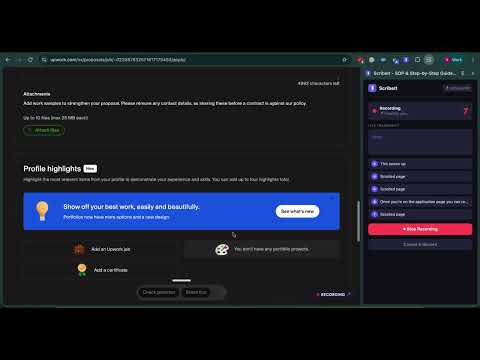
Record any workflow in your browser and turn it into a step-by-step guide with screenshots. Export to PDF or share a link.
ScribeIt turns any process you do in your browser into a step-by-step guide with screenshots, automatically. No account needed to try it. Install it, hit record, and make your first three guides without signing up for anything. You only need an account when you want to export a PDF or share a link. Writing documentation is tedious. You do the task, then you go back and screenshot every step, then you write out what you did, and by the time you're done you've spent an hour documenting something that took two minutes. ScribeIt does it while you work. Press record, go through your process the way you normally would, and it captures each step with a screenshot as you go. When you stop, you have a clean step-by-step guide ready to edit, export as a PDF, or share with a link. If you talk through what you're doing while you record, ScribeIt turns your words into the description for each step, so the guide reads like you explaining it rather than a list of clicks. And if your notes come out rough, it can tidy them into something clearer with a click. What people use it for: Standard operating procedures and process documentation, without setting aside a whole afternoon. Employee onboarding and training material, so you're not walking every new hire through the same twelve steps on a screen share. Internal how-to guides and help docs for whatever software your team runs on. Customer support articles and client walkthroughs. Process handovers, for when you go on leave or change roles. ScribeIt works on any website. It doesn't matter whether your team lives in Salesforce, HubSpot, Workday, a hospital scheduling system, or something built in-house twelve years ago. If you can do it in a browser tab, ScribeIt can document it. Pricing is simple. Three guides with no account. Create a free account and you get 5 recordings, 5 AI rewrites a month, PDF export, shareable links, and 100 MB of storage. Pro is $6.99/month for unlimited recordings, unlimited AI rewrites, and 5 GB of storage. On privacy: ScribeIt only captures during a recording you start yourself. It is never watching your browsing in the background. Voice narration needs you to grant microphone access before it can hear anything, and we don't sell your data. Full details are in our privacy policy: https://sites.google.com/eezentek.com/scribeit-privacy-policy?usp=sharing Made by Eezentek Incorporated.
5 out of 52 ratings
Details
- Version1.4.0
- UpdatedSeptember 14, 2026
- Size268KiB
- LanguagesEnglish
- Developer
Email
sutha.parath@eezentek.com - Non-traderThis developer has not identified itself as a trader. For consumers in the European Union, please note that consumer rights do not apply to contracts between you and this developer.
Privacy

ScribeIt - SOP & Step-by-Step Guide Maker has disclosed the following information regarding the collection and usage of your data. More detailed information can be found in the developer's privacy policy.
ScribeIt - SOP & Step-by-Step Guide Maker handles the following:
This developer declares that your data is
- Not being sold to third parties, outside of the approved use cases
- Not being used or transferred for purposes that are unrelated to the item's core functionality
- Not being used or transferred to determine creditworthiness or for lending purposes