

SCRIBEFY — Record. Transcribe. Summarize.

Overview
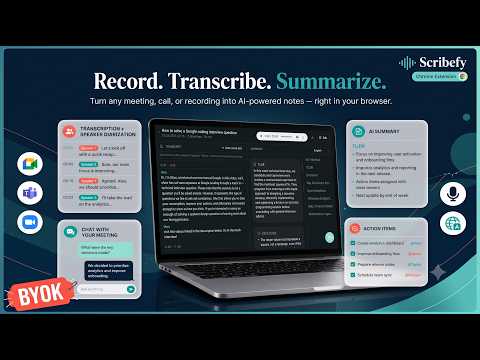
Record. Transcribe. Summarize. — get transcripts, summaries, action items, translation & chat for any conversation. BYO AI keys.
Scribefy is a Chrome extension (Manifest V3) that turns any spoken conversation into structured, searchable notes. It records audio straight from your browser — a Google Meet, Zoom, or Teams call, a YouTube video, a podcast, or your own microphone for in-person discussions — then transcribes the speech, separates and names each speaker, generates a concise summary, and pulls out the things that actually matter: key points, decisions, action items, open questions, and follow-ups. Already have a recording? Import an existing audio file and Scribefy transcribes and summarizes it the same way. Once a session is captured you can do more with it, all inside the browser: translate the summary into another language, chat with an AI about what was said, edit the transcript or notes, and play back or download the original recording. Everything happens inside your browser. You never have to install a desktop app, invite a meeting "bot" into your call, or upload your audio to a third-party service you don't control. Scribefy is "bring your own key" (BYOK): you plug in your own AI provider API keys, so your audio and transcripts go directly from your browser to the AI provider you chose — and nowhere else. WHO IS IT FOR? (USE CASES) - Professionals in back-to-back meetings who need notes without typing during the call. - Remote and hybrid teams capturing decisions and action items from Meet, Zoom, and Teams calls. - Sales, recruiting, and customer-success teams that want a clean record of every conversation. - Students and researchers transcribing lectures, interviews, and study sessions. - Multilingual teams who record in one language and need the summary in another. - Anyone sitting on existing recordings (voice memos, call exports, interviews) who wants them transcribed and summarized. - Anyone who listens to long audio (podcasts, webinars, recorded talks) and wants a summary instead of the full playback. - In-person meetings — just use your microphone; no internet meeting required. Typical jobs it does for you: • "Summarize this 45-minute call into a TL;DR plus key points." • "What did we decide, what are the action items, and who owns each one?" • "Translate the summary into Spanish." • "Ask a question about what was said in last week's call." • "Give me a searchable transcript I can come back to later." KEY FEATURES • One-click recording — capture browser tab audio, your microphone, or both. • Works on any meeting platform — deep integration with Google Meet, Zoom, and Teams, plus generic browser-audio capture for everything else. • Import existing audio — bring your own recording file; Scribefy saves it and transcribes it on demand, using the same pipeline as a live session. • Automatic transcription — fast, accurate speech-to-text, with support for multilingual conversations (set the spoken language, or let it auto-detect). Transcription runs on the whole recording (or imported file) on demand from the session view — no bot sits in the call listening. • Speaker identification — every transcript is diarized (each speaker separated out), and Scribefy can infer speakers' real names from the conversation itself — introductions, direct address, and sign-offs — instead of leaving generic "Speaker 1 / Speaker 2" labels. • AI summaries — a concise TL;DR, generated automatically once a transcript is ready or on demand whenever you want. • Choose what goes in the summary — turn sections on or off: decisions, action items (with owner and due date), key discussion points, open questions, attendees & absentees, date/time & context, next steps & follow-ups, and outcomes vs. agenda. • Add context before you transcribe — tell Scribefy what the recording is about and who's speaking to get sharper notes. • Translation — pick the language your summary is written in, and translate any summary on demand into 13 languages; translations are cached so switching back and forth is instant. • Chat over your meeting — ask an AI questions about a past conversation; it answers from that session's transcript and notes, streamed in real time. • Playback & download — every recording is saved locally so you can replay it in the session view or download the original audio file. • Edit anything — fix the title, correct transcript lines, or refine the summary; your edits are saved to the session. • Meeting history — every session is saved and searchable, so you can revisit past conversations any time. • Guided onboarding — a built-in tour walks you through setup and your first session. • Bring your own key (BYOK) — use your own AI provider accounts; you stay in control of cost and data. • Privacy-first — audio and transcripts flow directly from your browser to the AI provider you selected. No middle-man server. • Light & dark mode — automatically follows your system theme. (Roadmap: Google Docs & Notion export, calendar events, cross-meeting insights, and an AI Chief of Staff that automates post-meeting workflows.) SUPPORTED AI PROVIDERS (BRING YOUR OWN KEY) Speech-to-Text (transcription & speaker diarization): • Deepgram (nova-3) • Sarvam AI (saaras:v3 — auto-detects language; strong on Indian languages) • AssemblyAI (universal) AI Summaries, Action Items, Speaker Naming, Translation & Chat: • OpenAI • Anthropic (Claude) • Google (Gemini) You choose the provider for transcription and the provider for AI notes, and paste in your own API key for each. Different keys are saved per provider, so you can switch any time. The transcription model is pinned to each provider's best transcription model, so there's nothing to tune — and every provider returns diarized, speaker-separated output. HOW IT WORKS 1. INSTALL & SET UP Add the extension, open Settings, and paste in your API key(s) for a transcription provider and an AI (summary/chat) provider. A guided onboarding tour walks you through it. You can record and transcribe with just an STT key; add an AI key to unlock summaries, translation, and chat. 2. START — OR IMPORT — A SESSION Click "New Session" to capture audio from the active browser tab (your Meet/Zoom/Teams call or any playing media), from your microphone, or both together for in-person conversations — a lightweight recorder just shows the timer while it captures. Or click "Import Audio" to bring in an existing recording file instead. Either way, the session lands in your history, ready to transcribe. Before transcribing you can set the spoken language and add a line of context about what the recording is and who's speaking, for sharper notes. 3. TRANSCRIPTION Recording just captures the audio — nothing joins your call. From the session view, transcribe the whole recording (or an imported file) on demand: it's sent to your chosen speech-to-text provider and turned into diarized text with each speaker separated. Scribefy can then infer speakers' real names from the conversation and replace the generic "Speaker 1 / Speaker 2" labels. 4. SUMMARIZE Once a transcript is ready, it's sent to your chosen AI model — automatically or when you press Generate Summary — which returns a clean TL;DR plus the sections you enabled: decisions, action items, key points, open questions, attendees, next steps, and more. Long transcripts are handled automatically. 5. DO MORE WITH IT Translate the summary into another language, chat with an AI about the conversation, edit the transcript or notes, and play back or download the original recording. 6. REVIEW & REVISIT The session — transcript, summary, action items, chat, and audio — is saved to your meeting history, where you can search and reopen it whenever you need. PRIVACY & DATA HANDLING Scribefy is built around a "your data stays yours" model: • BYOK architecture — there is no Scribefy server in the middle. Your audio and transcripts go directly from your browser to the AI provider whose key you entered. • Local storage — your settings, meeting history (transcripts, summaries, translations, and chat), and saved recordings are stored in your own browser. Recordings are kept in the browser's private on-device file storage (OPFS) so you can replay and download them. • You control the AI relationship — billing, retention, and model choice are governed by your own account with the provider you select. • Minimal permissions — audio capture only happens while you have an active recording session. PERMISSIONS — WHY THEY ARE NEEDED • tabCapture / desktopCapture / offscreen — to record audio from the active browser tab and combine it with microphone input. • activeTab / tabs — to detect and integrate with the meeting page you're on (Google Meet, Zoom, Teams). • storage — to save your settings and meeting history locally. • windows — to manage the assistant's UI surfaces. Host access is limited to the meeting platforms (Google Meet, Zoom, Teams) and the provider APIs you actually use — transcription (Deepgram, Sarvam AI, AssemblyAI) and AI notes (OpenAI, Google, Anthropic). WHY SCRIBEFY? • No bots in your meetings — nothing joins the call; capture is local to your browser. • Provider freedom — pick the transcription and AI models you trust, and only pay your provider's rates. • More than a transcript — summarize, translate, chat, edit, and replay, all in one place. • Privacy by design — your conversations don't pass through our servers. • Everything in one place — record or import, transcribe, summarize, and search, without leaving the tab.
0 out of 5No ratings
Details
- Version0.1.2
- UpdatedJuly 17, 2026
- Offered bySoumya Jana
- Size404KiB
- LanguagesEnglish
- DeveloperSoumya Jana
Chandur, Tarakeswar Hooghly, West Bengal 712410 INEmail
support@fancytexts.orgPhone
+91 81168 03951 - TraderThis developer has identified itself as a trader per the definition from the European Union and committed to only offer products or services that comply with EU laws.
Privacy

This developer declares that your data is
- Not being sold to third parties, outside of the approved use cases
- Not being used or transferred for purposes that are unrelated to the item's core functionality
- Not being used or transferred to determine creditworthiness or for lending purposes