Item logo image for Screenvibing

Screenvibing

5.0(

2 ratings

)
Item media 5 (screenshot) for Screenvibing
Item video thumbnail
Item media 2 (screenshot) for Screenvibing
Item media 3 (screenshot) for Screenvibing
Item media 4 (screenshot) for Screenvibing
Item media 5 (screenshot) for Screenvibing
Item video thumbnail
Item media 2 (screenshot) for Screenvibing
Item media 3 (screenshot) for Screenvibing
Item media 4 (screenshot) for Screenvibing
Item media 5 (screenshot) for Screenvibing

Overview

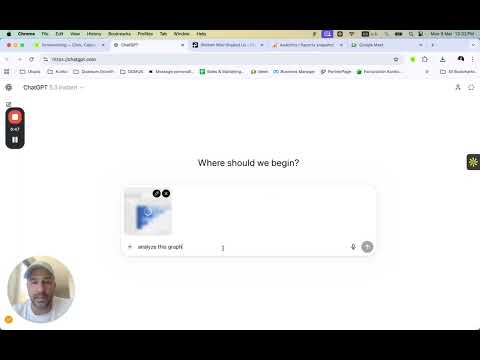
Capture screenshots from any site and send them to ChatGPT or Claude.

You're browsing. You see something. You want to ask AI about it. The old way: screenshot, save file, switch tabs, upload, wait, type context. By the time you're done, you forgot what you wanted to ask. Screenvibing: click, drag, send. Done. Your screenshot lands directly in ChatGPT or Claude. No files saved. No tab switching. No flow broken. HOW IT WORKS: 1. Open ChatGPT or Claude — click Screenvibing to pin it 2. Go to any website — click Screenvibing again 3. Screen darkens — drag to select exactly what matters 4. Hit Send — screenshot drops into your AI chat instantly 5. Add notes if you want (optional) That's it. Three seconds from "I want to ask about this" to AI seeing it. WHAT PEOPLE USE IT FOR: - Bug on screen? Show it to AI instead of describing it - UI design needs feedback? Just capture and send - Code on GitHub or docs? Send the exact snippet - Chart or dashboard? AI sees what you see - Error message? Screenshot beats copy-paste - Competitor's site? Let AI break it down FEATURES: - Precise region selection — capture exactly what matters - Direct paste into AI chat — no file downloads, no uploads - Pin ChatGPT AND Claude — choose where to send each time - Add notes alongside your screenshot for context - Keyboard shortcut: Cmd+Shift+V (Mac) / Ctrl+Shift+V (Win) - Zero clutter — screenshots never saved to your computer - Minimal dark UI that stays out of your way WORKS WITH: - ChatGPT (chatgpt.com) - Claude (claude.ai) PRIVACY: No data collected. No servers. No accounts. Screenshots exist only in your browser's memory and disappear after sending. What you capture stays between you and your AI. Free!

Details

  • Version
    0.5.0
  • Updated
    March 10, 2026
  • Offered by
    diegokunko
  • Size
    23.97KiB
  • Languages
    English
  • Developer
    Email
    info@kunkoagency.com
  • Non-trader
    This developer has not identified itself as a trader. For consumers in the European Union, please note that consumer rights do not apply to contracts between you and this developer.

Privacy

Manage extensions and learn how they're being used in your organization
The developer has disclosed that it will not collect or use your data. To learn more, see the developer’s privacy policy.

This developer declares that your data is

  • Not being sold to third parties, outside of the approved use cases
  • Not being used or transferred for purposes that are unrelated to the item's core functionality
  • Not being used or transferred to determine creditworthiness or for lending purposes

Support

Related

Recall.Ai

5.0

Save, organize, and summarize AI chats (ChatGPT, Gemini, Claude, etc.) directly in your browser. Cross-platform & privacy-first.

QuickShot

5.0

Take screenshots and record videos of websites

ChatGPT Images Exporter

4.3

Download all ChatGPT generated images in high quality and export metadata for easy organization.

GPT Folders

4.6

Organize your ChatGPT and Claude conversations into folders

ChatShot - AI Chat Screenshot

0.0

One-click screenshot & share for ChatGPT, Claude, Doubao conversations. Capture AI chat to clipboard instantly.

Multi AI Broadcaster

4.8

Send one prompt to ChatGPT, Claude, and Gemini tabs at once.

AskShot

5.0

A Chrome extension that lets you draw on any webpage, capture a screenshot, and chat with AI about the selected area.

Screenshot to AI

0.0

Send screenshots to any AI (ChatGPT, Grok, Gemini, Claude, and more) with one click

Claude to PDF: Export Claude Chats to PDF, Markdown, JSON

5.0

Export Claude chats to PDF or Markdown instantly. Save Claude conversations, download chats, and archive discussions with one clic

ScreenDrop - Record Screen & Drop Into Claude, ChatGPT, Grok, Gemini

0.0

Record your screen and drop the video straight into Claude, ChatGPT, Grok, or Gemini.

Paste GPT

0.0

Paste web content directly into Chat GPT or Claude AI

chatGPT screenshot

2.4

Take a nice screenshot of the whole chat GPT conversation

Recall.Ai

5.0

Save, organize, and summarize AI chats (ChatGPT, Gemini, Claude, etc.) directly in your browser. Cross-platform & privacy-first.

QuickShot

5.0

Take screenshots and record videos of websites

ChatGPT Images Exporter

4.3

Download all ChatGPT generated images in high quality and export metadata for easy organization.

GPT Folders

4.6

Organize your ChatGPT and Claude conversations into folders

ChatShot - AI Chat Screenshot

0.0

One-click screenshot & share for ChatGPT, Claude, Doubao conversations. Capture AI chat to clipboard instantly.

Multi AI Broadcaster

4.8

Send one prompt to ChatGPT, Claude, and Gemini tabs at once.

AskShot

5.0

A Chrome extension that lets you draw on any webpage, capture a screenshot, and chat with AI about the selected area.

Screenshot to AI

0.0

Send screenshots to any AI (ChatGPT, Grok, Gemini, Claude, and more) with one click

Google apps