

ScreenTime
Overview
Screen recorder with Google Drive integration. Record, upload, share.
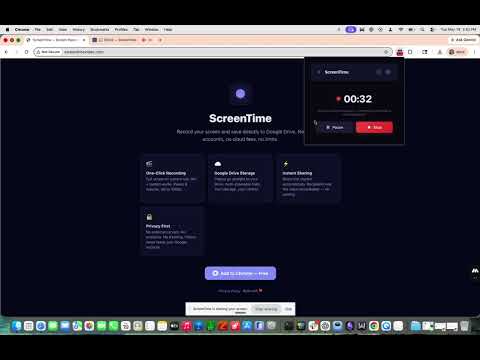
Record your screen and save directly to Google Drive — no accounts, no cloud storage fees, no limits. ScreenTime is a lightweight screen recorder that uses your own Google Drive as storage. Record and share — all from a Chrome extension. ✨ KEY FEATURES 🎬 One-Click Recording • Record your full screen or just the current tab • Microphone and system/tab audio capture • Pause and resume anytime • Quality presets: 1080p, 720p, 540p, 480p, 360p • MP4 (H.264+AAC) output for instant Drive playback • 3-2-1 countdown before recording starts ⌨️ Keyboard Shortcut • Alt+Shift+R to start/stop recording from any tab • No need to open the popup — just press and go ☁️ Google Drive Integration • Videos auto-upload to a "ScreenTime" folder in your Drive • Resumable uploads for large files • Auto-generates shareable links (anyone with link can view) • Open your ScreenTime folder directly after upload • No storage limits beyond your existing Drive space 📋 Recording History • Browse all your past recordings • One-click link copying • Open any recording in Drive instantly 🔒 PRIVACY FIRST • No data leaves your browser except to YOUR Google Drive • No analytics, no tracking, no external servers • No accounts to create — just sign in with Google • Your recordings, your storage, your control • Full privacy policy: https://gpadva81.github.io/screentime/privacy.html 💡 PERFECT FOR • Quick tutorials and walkthroughs • Bug reports and visual feedback • Team communication and demos • Client presentations • Anyone who wants Loom-like recording without the subscription
0 out of 5No ratings
Details
- Version2.0.0
- UpdatedJune 1, 2026
- Offered byActive Funnel
- Size78.89KiB
- LanguagesEnglish
- Developer
Email
gabriel@activefunnel.ai - Non-traderThis developer has not identified itself as a trader. For consumers in the European Union, please note that consumer rights do not apply to contracts between you and this developer.
Privacy

This developer declares that your data is
- Not being sold to third parties, outside of the approved use cases
- Not being used or transferred for purposes that are unrelated to the item's core functionality
- Not being used or transferred to determine creditworthiness or for lending purposes