


Overview
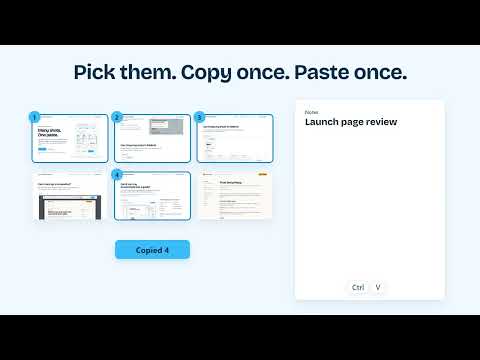
Copy and paste many screenshots in one click. Capture long pages, edit them and make docs.
Take your shots, pick the ones you need, and paste them all at once. Copy once, paste once, and every shot lands in your doc, email or ticket in the order you picked. A bug report with 10 screenshots takes 10 pastes. With Screenshots Clipboard it takes one. WHAT YOU CAN DO • Capture the visible part, the full page or any area you drag. Or click a part of the page, like a table or a card, to take just that part. • Full-page shots go from top to bottom and show a sticky header just once. • Pick your shots, press Copy, and paste them all in one go, in order. • Mark up a shot with arrows, text boxes, numbers, shapes, a pen and highlights. Crop it, or put shots side by side. Your original stays as it was. • Press Make guide to turn your shots, or a whole collection, into A4 or Letter pages you can type on, saved as a PDF. A checkout bug becomes a bug report for your developers. The steps to pay a bill with UPI become a how-to for your parents. • Save any shot as PNG, JPG or WebP. KEEP THEM ORGANISED • Sort your shots into collections, and put collections inside collections, like folders on your computer. • Drag a shot onto a folder to move it, or use Move to. • With Plus, download a whole collection as one .zip, with each collection inside it as its own folder. • Search your shots by title or site. • Want more room? Open the side panel, or the Library in a full tab. WHERE YOUR SHOTS LAND Email and documents take each shot as its own picture, in order. Most chat boxes take one picture per paste, so they get all your shots stacked in one. Want them one at a time? Choose "Copy one by one", then paste, paste, paste. HOW IT WORKS 1. Click Visible, Full page or Area. Each shot lands in your stack. 2. Click the shots you want. A number shows where each one lands. 3. Press Copy, then paste once. Shortcuts: Alt+Shift+V, Alt+Shift+F and Alt+Shift+S. You can change them in your browser's shortcut settings. FREE AND PLUS Free: capture, collections, one paste, editing, saving as PNG, JPG or WebP, and a How-to guide PDF up to 5 pages. You don't need an account or a card. Plus is a paid plan. It adds: • all nine guide templates, like Bug report, SOP and Release notes • guides of any length, saved as a PDF, page images or a collection • your picked shots as one PDF, in your order • your picked shots in one .zip • a whole collection as one .zip, folders and all • full-page shots that wait for pictures and moving parts Plus works in up to 3 browsers and is sold by Dodo Payments, our merchant of record. PRIVACY Your shots stay in your browser on this computer until you delete them. Every delete asks first, and Undo stays for a few seconds after. Privacy policy: https://goldenhoney.dev/legal/privacy GOOD TO KNOW It captures web pages in your browser. It can't capture other apps or record video. Browsers don't let any extension capture their own pages, like settings or the extension store, and there it tells you so. SUPPORT Questions or ideas: support@goldenhoney.dev. A person replies within 2 business days. Website: https://screenshotsclipboard.com Made by Golden Honey.
0 out of 5No ratings
Details
- Version1.0.0
- UpdatedOctober 31, 2026
- FeaturesOffers in-app purchases
- Size1.6MiB
- Languages10 languages
- DeveloperWebsite
Email
info@leepo.ai - Non-traderThis developer has not identified itself as a trader. For consumers in the European Union, please note that consumer rights do not apply to contracts between you and this developer.
Privacy

Screenshots Clipboard has disclosed the following information regarding the collection and usage of your data. More detailed information can be found in the developer's privacy policy.
Screenshots Clipboard handles the following:
This developer declares that your data is
- Not being sold to third parties, outside of the approved use cases
- Not being used or transferred for purposes that are unrelated to the item's core functionality
- Not being used or transferred to determine creditworthiness or for lending purposes
Support
For help with questions, suggestions, or problems, visit the developer's support site