

Screenshots Clipboard - Paste many at once, hover copy, guides, annotate

Overview
Screenshots straight to your clipboard. Select any area in one click, paste many at once, edit, make docs, keep collections.
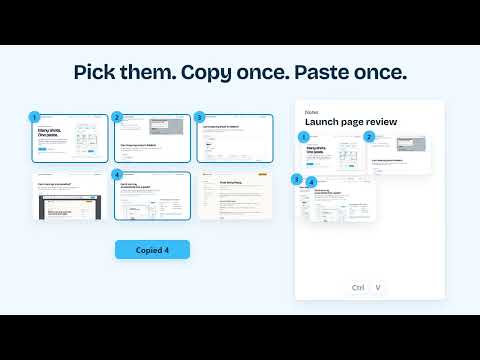
Stop pasting screenshots one by one. Copy once, paste once, about 5 seconds for any number. Less time pasting, more time on the work that matters. TAKE SCREENSHOTS • Click once to take what you see, the whole page, or any area you drag. • Each shot goes straight to your clipboard, so you can paste it right away. • Use the button, the right-click menu, or the keys Alt+Shift+V, Alt+Shift+F and Alt+Shift+S. • A full-page shot shows the top bar once, not again and again down the page. TAKE JUST ONE PART OF A PAGE • Move your mouse over the page. Each part lights up: a card, a table, a chart, a menu. • Click it, and you get only that part. SCROLL WHILE YOU SELECT • You can scroll the page while you choose a part. • Drag a box to the bottom of the screen and the page moves down with you, so a long part fits in one shot. PASTE MANY SHOTS AT ONCE • Pick the shots you want and press Copy. • Paste once. They all come in, in the order you picked. • There is no limit on how many you pick. • Documents and emails get each shot as its own picture. Chat apps get them joined into one picture. • Prefer one at a time? Use Copy one by one. EDIT YOUR SHOTS • Add arrows, text, numbers, shapes, a pen and highlights. • Cut a shot to size, or put two shots side by side. • Edit many shots, one after another. • Save as a new copy, or over the old one. You can always get the first version back. MAKE A DOCUMENT • Press Make guide. Each shot becomes a page. • Type your steps on each page. • Save it as a PDF, on A4 or Letter paper. • Choose from nine designs, like How-to guide, Bug report and SOP. KEEP THINGS TIDY • Put shots in collections, like folders, and folders inside folders. • Find any shot by its title or website. • Save a shot as PNG, JPG or WebP. WHAT PEOPLE USE IT FOR • Reporting a bug: take a shot of each step, put an arrow where it breaks, and drop every step into the ticket at once. • Writing a how-to: take a shot of each step, press Make guide, and send your team a clean PDF. • Saving design ideas: pick the buttons, cards and tables you like from any website and keep them in one collection. • Sharing a work update: put ten screenshots into one email or document in one go. • Helping family: turn the steps to pay a bill with UPI into a simple PDF for your parents. FREE AND PLUS Free: taking shots, collections, pasting many at once, editing, saving as PNG, JPG or WebP, and a How-to guide PDF up to 5 pages. You don't need an account or a card. Plus is a paid plan. It adds: • all nine designs and longer documents • your picked shots as one PDF or one .zip • a whole collection as one .zip • full-page shots that wait for moving parts to load Plus works in up to 3 browsers and is sold by Dodo Payments, our merchant of record. YOUR PRIVACY Your shots stay in your browser, on your computer, until you delete them. Every delete asks first, and Undo stays for a few seconds after. Privacy policy: https://goldenhoney.dev/legal/privacy GOOD TO KNOW It works on web pages in your browser. It can't take shots of other apps, and it doesn't record video. Browsers don't let any extension capture their own pages, like settings or the extension store, and there it tells you so. SUPPORT Questions or ideas: support@goldenhoney.dev. A person replies within 2 business days. Website: https://screenshotsclipboard.com Made by Golden Honey.
5 out of 52 ratings
Details
- Version1.2.5
- UpdatedNovember 12, 2026
- FeaturesOffers in-app purchases
- Size2.19MiB
- Languages10 languages
- DeveloperWebsite
Email
info@leepo.ai - Non-traderThis developer has not identified itself as a trader. For consumers in the European Union, please note that consumer rights do not apply to contracts between you and this developer.
Privacy

Screenshots Clipboard - Paste many at once, hover copy, guides, annotate has disclosed the following information regarding the collection and usage of your data. More detailed information can be found in the developer's privacy policy.
Screenshots Clipboard - Paste many at once, hover copy, guides, annotate handles the following:
This developer declares that your data is
- Not being sold to third parties, outside of the approved use cases
- Not being used or transferred for purposes that are unrelated to the item's core functionality
- Not being used or transferred to determine creditworthiness or for lending purposes
Support
For help with questions, suggestions, or problems, visit the developer's support site