Item logo image for Screenshotly - Social Ready Screenshots

Screenshotly - Social Ready Screenshots

5.0(

1 rating

)
Item media 4 (screenshot) for Screenshotly - Social Ready Screenshots
Item video thumbnail
Item media 2 (screenshot) for Screenshotly - Social Ready Screenshots
Item media 3 (screenshot) for Screenshotly - Social Ready Screenshots
Item media 4 (screenshot) for Screenshotly - Social Ready Screenshots
Item video thumbnail
Item media 2 (screenshot) for Screenshotly - Social Ready Screenshots
Item media 3 (screenshot) for Screenshotly - Social Ready Screenshots
Item media 4 (screenshot) for Screenshotly - Social Ready Screenshots

Overview

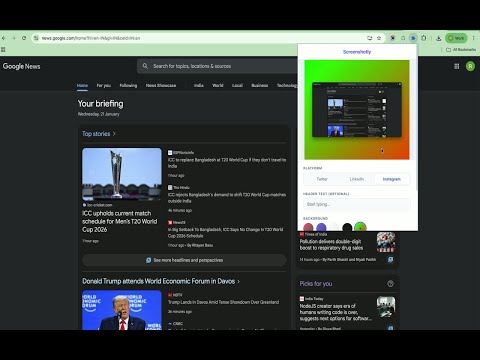
Turn any browser screenshot into a social-ready image (Twitter, LinkedIn, Instagram) in one click.

Create beautiful, social-media-ready screenshots in seconds. Screenshotly automatically captures your current tab and applies professional styling so you can share your work instantly.

Details

  • Version
    1.0.0
  • Updated
    January 22, 2026
  • Offered by
    jenniwebstudio
  • Size
    991KiB
  • Languages
    English
  • Developer
    RAHUL JAYANTIBHAI JALAVADIYA
    21, Kasturi bunglows, Nr. Kanha Rasvalley Nr. Golden Chowk, Mota varachha Surat, Gujarat 394101 IN
    Email
    jenniwebstudio@gmail.com
    Phone
    +91 76982 98965
  • Trader
    This developer has identified itself as a trader per the definition from the European Union and committed to only offer products or services that comply with EU laws.

Privacy

The developer has disclosed that it will not collect or use your data. To learn more, see the developer’s privacy policy.

This developer declares that your data is

  • Not being sold to third parties, outside of the approved use cases
  • Not being used or transferred for purposes that are unrelated to the item's core functionality
  • Not being used or transferred to determine creditworthiness or for lending purposes

Related

Publer

4.9

Share content across Facebook, Instagram, Twitter, LinkedIn, and all major social networks in just a few clicks

Twitter Screenshot – Capture Tweets from X

5.0

Take high-quality screenshots of tweets from X. One-click Twitter screenshot extension to save tweets as images, with no tracking.

One Screenshot - One Click Screenshot (Current and Full Page)

4.1

Take a screenshot of the current page and full page and save it to downloads in just one click.

ShotBird - Scrolling Screenshots, Tweet Images & Editor

4.9

Take scrolling screenshots, turn tweets into images, and edit captures—all in one lightweight extension.

Screen site Tool – Capture Full Page as PNG

5.0

Capture full-page website screenshots in one click. Save instantly as PNG. Clean and simple.

Screenshot for YouTubeâ„¢

4.8

Screenshot any video on YouTube in one click

Captureo: Full Webpage Screenshots for Chrome

5.0

Take screenshots of web pages in one click. Full page or visible area.

Copy Instagram Images

5.0

A browser extension that lets you right-click & copy the images from Instagram

Recordit - Instant screen recording & link sharing

5.0

Capture screen recordings and screenshots in one click, then share instantly with a link.

Twitter Video Downloader -x video downloader - VidSaver.io

3.8

Download Twitter videos in best quality with one simple click.

Page Screenshot

3.9

Take a screenshot from the entire website with just one click!

Social Media Downloader

4.5

Downloads medias from social networks like Facebook, Instagram, Twitter & many more in just one click.

Publer

4.9

Share content across Facebook, Instagram, Twitter, LinkedIn, and all major social networks in just a few clicks

Twitter Screenshot – Capture Tweets from X

5.0

Take high-quality screenshots of tweets from X. One-click Twitter screenshot extension to save tweets as images, with no tracking.

One Screenshot - One Click Screenshot (Current and Full Page)

4.1

Take a screenshot of the current page and full page and save it to downloads in just one click.

ShotBird - Scrolling Screenshots, Tweet Images & Editor

4.9

Take scrolling screenshots, turn tweets into images, and edit captures—all in one lightweight extension.

Screen site Tool – Capture Full Page as PNG

5.0

Capture full-page website screenshots in one click. Save instantly as PNG. Clean and simple.

Screenshot for YouTubeâ„¢

4.8

Screenshot any video on YouTube in one click

Captureo: Full Webpage Screenshots for Chrome

5.0

Take screenshots of web pages in one click. Full page or visible area.

Copy Instagram Images

5.0

A browser extension that lets you right-click & copy the images from Instagram

Google apps