

Screenshot Suite - Screen Capture, Recorder & Annotator

Overview
Capture screenshots & record your screen in Chrome. Annotate, blur, export to PDF/GIF/MP4. Free, no account needed.
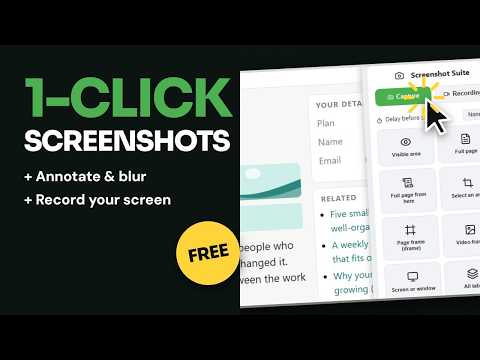
Take a screenshot (screen capture) of any web page, capture a full page screenshot or record your screen, then annotate, blur and export to PNG, JPEG, PDF, MP4 or GIF. Everything happens in Chrome, and your captures stay on your device. SCREENSHOTS ✔ Visible area, Full page, or Full page from here (a scrolling screenshot that starts from where you are) ✔ Select an area: draw the part of the page you want ✔ Page frame (iframe): capture one embedded frame of the page in full ✔ Video frame: capture the current frame of an HTML5 video ✔ Screen or window: capture your whole screen or another application ✔ Keyboard shortcuts for visible area and area screenshots, which you can assign in Chrome, and a right-click menu ✔ Optional delay before starting, and an option to add the page URL and date to the screenshot SCREEN RECORDER ✔ Record a tab, or record your screen or a window ✔ Add your webcam as an overlay; when the webcam is on, your microphone is recorded too ✔ Live drawing on the page while you record a tab with the webcam on (strokes fade after 3 seconds) ✔ Video quality: Auto, 720p, 1080p or 4K ✔ Trim the recording, then save it as WebM, MP4 or GIF ANNOTATE AND EDIT ✔ Rectangle, ellipse, line, arrow, freehand and highlighter ✔ Text with font, size and background, numbered steps and stamps ✔ Blur or pixelate names, emails and other private details before you send a screenshot ✔ Magnifier, crop and resize ✔ Watermark, browser frame and padding EXPORT AND ORGANIZE ✔ Save screenshots as PNG or JPEG, or export to PDF (very long full page screenshots are split into A4 pages) ✔ Copy images to the clipboard (recordings are saved as files) ✔ Downscale images to 50% on Retina/HiDPI screens ✔ Download automatically, or choose the save location for every download ✔ Local capture history, available from the popup: reopen, download again or delete your last 30 screenshots and recordings SCREENSHOT SUITE PRO (COMING SOON) Optional Pro features are coming soon. Everything listed above stays free and needs no account. Pro will add: • Named watermark and frame presets • Search and tags in your capture history, which keeps up to 200 items • All tabs: capture every tab in the window, one after another • Custom file name templates (date, time, site, mode) • Custom export scale for images PRIVACY Your captures stay on your device unless you choose to export or share them. If you opt in, we collect anonymous usage statistics about which features are used, to improve Screenshot Suite. We never collect your capture content, page URLs or browsing history. You can turn this off anytime in Settings. When the webcam is on, your microphone is recorded locally, together with the video. LANGUAGES Available in more than 50 languages, matching your Chrome language automatically. Add Screenshot Suite to Chrome, pin it to your toolbar, and take your first screenshot.
5 out of 54 ratings
Details
- Version1.0.1
- UpdatedOctober 22, 2026
- Size1.37MiB
- Languages53 languages
- DeveloperHolvine, LLCWebsite
131 Continental Dr Ste 305 Newark, DE 19713 USEmail
contact@screenshotsuite.comPhone
+33 6 98 73 10 51 - TraderThis developer has identified itself as a trader per the definition from the European Union and committed to only offer products or services that comply with EU laws.
- D-U-N-S145045473
Privacy

Screenshot Suite - Screen Capture, Recorder & Annotator has disclosed the following information regarding the collection and usage of your data. More detailed information can be found in the developer's privacy policy.
Screenshot Suite - Screen Capture, Recorder & Annotator handles the following:
This developer declares that your data is
- Not being sold to third parties, outside of the approved use cases
- Not being used or transferred for purposes that are unrelated to the item's core functionality
- Not being used or transferred to determine creditworthiness or for lending purposes
Support
For help with questions, suggestions, or problems, visit the developer's support site