

Screenshot Now - Easy Screen Capture & Screenshot Tool
1 rating
)
Overview
The easiest way to capture full page or area screenshots. Fast, simple screen capture with instant copy, save, and quick markup.
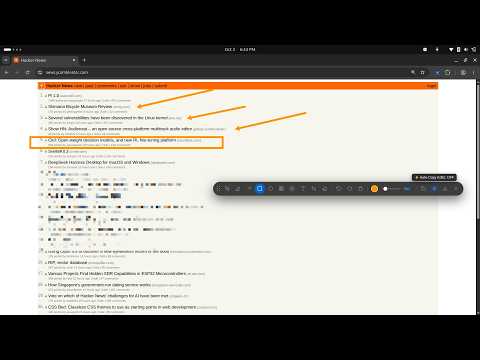
Screenshot Now is a fast, easy-to-use screenshot and screen capture tool designed for everyone. Capture any webpage with one click, highlight details with clean tools, blur sensitive personal information, and copy or download your screenshot instantly. ⚡ Quick & Easy Shortcuts • Alt + Shift + S: Instantly capture the visible screen and open the quick tools bar. • Alt + Shift + A: Easily select and capture any area on the screen. • Alt + Shift + F: Capture the entire scrollable webpage from top to bottom. 🎨 Simple Floating Quick-Tools Bar A clean, floating toolbar appears right over your capture with all the essentials: • Freehand Pen: Draw and mark up anything on the screen. • Highlighter: Bright translucent highlight for important text and details. • Pointers & Arrows: Point directly to what matters. • Rectangles & Circles: Outline important sections and boxes. • Blur / Privacy Tool: Hide passwords, private emails, phone numbers, and sensitive details in seconds. • Numbered Step Badges (1, 2, 3...): Easily create how-to steps and guides. • Text Tool: Add clean text notes anywhere on your screenshot. • Crop Tool: Adjust and trim the borders of your image easily. 🧠 Smart Settings Memory Never reset your favorite settings again. Screenshot Now remembers your preferred brush size, favorite color, and last tool automatically so you can get right to work every time. ✨ Convenient Everyday Features • One-Click Copy to Clipboard (Ctrl+C): Copy the screenshot to your clipboard to paste directly into emails, messages, notes, or documents. • Organized Downloads (Ctrl+S): Automatically names files cleanly • Clean Page Info Stamp: Optional neat watermark showing page title, website, screen size, and date/time. • Works on Any Webpage: Clean, isolated interface that never breaks the styling of the webpage you are viewing. • Dedicated Editor Tab: Open and edit any past screenshot in a full-sized clean window.
5 out of 51 rating
Details
- Version1.0.4
- UpdatedOctober 13, 2026
- Offered byNitin
- Size147KiB
- Languages7 languages
- Developer
Email
nitin.oneand@gmail.com - Non-traderThis developer has not identified itself as a trader. For consumers in the European Union, please note that consumer rights do not apply to contracts between you and this developer.
Privacy

This developer declares that your data is
- Not being sold to third parties, outside of the approved use cases
- Not being used or transferred for purposes that are unrelated to the item's core functionality
- Not being used or transferred to determine creditworthiness or for lending purposes