

Screenshot Master - Full Page Capture & Editor
2 ratings
)
Overview
Capture full pages or regions, annotate with arrows, shapes, text & blur. Professional screenshots made easy.
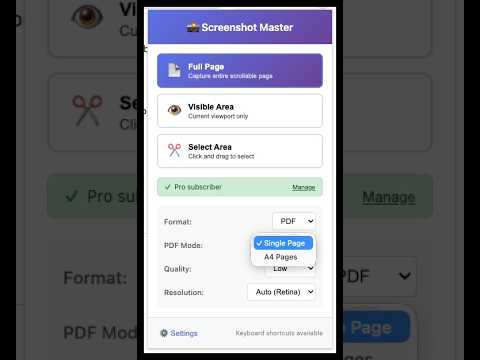
**Screenshot Master - The screenshot tool that actually lets you edit** 🎉 All features are now FREE! No subscriptions, no limitations. Screenshot Gallery - organize and search all your captures Smart OCR - automatically extract text from screenshots Search by filename, URL, or notes Most screenshot tools just capture. Screenshot Master captures, annotates professionally, extracts text with OCR, and organizes everything in a beautiful Gallery — all without leaving your browser. **🆕 NEW FEATURES** • **📚 Screenshot Gallery** — All your captures, organized and searchable. Browse thumbnails, preview full images, and open file locations with one click • **🔤 Smart OCR** — Automatically extract text from your screenshots. Perfect for capturing text from images, PDFs, or any content you can't copy **CORE FEATURES** • **Full Page Capture** — Automatically scroll and capture entire web pages, no matter how long • **Visible Area Capture** — Instantly capture exactly what's on your screen • **Select Area Capture** — Click and drag to capture any region with precision • **Built-in Annotation Tools** — Add arrows, rectangles, circles, text labels, and freehand drawings • **Blur & Redact** — Hide sensitive information like emails, names, or account numbers before sharing • **Multiple Export Formats** — Save as PNG, JPEG, or PDF with one click **WHY SCREENSHOT MASTER?** Stop wasting time switching between apps. The old workflow — screenshot, open editor, annotate, find file later — is slow and frustrating. Screenshot Master combines everything into one seamless tool: ✓ Capture → Edit → Save in seconds ✓ Gallery keeps all screenshots organized ✓ OCR extracts text automatically ✓ Works on any website ✓ Crystal clear on high-DPI displays **PERFECT FOR** • Researchers capturing and organizing web content • Content creators making tutorials and guides • QA teams reporting bugs with clear annotations • Students collecting study materials with OCR • Designers sharing visual feedback • Anyone who needs screenshots they can find later **PRIVACY FOCUSED** All screenshots are saved locally to your computer. OCR processing happens securely. Your data stays yours. --- 📧 Support: support@yinadoc.com 🌐 Website: https://www.yinadoc.com/screenshot-master 📋 Privacy Policy: https://www.yinadoc.com/screenshot-master/privacy
5 out of 52 ratings
Details
- Version2.1.0
- Updated11 May 2026
- FeaturesOffers in-app purchases
- Offered byironwirevip
- Size70.44KiB
- LanguagesEnglish (United States)
- Developer
Email
588060@qq.com - Non-traderThis developer has not identified itself as a trader. For consumers in the European Union, please note that consumer rights do not apply to contracts between you and this developer.
Privacy

This developer declares that your data is
- Not being sold to third parties, outside of the approved use cases
- Not being used or transferred for purposes that are unrelated to the item's core functionality
- Not being used or transferred to determine creditworthiness or for lending purposes
Support
For help with questions, suggestions or problems, visit the developer's support site