

Overview
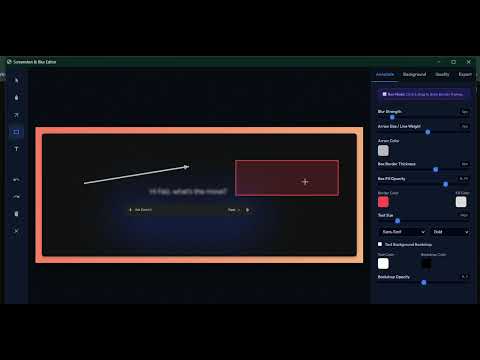
Capture screen selections, blur confidential details, and annotate beautifully with gradients, drop shadows, and noise textures.
Berikut adalah draf deskripsi lengkap, padat, dan profesional untuk dihantar ke Chrome Web Store. Deskripsi ini ditulis mengikut format standard yang memikat pengguna (user-focused) di samping mengoptimumkan kata kunci penting untuk kedudukan SEO (Search Engine Optimization) stor aplikasi. Screenshot & Blur – Capture, Annotate & Pretty Share Take beautiful screenshots, obscure sensitive information instantly, and add elegant annotations before sharing. Perfect for developers, QA engineers, content creators, and remote teams who need to create clean, high-quality visual documentation or social media graphics in seconds. Unlike clunky screenshot tools, Screenshot & Blur features a minimalist, privacy-first workflow combined with high-end canvas effects to make your screen captures look sharp and professional. 🌟 Key Features 1. Precision Area Capture & High-Res Export Flexible Selection: Drag and select any specific area of your active tab instantly. Retina-Ready Scaling: Export your final images at 1×, 1.5×, 2×, or 3x scale factor to ensure pixel-perfect clarity on high-DPI and Retina screens. 2. Instant Privacy & Blur Tools Smart Pixel Obscurity: Draw rectangles over sensitive data, passwords, emails, or personal details to apply a smooth Gaussian blur effect. Adjustable Intensity: Fine-tune blur strength dynamically using a simple control slider. 3. Professional Annotation Suite Arrows & Boxes: Highlight critical areas with customizable vector arrows and stroke/fill boxes. Rich Text Overlays: Add context with clean typography, variable font weights, and adjustable solid background backdrops. Emoji Graphics: Inject modern expressive emoji indicators from a quick-access selection grid to guide attention. 4. Design & Polish Controls (Beautify Mode) Custom Backdrops: Place your cropped screenshot on gorgeous pre-configured linear gradients, solid background layouts, or upload your own custom canvas frame image. Canvas Styling: Adjust container padding, card border-radii, and depth-focused drop shadow configurations easily. Grain Filter: Layer a subtle, premium monochrome grain/noise texture over the background for a modern aesthetic. 5. Seamless Workflow Mechanics One-Click Actions: Copy directly to your clipboard as a PNG blob or download natively into your local drive. Keyboard Navigation: Full support for fast operational hotkeys, including full Undo/Redo historical queues (up to 50 states) and instant element deletions. 🚀 How It Works Click the extension icon or press Alt + S. Drag your cursor to select the screen region you want to capture. Use the annotation dashboard to add blurs, text, shapes, or emojis. Customize your background frame, padding, and shadows under the design tabs. Click Copy to instantly share or Save to download your high-quality graphic. 🔒 Privacy First 100% Local Processing: Your screen captures and data never leave your local device. All image manipulation, cropping, and canvas filters are handled strictly client-side within your browser session storage context. Zero Analytics/Tracking: We do not track your browsing history or data metrics. ⌨️ Default Shortcuts Start Capture Area: Alt + S (Can be customized in chrome://extensions/shortcuts) Undo Action: Ctrl + Z / Cmd + Z Redo Action: Ctrl + Y / Cmd + Y Delete Selected Annotation: Delete or Backspace Upgrade your visual documentation workflow today with Screenshot & Blur—the atomic tool for clean, safe, and beautiful screen sharing.
0 out of 5No ratings
Details
- Version3.1
- UpdatedJune 10, 2026
- Size1.08MiB
- LanguagesEnglish (United Kingdom)
- DeveloperWebsite
Email
faizazizanxyz@gmail.com - Non-traderThis developer has not identified itself as a trader. For consumers in the European Union, please note that consumer rights do not apply to contracts between you and this developer.
Privacy

Screenshot & Blur has disclosed the following information regarding the collection and usage of your data. More detailed information can be found in the developer's privacy policy.
Screenshot & Blur handles the following:
This developer declares that your data is
- Not being sold to third parties, outside of the approved use cases
- Not being used or transferred for purposes that are unrelated to the item's core functionality
- Not being used or transferred to determine creditworthiness or for lending purposes