

Screenshot Beautifier

Overview
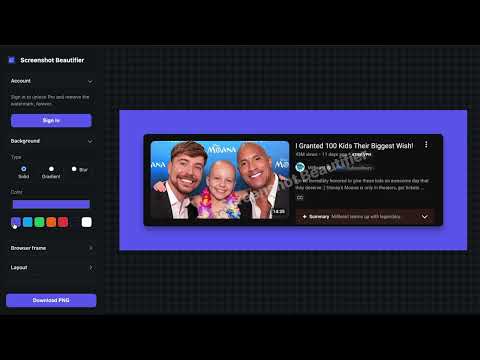
Select any area of a page and turn it into a nice framed screenshot with an adjustable rounded, colored border.
Ever taken a screenshot and thought "this looks kind of boring"? Screenshot Beautifier fixes that. Just click the button, drag to select whatever's on your screen, and it opens in a simple editor where you can dress it up before you share it. Make it look nice Add a colorful background, a solid color, a smooth gradient, or even a soft blurred version of your own screenshot Round the corners and add a realistic shadow so it looks like it's floating on the page. You can also resize it to fit perfectly wherever you're posting it, whether Instagram, youtube, a document, a phone screen, whatever you need Add a little flair You can tilt it for a 3D effect, like it's leaning toward you or even wrap it in a browser window frame so it looks like a real webpage, not just a random crop. You can give it a smooth "sliding in" animation for when you want to share a video instead of a still image. Lastly, you can download it as a picture (PNG), or download it as a short video with the animation included. If you've ever tried to make a screenshot look presentable for a presentation, a social media post, a portfolio, or just to send to a friend without it looking like a random crop from your phone, this does that for you. And everything happens right there in your browser. What it costs: Everything above is free to use. Free downloads have a watermark; if you want to remove it, it's a one-time payment of $11.99 that you pay once and it's yours forever, no subscriptions.
0 out of 5No ratings
Details
- Version0.2
- UpdatedAugust 8, 2026
- Offered byelvis.onobo
- Size1.33MiB
- LanguagesEnglish
- Developer
Email
elvis.onobo@gmail.com - Non-traderThis developer has not identified itself as a trader. For consumers in the European Union, please note that consumer rights do not apply to contracts between you and this developer.
Privacy

Screenshot Beautifier has disclosed the following information regarding the collection and usage of your data. More detailed information can be found in the developer's privacy policy.
Screenshot Beautifier handles the following:
This developer declares that your data is
- Not being sold to third parties, outside of the approved use cases
- Not being used or transferred for purposes that are unrelated to the item's core functionality
- Not being used or transferred to determine creditworthiness or for lending purposes