

ScreenShift - Mobile Simulator & Responsive Tester

Overview
Preview websites across 40+ realistic mobile and tablet viewports with native safe areas, left rotation, and zero data tracking.
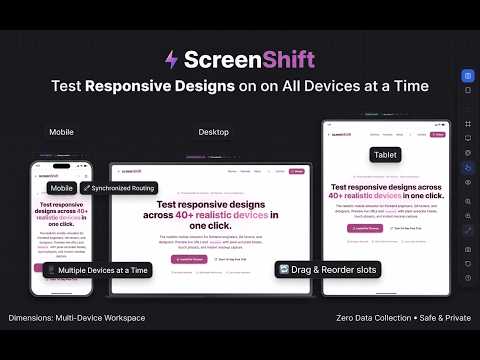
ScreenShift is a responsive testing simulator and device mockup capture tool built for frontend developers, QA engineers, and UI/UX designers. Test any live website or localhost URL across multiple authentic mobile, tablet, and desktop viewports simultaneously. KEY FEATURES: 1. Unified 3-Device Workspace: • View Mobile, Desktop (PC), and Tablet side-by-side simultaneously. • Dynamic slot reordering (reposition left, center, or right viewports). • Synchronized routing: navigating, clicking links, or refreshing in one frame automatically updates all viewports. 2. Pixel-Accurate Device Simulation: • Native safe-area insets (camera cutouts, Dynamic Island, punch-holes, and home indicator bars). • Unidirectional left-only rotation (0° to 270°) for phones and tablets with dynamically repositioned notch insets. • Hardware-accurate bezels with premium finishes (Titanium, Space Gray, Silver, Midnight). • Authentic browser chrome overlays: Mobile Safari / Mobile Chrome for phones & tablets; Desktop Chrome / Safari for PC. 3. Multi-Mode High-Res Screenshot Engine: • Isolated Mockup: Capture frame and screen with a 100% transparent background. • Viewport Only: Clean web content capture without bezels or frames. • Full-Page Scroll Capture: Seamlessly stitched, edge-to-edge document captures with zero rounded-corner clipping. • Mockup on Canvas: Position your mockup on custom color or gradient studio backdrops. 4. Multi-Format High-DPI Export: • Download as PNG (transparent), WebP, JPEG, or single-page PDF. • Standardized PDF page presets: A4 (default), US Letter, US Legal, and A3 — centered on a clean white page. • One-click Copy to Clipboard. PRIVACY & ZERO DATA COLLECTION: • 100% Client-Side: All rendering, rotation transforms, and canvas stitching happen locally inside your browser. • Zero Data Collection: No analytics, tracking pixels, cookies, or remote logging. • Fully compliant with Manifest V3 and Google Enhanced Safe Browsing standards. Official Site: https://screenshift.vercel.app/
0 out of 5No ratings
Details
- Version1.0.0
- UpdatedOctober 31, 2026
- Size218KiB
- LanguagesEnglish (United States)
- DeveloperWebsite
Email
rohan26ir@gmail.com - Non-traderThis developer has not identified itself as a trader. For consumers in the European Union, please note that consumer rights do not apply to contracts between you and this developer.
Privacy

This developer declares that your data is
- Not being sold to third parties, outside of the approved use cases
- Not being used or transferred for purposes that are unrelated to the item's core functionality
- Not being used or transferred to determine creditworthiness or for lending purposes
Support
For help with questions, suggestions, or problems, visit the developer's support site