

Auto Blur Sensitive Info for Screen Sharing & Demos | ScreenShield
2 ratings
)
Overview
Automatically blur emails, phone numbers, card numbers & API keys before you share your screen. One-click blur & safe screenshots.
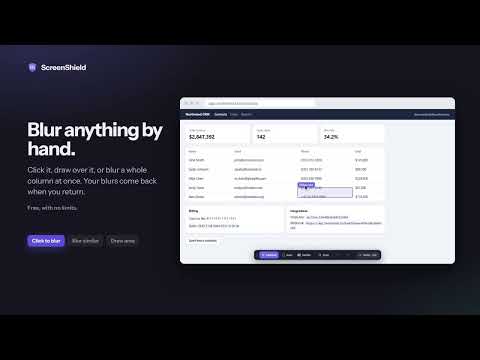
Blur emails, phone numbers, card numbers and API keys before you share your screen. ScreenShield hides sensitive info right inside the page, so the people on your call, in your recording or watching your livestream never see it. Made for sales demos, customer support calls, tutorials, livestreams and every Zoom, Google Meet or Microsoft Teams call where you share a browser tab. ★ NEW IN 3.0 • Everything that used to be limited is now free and unlimited • Automatic detection of 16 kinds of sensitive info (Pro) • Presentation Mode turns on by itself when you start sharing (Pro) • Saved blurs are applied while the page loads, so nothing flashes on screen first • A practice page to try everything on fake data • New design with light and dark themes, available in 19 languages FREE, WITH NO LIMITS ✓ Click to blur: click any text, image, table cell or button to blur it. Click it again to unblur. ✓ Draw area: drag a rectangle to blur a whole region, like a chart or a sidebar. ✓ Blur similar: click one email in a list and the whole email column is blurred. ✓ Saved blurs: blurs are saved for each site and come back when you return. ✓ Blur strength: make the blur as strong as you like. ✓ Hide tab title: replace a tab's title and icon so nobody can read it. ✓ Page scan: find the emails and phone numbers on any page and blur them all at once. ✓ Panic key: Alt+Shift+H hides the whole screen instantly. Press it again to show it. ✓ Undo and redo, keyboard shortcuts and a right-click menu. PRO, FOR PEOPLE WHO SHARE THEIR SCREEN EVERY DAY ★ Automatic detection on every site: sensitive info is hidden as pages load, without you clicking anything. ScreenShield finds emails, phone numbers, card numbers (checked with the Luhn algorithm), IBANs (checksum verified), US Social Security numbers, IP addresses (IPv4 and IPv6), API keys from popular services, access tokens, JWTs, private keys, database connection URLs, secrets inside links, crypto wallet addresses and, if you turn it on, money amounts. ★ Your own keywords: hide client names, project code names or account numbers. Regular expressions are supported, and you can test a pattern before you use it. ★ Presentation Mode: hides sensitive info in every open tab and masks the titles of your other tabs. It turns on by itself when you start sharing in Google Meet, Zoom or Microsoft Teams on the web, and turns off when you stop. Sharing from a desktop meeting app? Press Alt+Shift+M. ★ Black bars: cover things with solid black instead of a blur. ★ Site-wide rules: apply a blur to every page of a site, not just one page. ★ Protected screenshots: take a screenshot with everything already hidden, then download it as a PNG or copy it. ★ Backup: export your settings and saved blurs to a file, and import them on another computer. Pro costs $4.99 a month, $29.99 a year, or $49 once for lifetime access. Try it free for 7 days. Launch offer: lifetime Pro for $29 until November 30, 2026. Payments are handled securely by ExtensionPay and Stripe. You can cancel a monthly or yearly plan at any time. HOW IT WORKS 1. Pin ScreenShield to your toolbar. 2. Open it and choose Click to blur, Draw area or Blur similar, or scan the page. 3. Share your screen. With Pro, Presentation Mode turns on by itself. New to it? The welcome page opens a practice page full of fake data. PRIVACY • All detection and blurring happen on your computer. Page content never leaves your browser. • No analytics, no ads, no tracking. The free plan needs no account. • Your settings and saved blurs are stored by Chrome on your computer. • The only network connection is to extensionpay.com, to check and process Pro purchases. If you buy Pro, ExtensionPay keeps the email address you pay with. • ScreenShield runs on the pages you visit so it can re-apply your blurs and hide sensitive info while the page loads. Privacy policy: https://sky-blue1111.github.io/screenshield-site/privacy/ GOOD TO KNOW • Chrome doesn't let extensions run on chrome:// pages, the Chrome Web Store or other extensions' pages. • Text drawn on a canvas (as in Google Docs) or inside images can't be read. Use Draw area to cover it. • Automatic detection lowers the risk of a leak, but no tool catches everything. Look over your screen before you share something highly sensitive. KEYBOARD SHORTCUTS • Alt+Shift+S: start or stop picking things to blur • Ctrl+Shift+X (Mac: Cmd+Shift+X): remove all blurs on the page • Alt+Shift+M: Presentation Mode on or off (Pro) • Alt+Shift+H: hide the whole screen instantly • Esc: stop picking. Ctrl+Z / Ctrl+Shift+Z: undo / redo You can change any shortcut at chrome://extensions/shortcuts. Questions or ideas? Visit https://sky-blue1111.github.io/screenshield-site/support/. We read every message.
1 out of 52 ratings
Details
- Version3.0.0
- UpdatedOctober 22, 2026
- Offered bySky Dream Workshop
- Size274KiB
- Languages19 languages
- Developer
Email
skyblue.workshop.mail@gmail.com - Non-traderThis developer has not identified itself as a trader. For consumers in the European Union, please note that consumer rights do not apply to contracts between you and this developer.
Privacy

Auto Blur Sensitive Info for Screen Sharing & Demos | ScreenShield has disclosed the following information regarding the collection and usage of your data. More detailed information can be found in the developer's privacy policy.
Auto Blur Sensitive Info for Screen Sharing & Demos | ScreenShield handles the following:
This developer declares that your data is
- Not being sold to third parties, outside of the approved use cases
- Not being used or transferred for purposes that are unrelated to the item's core functionality
- Not being used or transferred to determine creditworthiness or for lending purposes
Support
For help with questions, suggestions, or problems, visit the developer's support site