Item logo image for Screen Translator - Translate PDF, Docs, Word, PowerPoint, Images, Comic...

Screen Translator - Translate PDF, Docs, Word, PowerPoint, Images, Comic...

Featured
5.0(

5 ratings

)
Item media 3 (screenshot) for Screen Translator - Translate PDF, Docs, Word, PowerPoint, Images, Comic...
Item media 4 (screenshot) for Screen Translator - Translate PDF, Docs, Word, PowerPoint, Images, Comic...
Item video thumbnail
Item media 2 (screenshot) for Screen Translator - Translate PDF, Docs, Word, PowerPoint, Images, Comic...
Item media 3 (screenshot) for Screen Translator - Translate PDF, Docs, Word, PowerPoint, Images, Comic...
Item media 4 (screenshot) for Screen Translator - Translate PDF, Docs, Word, PowerPoint, Images, Comic...
Item video thumbnail
Item media 2 (screenshot) for Screen Translator - Translate PDF, Docs, Word, PowerPoint, Images, Comic...
Item video thumbnail
Item media 2 (screenshot) for Screen Translator - Translate PDF, Docs, Word, PowerPoint, Images, Comic...
Item media 3 (screenshot) for Screen Translator - Translate PDF, Docs, Word, PowerPoint, Images, Comic...
Item media 4 (screenshot) for Screen Translator - Translate PDF, Docs, Word, PowerPoint, Images, Comic...

Overview

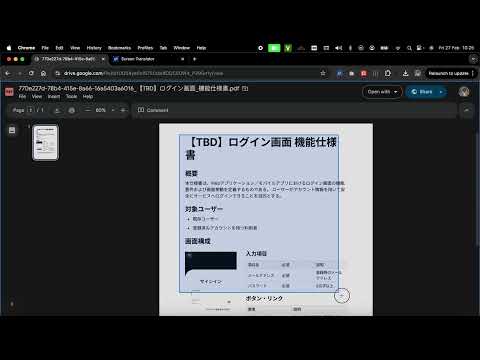
Drag to select any area on a webpage and translate text from GG Drive, PDFs, Docs, Word, PowerPoint, images, comics—right on screen.

🚀 Getting Started ● After installing the extension, reload the page you want to translate ● Click the extension icon, or Ctrl+Shift+X in Windows, or Command+Shift+X in Mac ● Drag to select an area on the page ● Wait for the translation overlay ● Read, copy, or hide the translated text ● (Optional) Pin extension to toolbar to start action quickly ✨ Key Features ● Drag & select any area on a webpage ● Extract text and translate into your chosen language ● Overlay translated text at the original position ● Show / hide translation layer anytime ● Click text to copy ● Customizable translate language in Options ● Customizable auto translate with the last area coordinates in Options ● Supports translation in up to 50 languages worldwide 🔐 Privacy & Data Usage ● Text and images are processed only for translation purposes ● No personal data is sold or shared with third parties ● Data handling is clearly described in our Privacy Policy 👉 Learn more: https://screentranslator.thegioigiandon.com/about-us 👉 Feedback: https://screentranslator.thegioigiandon.com/feedback

Details

  • Version
    1.1.1
  • Updated
    March 6, 2026
  • Size
    34.47KiB
  • Languages
    8 languages
  • Developer
    Nguyễn Đức Thịnh
    Website
    Email
    ducthinhtrai@gmail.com
    Phone
    +84 384 737 103
  • Trader
    This developer has identified itself as a trader per the definition from the European Union and committed to only offer products or services that comply with EU laws.

Privacy

Manage extensions and learn how they're being used in your organization

Screen Translator - Translate PDF, Docs, Word, PowerPoint, Images, Comic... has disclosed the following information regarding the collection and usage of your data. More detailed information can be found in the developer's privacy policy.

Screen Translator - Translate PDF, Docs, Word, PowerPoint, Images, Comic... handles the following:

User activity
Website content

This developer declares that your data is

  • Not being sold to third parties, outside of the approved use cases
  • Not being used or transferred for purposes that are unrelated to the item's core functionality
  • Not being used or transferred to determine creditworthiness or for lending purposes

Support

Related

Image Translator OCR

5.0

Capture screen area, extract text (OCR) and translate using Gemini/OpenAI.

Manga Translator🍓

4.1

Manga translator for Japanese, Korean, and Chinese

Manga Translator

3.2

AI translator for untranslated manga images and websites

Graphic Novel Screen Translator

3.2

An easy to use extension for translating any text on the webpage to English

Image Translator OCR

5.0

Translate text in images using local OCR processing. Select any area on a webpage to extract and translate text instantly.

Image Translator

3.6

Translate from pictures quickly with Image Translator app. Easy text converter and traduction photo tool for screenshots and comics.

Torii Image Translator — AI Manga Translator, Manhwa Translator ...

4.2

Best manga translator, manhwa translator, image translator in general, using AI, translate any image on any website!

OCR Translator

4.6

Capture, crop, and instantly translate any on-screen text, including images, with just one click.

Google Translate & Image Translator by Tranzly – Popup View

4.3

Quickly translate texts and images with Google Translate without any copy‑pasting.

AI Image Translator

0.0

Right-click any image on the web and instantly translate the text within it.

Image Translator - Manga Translator

2.2

Image Translator can translate images and translate manga into 30+ languages and keep the original text layout and style

Illuminate

5.0

See the world in your language. Select any area on your screen to extract and translate text instantly.

Image Translator OCR

5.0

Capture screen area, extract text (OCR) and translate using Gemini/OpenAI.

Manga Translator🍓

4.1

Manga translator for Japanese, Korean, and Chinese

Manga Translator

3.2

AI translator for untranslated manga images and websites

Graphic Novel Screen Translator

3.2

An easy to use extension for translating any text on the webpage to English

Image Translator OCR

5.0

Translate text in images using local OCR processing. Select any area on a webpage to extract and translate text instantly.

Image Translator

3.6

Translate from pictures quickly with Image Translator app. Easy text converter and traduction photo tool for screenshots and comics.

Torii Image Translator — AI Manga Translator, Manhwa Translator ...

4.2

Best manga translator, manhwa translator, image translator in general, using AI, translate any image on any website!

OCR Translator

4.6

Capture, crop, and instantly translate any on-screen text, including images, with just one click.

Google apps