


Overview
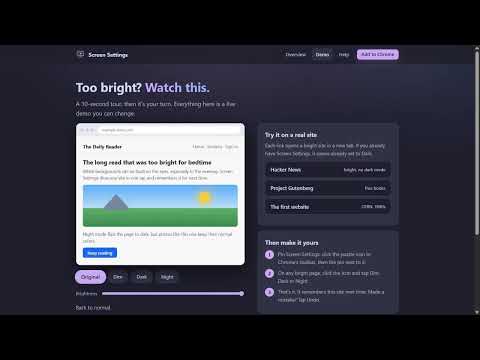
Too bright? Dim, Dark or Night any site in one tap. Brightness, contrast and zoom, saved per site or page, free.
Too bright? Screen Settings dims any website in one tap and remembers it for next time. WHAT YOU GET • One-tap presets: Dim, Dark and Night (Night inverts colors; photos and video stay normal) • Brightness and contrast sliders, with saturation, hue, sepia and zoom under "More" • Saved for this site, this page, or all sites. The popup always says where changes apply • Undo after every change, and a one-tap reset when a site looks wrong • Your look is applied as the page loads, so you rarely see a bright flash first • Colorblind assist and simulation modes (approximate aids, not medical tools) • Accessibility options: reduce motion, underline links, stronger focus outline, readable text spacing • Keyboard shortcuts: Alt+Shift+O turns filters on or off, Alt+Shift+D cycles Dim, Dark and Night • Export and import your settings, and share a look with a link FREE AND PRIVATE Screen Settings is free, with no account and no ads. It changes how pages look; it never reads page content or your browsing history. Your settings stay on your device. Anonymous usage counts are optional and off by default. LEARN MORE Try the interactive demo: https://stronglyconnectededge.com/screen-settings/demo Privacy policy: https://stronglyconnectededge.com/screen-settings/privacy Help and contact: https://stronglyconnectededge.com/screen-settings/support
0 out of 5No ratings
Details
- Version1.0
- UpdatedNovember 16, 2026
- Size60.79KiB
- LanguagesEnglish
- DeveloperStrongly Connected Edge LLCWebsite
200 W River Dr, St Charles, IL 60174 Saint Charles, IL 60174 USEmail
hello@stronglyconnectededge.comPhone
+1 630-733-5884 - TraderThis developer has identified itself as a trader per the definition from the European Union and committed to only offer products or services that comply with EU laws.
- D-U-N-S147518614
Privacy

Screen Settings has disclosed the following information regarding the collection and usage of your data. More detailed information can be found in the developer's privacy policy.
Screen Settings handles the following:
This developer declares that your data is
- Not being sold to third parties, outside of the approved use cases
- Not being used or transferred for purposes that are unrelated to the item's core functionality
- Not being used or transferred to determine creditworthiness or for lending purposes
Support
For help with questions, suggestions, or problems, visit the developer's support site