


Огляд
Record your computer's screen with just one click!
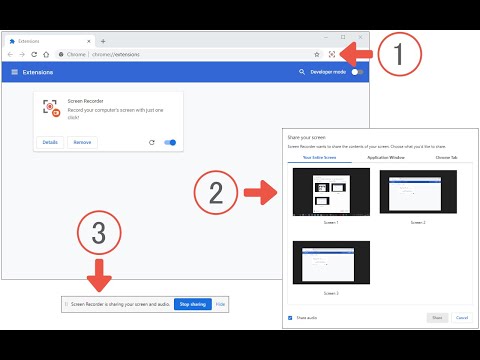
Screen Recorder extension helps you record video from the computer's screen. To work with this addon, please click on the toolbar button. Once the recorder interface appears, please adjust desired options, and then click the - Start - button. The video source could be your screen, window, or tab. The audio source can be the system's audio, microphone, mixed, or no audio at all. When you click the start button, a popup will appear within the interface. This popup window allows you to select the desired screen, tab, or window. To start recording please click on the - Share - button. When you are done recording the screen, please press the toolbar button (or the stop button on the app interface) to stop the recording process. The recorded video will be download to your computer automatically (on the default download location). By default, recorded media is in - webm - format. To get more information about webm video format, please visit this Wikipedia page (https://en.wikipedia.org/wiki/WebM). If you want to change this format to a different one, please use a different software. Moreover, to switch the interface theme to dark, please press the moon icon in the right toolbar. To report bugs, please fill out the bug report form on the addon's homepage (https://mybrowseraddon.com/screen-recorder.html).
3,1 з 5309 оцінок
Деталі
- Версія0.2.2
- Оновлено14 серпня 2025 р.
- Розробник:Grephy
- Розмір62.9KiB
- МовиEnglish
- Розробник
Електронна пошта
grephyr.prj@gmail.com - Не продавецьЦей розробник не ідентифікував себе як продавець. Зверніть увагу, що права споживачів у Європейському Союзі не поширюються на контракти з цим розробником.
Конфіденційність

Цей розробник заявляє, що ваші дані:
- не продаються третім особам (за винятком дозволених випадків)
- не використовуються й не передаються для цілей, що не пов’язані з основними функціями продукту
- не використовуються й не передаються для визначення кредитоспроможності або в цілях кредитування
Підтримка
Із запитаннями, пропозиціями й проблемами звертайтеся на сайт підтримки розробника.