


Overview
Blur sensitive data during Zoom, Meet, Loom and client demos. Save privacy layouts per website. Local processing.
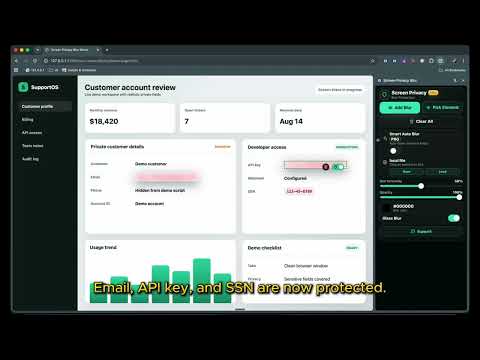
Screen Privacy Blur helps you protect sensitive information during screen sharing, video calls, demos, live streams, and recordings. Create manual blur overlays anywhere on a webpage, resize and move them freely, pick exact page elements to protect, save layouts per site, or use Smart Auto Blur Pro to automatically detect and blur sensitive fields such as emails, passwords, phone numbers, card fields, API keys, tokens, SSNs, and private text patterns. Data Replacement Pro turns real CRM contacts into readable fictional demo data. Create reusable scenarios for names, companies, email addresses, phone numbers, and custom text while keeping identities consistent across the page. Perfect for remote work, client demos, product walkthroughs, support calls, online teaching, streaming, and any situation where you need to share your screen without exposing private data. Key Features: • One-click manual blur overlays • Pick exact elements to blur • Drag, resize, and position blur areas • Save and load blur layouts per website • Per-overlay pin controls • Adjustable blur intensity, opacity, color, and glass blur • Smart Auto Blur Pro for automatic sensitive field detection • Data Replacement Pro with reusable local demo scenarios • Exact replacement values and editable matching rules • Consistent fictional identities across repeated values, sorting, reloads, SPA navigation, tab changes, and scrolling • Persistent Chrome side panel controls • Works across websites and web apps • Local detection, replacement, and overlay rendering • Built-in support page for help and feedback Privacy-first by design. Manual overlays, Smart Auto Blur detection, replacement rules, and demo identities stay on your device. No screenshots, page content, form values, or browsing history are collected. What's new in 2.6.0: • Added local Data Replacement Pro scenarios for readable product demos • Added manual replacement values and editable source matching rules • Replaces repeated visible occurrences of the same value automatically • Keeps demo mode active across full-page navigation, SPA transitions, in-app tabs, and virtualized scrolling • Preserves readable formatting for email addresses and other supported values
4.9 out of 58 ratings
Details
- Version2.6.2
- UpdatedOctober 10, 2026
- Size141KiB
- Languages10 languages
- DeveloperWebsite
Email
mborodin87@gmail.com - Non-traderThis developer has not identified itself as a trader. For consumers in the European Union, please note that consumer rights do not apply to contracts between you and this developer.
Privacy

This developer declares that your data is
- Not being sold to third parties, outside of the approved use cases
- Not being used or transferred for purposes that are unrelated to the item's core functionality
- Not being used or transferred to determine creditworthiness or for lending purposes
Support
For help with questions, suggestions, or problems, visit the developer's support site