


Overview
Pay-as-you-go web scraper with a free trial. Extract lists, detail pages and images to CSV, Excel or JSON. No subscription.
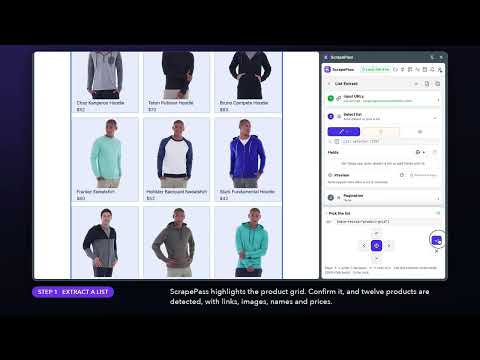
ScrapePass turns any website into clean data, right in a side panel. Point, click, export. No coding required. Click a list of products, jobs, listings or search results, and ScrapePass finds every item and its fields for you. It follows "Load more" and "Next" buttons, visits each detail page, downloads images with clean file names and captures full-page screenshots. Then export everything to CSV, Excel or JSON. WHAT YOU CAN DO • List Extract: select a list of products, jobs, listings, reviews or search results and get every item as a row. Auto-detect finds the list and its fields for you. • Magic: fills in the usual fields for 24 kinds of pages (products, jobs, articles, properties, businesses, events, recipes and more). • Pagination: follow "Next" or "Load more" buttons, or infinite scroll, to collect every page. • Detail Extract: use a list of links, or a dataset you already extracted, and pull the same details from every page. Click any element to add it as a field. • Bulk download: save every image from a list or dataset into a folder, named and numbered from any column. • Screenshots: capture full-page screenshots from a list of links. • Run in parallel: list, detail, image and screenshot tasks run side by side in the background, each with its own progress. • Datasets: review and manage your results in a dedicated window, then export to CSV, Excel or JSON. • Recipes: save a setup and run it again later in one click. GREAT FOR Product and price research, lead lists, job and real-estate listings, reviews, product image libraries and page archives. PRIVATE BY DESIGN Extraction runs in your browser. The pages you extract, your datasets and your exports stay on your device; they are not uploaded to our servers. FAIR, PAY-AS-YOU-GO PRICING • Selecting data, running extractions and reviewing datasets are free. • Exports, bulk downloads and screenshots use a 24-hour pass with unlimited use. • Sign up and verify your email to get 5 free days (each free day is one 24-hour pass). • Need more? Refer friends for more free days, or buy credits from $9. One-time payments, no subscription. Use ScrapePass only on pages you have the right to access, and follow each site's terms. Website: https://scrapepass.com Support: support@scrapepass.com
0 out of 5No ratings
Details
- Version0.1.0
- UpdatedOctober 20, 2026
- FeaturesOffers in-app purchases
- Size431KiB
- LanguagesEnglish (United States)
- DeveloperWebsite
Email
support@scrapepass.com - Non-traderThis developer has not identified itself as a trader. For consumers in the European Union, please note that consumer rights do not apply to contracts between you and this developer.
Privacy

This developer declares that your data is
- Not being sold to third parties, outside of the approved use cases
- Not being used or transferred for purposes that are unrelated to the item's core functionality
- Not being used or transferred to determine creditworthiness or for lending purposes