


Overview
Free web scraper: extract lists, pages, images and emails to CSV, Excel or JSON. 10 full runs a month free, no account needed.
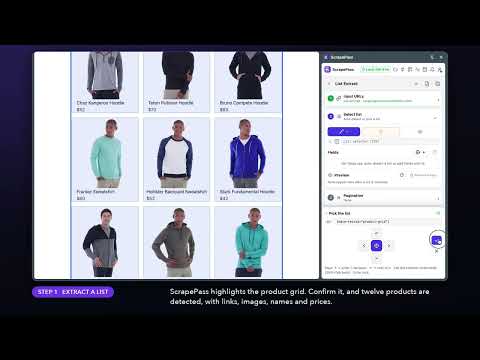
ScrapePass turns any web page into clean data ✨ Lists of products, places, jobs or posts, the details on each item's page, emails, images and screenshots. Export to CSV, Excel or JSON in one click 📊 🆓 Free to start: 10 full runs a month, with no account needed. Every run is complete: no page, URL or file limit, and exports are always free. 🚀 HOW IT WORKS 1️⃣ Open a page with a list (search results, a category, a map, a directory). 2️⃣ Click the ScrapePass icon. It finds the list and its fields for you. 3️⃣ Add what you want from each item: its page details, the emails on its website, its images or a screenshot. 4️⃣ Press Start. One run, one table ✅ 🪄 SIMPLE MODE • Finds the list on the page and reads it the way a run does, with a live preview 👀 • Add, rename or remove columns, and pick any value on the page with a click 🖱️ • Follows pagination: Next buttons, Load more buttons and infinite scroll 📜 • Chains steps in one run: the list, then each item's page, emails, images and screenshots, all in one table 🔗 • Name downloaded images and screenshots from a column, with an optional 001_ prefix 🏷️ 🛠️ ADVANCED MODE • 📋 List Extract: any repeating list, with Auto-detect and Magic fields for products, jobs, places, articles and more. • 🔍 Detail Extract: the same fields from a list of URLs. • 📧 Email Extract: emails and contacts from websites, with options for crawl depth. • 🖼️ Image download and 📸 full-page screenshots. • 💾 Save your setups as recipes and run them again anytime. ⚡ PREBUILT TEMPLATES Ready-made setups for about 30 popular shopping, travel, jobs, maps, reviews and search sites. On those sites, Magic uses the template automatically and falls back to its own detection if the site has changed. See the full list at scrapepass.com/templates. 🤖 AI CONNECTOR Let an AI app on your computer use ScrapePass in your browser through MCP: read pages, extract lists, run your recipes and query your data. It talks to the extension directly on your computer. 🔒 PRIVATE BY DESIGN • Extraction runs in your own Chrome, with your own sessions. Pages, data, recipes and exports stay in your browser and are not uploaded to ScrapePass servers. • No ads and no analytics in the extension 🚫 To count the free plan's runs, it sends only a random install ID, its version and the day. • Site access is asked per site, only when needed. • ScrapePass never solves captchas 🧩 A run that meets one waits for you. 💎 PRICING • 🆓 Free: 10 full runs a month, no account needed, free exports. • ⭐ Pro: unlimited runs for $15 a month, $40 every 6 months, or $60 a year. Cancel anytime. ⚖️ Only extract data you have the right to access, and follow each site's terms. 🌐 Website and help: https://scrapepass.com 🛡️ Privacy policy: https://scrapepass.com/legal/privacy
0 out of 5No ratings
Details
- Version0.6.4
- UpdatedNovember 13, 2026
- FeaturesOffers in-app purchases
- Size1.34MiB
- Languages41 languages
- DeveloperWebsite
Email
support@scrapepass.com - Non-traderThis developer has not identified itself as a trader. For consumers in the European Union, please note that consumer rights do not apply to contracts between you and this developer.
Privacy

This developer declares that your data is
- Not being sold to third parties, outside of the approved use cases
- Not being used or transferred for purposes that are unrelated to the item's core functionality
- Not being used or transferred to determine creditworthiness or for lending purposes