

Scrapely
2 ratings
)
Overview
Point-and-crawl data extraction. Detect tables and lists on any page, paginate automatically, and export clean data.
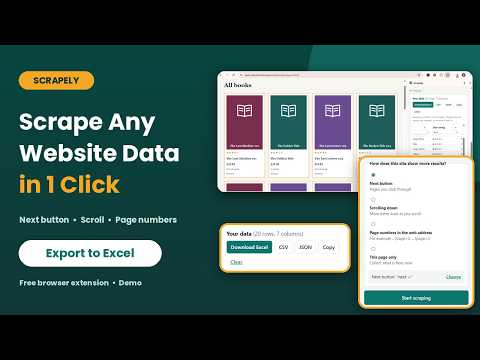
Scrapely turns any web page into a clean spreadsheet. It finds the tables and lists on a page, loads the rest of the results for you, and exports everything to Excel, CSV, or JSON. No code, no selectors, no setup. Websites show their data in different ways. Some have a Next button, some load more as you scroll, some put the page number in the web address, and some show everything on one page. Scrapely supports all four, so you can pick the one that matches the site. ====================================== OVERVIEW: FOUR WAYS TO LOAD MORE DATA ====================================== 1. NEXT BUTTON For sites with "Next", "Load more", or numbered page links. Scrapely finds the button automatically, clicks it page after page, and collects each page. Best for search results, directories, product catalogs, and job boards. 2. SCROLLING DOWN For infinite-scroll sites where new items appear as you move down the page. Scrapely scrolls for you and collects items as they load. Best for social feeds, listings, and image galleries. 3. PAGE NUMBERS IN THE WEB ADDRESS For sites where the address changes with each page, such as example.com/list?page=2. You give Scrapely the address pattern and a page range, and it visits each page in turn. Best for sites with predictable page addresses. 4. THIS PAGE ONLY For a single page that already shows all the data, such as a long table. Scrapely collects what is on screen and stops. Best for quick one-off exports. Every method uses the same simple flow: find the data, choose how the site loads more, start scraping, clean up your columns, and export. ====================================== HOW SCRAPELY WORKS (FOR ALL METHODS) ====================================== Step 1. Open the page you want and click the Scrapely icon. The side panel opens next to the page. Step 2. Click "Find data on this page". Scrapely looks for repeating items, such as table rows or product cards, and outlines them in amber on the page. If it picked the wrong block, click "Wrong data? Try another" to cycle through the other candidates. Step 3. Choose how the site loads more results (the four methods above). Step 4. Click "Start scraping". A live status line shows the page number and how many rows have been collected. Step 5. Review the preview table, edit the columns, and export. Duplicate rows are removed automatically, so overlapping pages never create repeated data. ====================================== DETAIL: 1. NEXT BUTTON ====================================== How it works Scrapely reads the current page, clicks the Next button, waits for the new content to load, reads that page, and repeats until there are no more pages. Finding the button When you click "Find data", Scrapely looks for a Next button for you. It recognizes the common patterns: links marked as "next", buttons labeled Next, Next page, Older posts, Load more, Show more, and arrow symbols. It ignores image carousels and sliders so it does not click the wrong arrows. If your site uses numbered pages (1 2 3 4), Scrapely finds the current page and clicks the one after it. If the button is not found, or you want a different one, click "Choose button", then click the button you want on the page. Press Esc to cancel. Scrapely remembers the button by its label, accessibility name, classes, and link shape, so it can find it again on every page, even when the pagination layout changes (for example, when a Previous button appears on page 2). Waiting for the page to load After each click, Scrapely waits until the list on the page has actually changed before reading it. This works on both classic sites, where the whole page reloads, and modern sites, where the list updates in place. If a site is slow, increase the delay in Settings. When it stops - The Next button is disabled or missing (you reached the last page). - A page returns nothing new. - You reach the page limit you set. - You click Stop. Tips - Use "Load more" and "Show more" buttons the same way. They are treated as Next buttons. - If a site takes a long time to load each page, set a longer delay (3 to 5 seconds). - If the crawl stops early, click "Find data" again and re-choose the button. ====================================== DETAIL: 2. SCROLLING DOWN ====================================== How it works Scrapely scrolls to the bottom of the list, waits for new items to appear, collects them, and scrolls again. It repeats until no more items load. What it handles - Pages that scroll as a whole. - Lists inside their own scrolling container, such as a results panel next to a map. - Slow loading. Scrapely waits for new items or extra page height, and gives the page a small nudge up and down to trigger lazy loading if nothing happens at first. When it stops - Two rounds in a row bring no new items (the end of the list). - You reach the page limit you set. For scrolling, each scroll round counts as one step, so raise the limit for very long feeds. - You click Stop. Tips - Keep the Scrapely side panel open while the job runs. - Turn on "Keep the page active when hidden" in Settings if you want to switch to another tab. Pages normally pause loading in the background, and this option stops them from noticing they are hidden. - For feeds with thousands of items, raise the page limit and set a gentle delay. ====================================== DETAIL: 3. PAGE NUMBERS IN THE WEB ADDRESS ====================================== How it works Many sites put the page number in the address: example.com/products?page=2, example.com/blog/page/2, or example.com/list?p=2. Scrapely opens each of these pages in turn, reads the data, and moves to the next number. You do not need to find or click any buttons. Setting it up 1. Open page 1 or 2 of the list and click "Find data". 2. Choose "Page numbers in the web address". 3. Scrapely guesses the pattern from the current address and fills in the box, replacing the page number with {n}. For example: example.com/list?page={n} 4. Check that {n} sits exactly where the page number goes. Edit the address if needed. 5. Set the first and last page, for example from 1 to 20. 6. Click "Start scraping". Scrapely recognizes common patterns such as page=, p=, pg=, paged=, pagenum=, and /page/2. If it cannot recognize your address, add {n} yourself. When it stops - It reaches your last page number. - A page returns nothing new (the list has run out). - You reach the page limit you set. - You click Stop. Tips - Some sites count by offset instead of page number (start=0, start=20). Edit the address pattern to match what the site uses. - This method is the most reliable and fastest when a site supports it, because it does not depend on finding a button. ====================================== DETAIL: 4. THIS PAGE ONLY ====================================== How it works Scrapely collects all the repeating data currently on the page, then stops. No clicking, scrolling, or loading. Best for - Long tables or lists that already show every row. - Quick one-time exports. - Testing: check that Scrapely detects the right columns before running a bigger job. - Pages you have already scrolled or filtered yourself. Tips - If you want to scrape a filtered or searched view, set up the page how you like it first, then use "This page only". - When you are happy with the columns, you can switch to another method for the rest of the site. ====================================== CLEAN, ENRICH, AND EXPORT ====================================== Edit your columns - Rename any column. - Remove columns you do not need. - Convert values: number only, date (YYYY-MM-DD), domain name, lowercase, or UPPERCASE. Collect more details from each link If your data contains links, Scrapely can visit each one in a background tab and add new columns, such as: - Title and description - Main image - Price - Email addresses and phone numbers - Specification tables and key-value details - Structured data published by the page Choose which link column to follow, set how many tabs to use at once, and Scrapely fills in the details row by row. Links that fail can be retried by running it again. Export anywhere - Excel (.xlsx) - CSV - JSON - Copy to clipboard, then paste straight into Google Sheets or Excel Save a setup for each site Click "Save this setup for this site" in Settings. Scrapely remembers the detected data, Next button, method, delays, and your column edits, and offers to load them the next time you open that site. ====================================== SETTINGS AND CONTROLS ====================================== - Delay between pages: set a polite pause (default 1.5 seconds). Scrapely adds a little random variation so requests do not look robotic. - Page limit: stop automatically after a set number of pages or scroll rounds (default 50). - Stop button: stops safely after the current step. Everything collected so far is kept. - Keep the page active when hidden: lets long jobs continue when you switch tabs. - Keep the computer awake: prevents your computer from sleeping during long jobs. ====================================== PRIVATE BY DESIGN ====================================== - Everything runs inside your browser. - No account, no sign-up, no tracking. - Scrapely does not send the pages you visit or the data you collect to any server. - Saved setups are stored only on your device and can be deleted at any time. ====================================== RESPONSIBLE USE ====================================== Use Scrapely only on websites and data you are allowed to collect, and respect each site's terms of service and robots.txt. Use sensible delays so you do not overload servers. Do not use Scrapely to bypass logins, paywalls, or security measures. ====================================== SUPPORT ====================================== Need help? Visit our support page or email us. We read every message and use your feedback to improve Scrapely.
5 out of 52 ratings
Details
- Version0.4.3
- UpdatedOctober 9, 2026
- Offered byFoozera
- Size24.84KiB
- LanguagesEnglish
- Developer
Email
foozera.com@gmail.com - Non-traderThis developer has not identified itself as a trader. For consumers in the European Union, please note that consumer rights do not apply to contracts between you and this developer.
Privacy

This developer declares that your data is
- Not being sold to third parties, outside of the approved use cases
- Not being used or transferred for purposes that are unrelated to the item's core functionality
- Not being used or transferred to determine creditworthiness or for lending purposes
Support
For help with questions, suggestions, or problems, visit the developer's support site