

ScrapeLens – Web Scraper & Crawler: Extract Data to Excel, CSV, PDF

Overview
Scraper, crawler & price-change alerts in one. Clean data, export to Excel, CSV, PDF & 20+ formats. All for $4.99 a year.
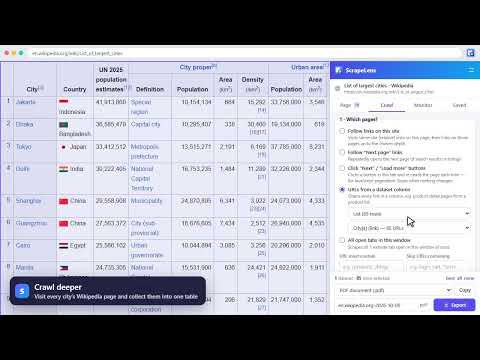
ScrapeLens is a no-code web scraper, site crawler and change monitor for Chrome, for $4.99 a year. Open it on a website and it finds the data on the page for you: tables, product listings, search results, lists and contact details. Clean the data, collect more pages, get alerted when something changes, and export it to Excel, CSV, PDF or Google Sheets. No coding, no account to create, no page limits. Your scraped data stays in your browser. ★ WHY SCRAPELENS IS WORTH $4.99 A YEAR • It costs less per year than most scraping tools charge per month. Tools that crawl sites, run on a schedule or send change alerts usually bill monthly and still cap your pages or credits. ScrapeLens works out to about 42¢ a month. • No limits or credits. Scrape as many pages, rows, crawls and monitors as you need. • Everything is included: change alerts, data cleaning, saved recipes, multi-page crawling and every export format. There is no "Pro" tier. • It pays for itself the first time it saves you an afternoon of copying and pasting. • Private by design: no account, no tracking, no ads. • Cancel anytime from the extension's Settings. ★ FINDS THE DATA FOR YOU Click "Scan page" and ScrapeLens lists everything it found, best matches first: repeated items such as product grids and search results, tables, lists, structured data embedded in the page, contact details, links and images. Hover over a result to see it highlighted on the page. Want something specific? Click any element and ScrapeLens selects it along with every similar element. Advanced users can also extract data with a CSS selector, XPath or a regular expression. ★ CRAWL MORE PAGES Follow links across a site, step through "Next" pages, click "Load more" buttons, open every link in a column (for example each product page from a product list), or scrape all your open tabs at once. Everything is merged into one table with the source address on each row. ScrapeLens respects robots.txt by default. ★ GET ALERTED WHEN DATA CHANGES Choose what to watch and how often, from every 15 minutes to once a week. ScrapeLens checks in the background while Chrome is open and sends a desktop notification such as "Aurora Headphones: Price $19.99 → $17.99", with a full change log you can export. ★ CLEAN BEFORE YOU EXPORT Preview every dataset as a table. Rename or hide columns, filter rows and remove duplicates. Pull numbers out of text, split values, find and replace, and sort. Every step can be undone, and saved recipes repeat the same steps on similar pages. ★ EXPORT ANYWHERE Save to Excel, CSV, PDF, Word, JSON and many other formats, copy straight into Google Sheets, or send rows to Zapier, Make or your own API with a webhook. Several datasets become separate sheets in one workbook. ★ PRIVATE BY DESIGN Scraped data never leaves your computer unless you send it to your own webhook. The only thing ScrapeLens sends to its server is an anonymous license key, to check that your subscription is active. ★ PRICE $4.99 per year, billed securely through Stripe. Every feature is included. The subscription renews yearly, and you can cancel anytime from the extension's Settings. Your license key also works on your other computers. HOW TO USE 1. Click the ScrapeLens icon (or press Alt+Shift+S) to open the side panel and subscribe. 2. The page is scanned automatically. Tick the datasets you want. 3. Optionally clean the data, crawl more pages or set up a monitor. 4. Choose a format and click Export. Please scrape responsibly and respect each website's terms of service and applicable privacy laws.
0 out of 5No ratings
Details
- Version1.0.0
- UpdatedNovember 3, 2026
- FeaturesOffers in-app purchases
- Offered bymaelswarm
- Size131KiB
- LanguagesEnglish
- Developer
Email
maelswarm@proton.me - Non-traderThis developer has not identified itself as a trader. For consumers in the European Union, please note that consumer rights do not apply to contracts between you and this developer.
Privacy

ScrapeLens – Web Scraper & Crawler: Extract Data to Excel, CSV, PDF has disclosed the following information regarding the collection and usage of your data. More detailed information can be found in the developer's privacy policy.
ScrapeLens – Web Scraper & Crawler: Extract Data to Excel, CSV, PDF handles the following:
This developer declares that your data is
- Not being sold to third parties, outside of the approved use cases
- Not being used or transferred for purposes that are unrelated to the item's core functionality
- Not being used or transferred to determine creditworthiness or for lending purposes
Support
For help with questions, suggestions, or problems, visit the developer's support site