


개요
Extract data from websites into spreadsheets.
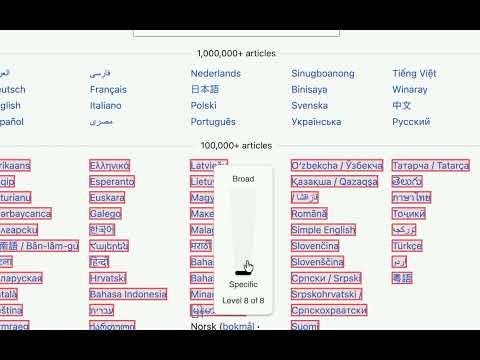
Transform any website into structured data with just a few clicks. Scrape Similar is the powerful yet intuitive Chrome extension that lets you extract information from web pages and export it directly to Excel, Google Sheets, CSV, or copy to your clipboard. 🎯 VISUAL ELEMENT PICKER NEW! Point and click to scrape data - no technical knowledge required: • Hover over any element to see all similar matches highlighted in real-time • Adjust selector specificity to capture exactly what you need (broader or more precise) • Visual feedback shows matched element count before you scrape • Context menu for fine-tuning your selection on the fly • Keyboard shortcut (⌘+Shift+X / Ctrl+Shift+X) for instant access • Intelligent XPath generation automatically creates the perfect selector 🌐 WHAT YOU CAN EXTRACT • Product listings from e-commerce sites • Contact information from business directories • Social media links and engagement metrics • SEO elements like headings, meta tags, and link structures • Form data and interactive elements • Images with alt text and dimensions • Custom data from any website structure ⚡ KEY FEATURES SMART DATA EXTRACTION • Visual Picker Mode - Point, click, and scrape without writing code • Advanced XPath-based scraping with intelligent element detection • Auto-generate scraping configurations from selected elements • Built-in presets for common use cases (links, images, forms, headings) • Real-time preview of extracted data before export MULTIPLE EXPORT OPTIONS • Clipboard Export - Quick copy for immediate use • CSV/TSV Export - Download data in spreadsheet formats • Google Sheets Integration - Direct export with OAuth2 authentication • Excel - Download data as an xlsx file • Custom Column Mapping - Organize data exactly how you need it PROFESSIONAL TOOLS • Side Panel Interface - Work alongside your browsing without interruption • Context Menu Integration - Right-click any element to start scraping • Keyboard Shortcuts - ⌘+Shift+X (Mac) or Ctrl+Shift+X (Windows/Linux) for Visual Picker, • ⌘+Shift+S / Ctrl+Shift+S for Side Panel • Theme Support - Light and dark mode for comfortable use USER-FRIENDLY EXPERIENCE • Interactive Onboarding - Get started in minutes with guided tutorials • Preset Management - Save and reuse your custom scraping configurations • Visual Element Highlighting - See exactly what data will be extracted • Error Handling - Clear feedback when scraping encounters issues ✔️ PERFECT FOR • Digital Marketers - Extract competitor data, contact lists, and social media information • Researchers - Gather structured data from academic or business websites • E-commerce Analysts - Monitor product prices, descriptions, and availability • SEO Specialists - Analyze website structures, link profiles, and meta data • Data Analysts - Collect web data for analysis and reporting • Content Creators - Gather research data and reference materials • Anyone who needs data from websites - No coding experience required! 🔓 NO LOCK-IN • Export and backup saved presets in JSON • Import saved presets from another profile or device 🛡️ PRIVACY & SECURITY • Local Processing - All scraping happens in your browser • No Data Storage - We never see or store your scraped data • Secure Exports - Direct integration with Google's secure APIs • Transparent Analytics - Anonymous usage data only, no personal information collected 🚀 GETTING STARTED • Install the extension and pin it to your toolbar • Navigate to any website you want to scrape • Press ⌘+Shift+X (Mac) or Ctrl+Shift+X (Windows/Linux) to activate Visual Picker • Hover over elements to see matches highlighted • Right-click to adjust specificity or click to scrape • Export your data to Google Sheets, Excel, CSV, or clipboard Transform your web browsing into data collection with Scrape Similar - the professional web scraping tool that respects your privacy and enhances your productivity.
5점 만점에 4.9점평점 7개
세부정보
개인정보 보호

Scrape Similar에서 데이터 수집 및 사용과 관련하여 다음 정보를 공개했습니다. 더 자세한 정보는 개발자의 privacy policy을 참고하세요.
Scrape Similar 항목은 다음을 처리합니다.
개발자가 사용자 데이터에 관해 다음과 같이 선언했습니다
- 승인된 사용 사례를 제외하고 서드 파티에 판매하지 않음
- 항목의 핵심 기능과 관련 없는 목적으로 사용하거나 전송하지 않음
- 신용도 판단 또는 대출 목적으로 사용하거나 전송하지 않음