


Overview
Intelligently extract and analyze web content
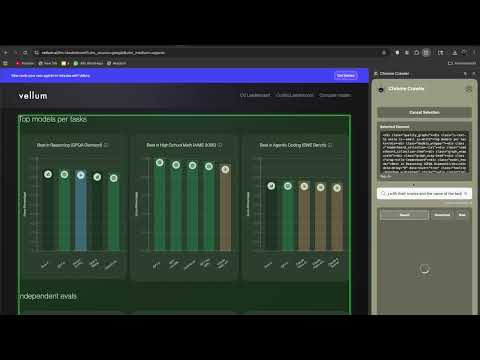
ScrapeAnything is a browser tool that lets you select any element on a webpage and analyze it instantly. Instead of manually copying text, switching tabs, or organizing information by hand, the extension processes the content you choose and provides structured results, insights, and summaries. >>>> Key Features >> One-Click Element Selection Choose any part of a webpage using a visual selector that highlights the structure of the content. Select text blocks, articles, tables, lists, product cards, and more. >> AI-Powered Interpretation Ask questions about the selected content and receive context-aware answers. Extract summaries, find specific details, or understand patterns without additional tools. >> Structured Data Extraction Automatically convert tables, lists, and structured elements into clean formats. View results as text, formatted tables, JSON, or export to CSV. >> Works Across Most Websites Use ScrapeAnything on news pages, marketplaces, research sites, pricing pages, job boards, real estate platforms, and many other types of content. >> Editable Output Review and edit extracted information before exporting or using it in other tools. >> Daily Credit System Usage limits reset every day at midnight UTC, making costs predictable and transparent. >>>> How It Works 1) Install the extension. 2) Sign in with your email. 3) Click “Select Element” to choose any content on a webpage. 4) Ask a question or describe what you want to extract. 5) View and edit the results, then export if needed. The process is designed to be fast, simple, and free of technical setup.
5 out of 52 ratings
Details
- Version0.0.1
- UpdatedDecember 1, 2025
- Size206KiB
- LanguagesEnglish
- DeveloperWebsite
Email
aaryanshsahay7@gmail.com - Non-traderThis developer has not identified itself as a trader. For consumers in the European Union, please note that consumer rights do not apply to contracts between you and this developer.
Privacy

Scrape Anything has disclosed the following information regarding the collection and usage of your data. More detailed information can be found in the developer's privacy policy.
Scrape Anything handles the following:
This developer declares that your data is
- Not being sold to third parties, outside of the approved use cases
- Not being used or transferred for purposes that are unrelated to the item's core functionality
- Not being used or transferred to determine creditworthiness or for lending purposes