

Scout - Online Accountability

Overview
Scout – Online Accountability turns online activity into communication.
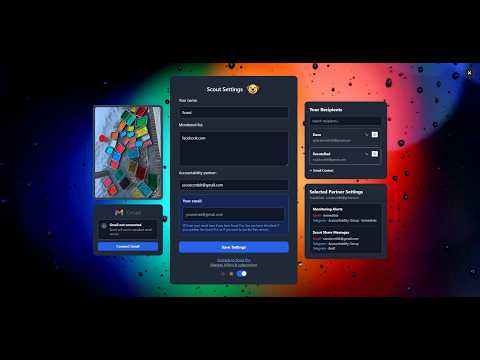
Scout can be used to: • Create online accountability groups • Send pictures, Youtube videos, and messages to multiple platforms instantly • Leave hidden messages anywhere on the internet that can only be seen by the people you select • Create accountability around social media or online shopping • Detect visits to pornography, gambling, or other sites you've chosen to monitor • Let a parent know when homework or school websites are being used • Show that you're following through on a job search • Build custom accountability around virtually any website, page, or keyword you set up How It Works: When you add someone new as an accountability partner, or Share something with someone you haven't connected with before, Scout sends them an email request to accept messages from you. If they accept, they can choose where they want to receive your messages, including through Email, Discord, and Telegram. From there, you can see the settings they've chosen on your contacts list, including where your monitoring alerts will be sent and which channels they've enabled for messaging. Accountability Monitoring: Scout can be used with or without monitoring. For ongoing accountability, Scout can work quietly in the background. Add websites, specific URLs, or keywords to your monitoring list. When Scout detects a match in the URL, it automatically sends a screenshot and page details to your accountability partner through the channels they've enabled. Recipients can choose between instant alerts, or once daily summaries for monitoring. Hidden Messages: Leave private notes for your Scout relationships to discover while browsing. When two people have Scout installed, have connected their Gmail accounts in settings, and have accepted each other’s relationship requests, they can leave messages for one another on any website or web page. There’s no notification telling the recipient where a message was left, they’ll discover it naturally if they visit that page. Hidden Messages are only visible to the people they were shared with, turning the web into a place to leave little surprises, reminders, encouragement, or inside jokes for each other. Share tab: Open the Share tab to instantly send a screenshot of the page you're viewing to a friend or accountability partner. Messages include the screenshot, page URL, title, timestamp, and an optional personal message. Recipients choose which supported channels they want to make available for messages, including Email, Discord, and Telegram. Monitoring does not need to be enabled to use Share. YouTube videos and images can also be shared directly by right-clicking the content and selecting the Scout sharing option. On YouTube, you may need to right-click twice to open the browser’s context menu and see the Scout sharing option. Groups: Scout can be used for simple one-on-one accountability, but it can also support groups. Discord: You can create an accountability server on Discord and have group members add you as their accountability partner. From there, you can set it up so each user's monitoring alerts are delivered to specific channels you make for them, while the group can use shared channels or #general to discuss progress and encourage each other. Telegram: You can use the ScoutOABot for one-on-one accountability relationships, or create a Telegram group for multiple participants. The ScoutOABot will be added when you connect a Telegram account using the settings page. Scout automatically organizes each accountability relationship into its own topic, keeping each person's monitoring alerts and screenshots separate while still allowing the group to use shared topics for discussion, progress updates, and encouragement. For group topics, ScoutOABot must be made an administrator with Manage Topics permission. Email tab: Scout also includes a separate Email feature that does not require an accountability relationship. Connect your Gmail account and you can send normal emails directly through Scout. Enter a recipient, subject, and message, and optionally attach the current page's screenshot, page link, or files. This makes it easy to send something you're looking at without leaving the browser. Recipients can: • Accept or decline a relationship • Choose which supported platforms receive Scout messages • Choose which supported platforms receive monitoring alerts • Receive monitoring alerts instantly or as a daily summary • End an individual relationship at any time • End Scout messages as a whole at any time User Control and Transparency: Users retain control over Scout at all times. Monitoring can be enabled, disabled, or changed whenever the user chooses, but Scout doesn't hide those changes from the accountability partner. If monitoring settings change, the accountability partner receives a notification showing the previous and current settings. Partners are also notified when monitoring is enabled, disabled, or if Scout is uninstalled. Accountability only works when it's voluntary, Scout is built around that principle. Scout isn't designed to shame someone or secretly record everything they do online. It's designed to provide a lightweight layer of transparency between people who have agreed to hold each other accountable. For most people, they don't need a nuclear option when they want accountability, and Scout hopes to serve these people in a simple, lightweight, and flexible way. If you’re trying to build better habits or add an extra layer of transparency to your relationships, Scout can help.
5 out of 55 ratings
Details
- Version1.2.9
- UpdatedOctober 28, 2026
- FeaturesOffers in-app purchases
- Size1.42MiB
- Languages16 languages
- DeveloperScout - Online AccountabilityWebsite
527 S Van Buren St Green Bay, WI 54301-3918 USEmail
brettmariani923@gmail.com - Non-traderThis developer has not identified itself as a trader. For consumers in the European Union, please note that consumer rights do not apply to contracts between you and this developer.
Privacy

Scout - Online Accountability has disclosed the following information regarding the collection and usage of your data. More detailed information can be found in the developer's privacy policy.
Scout - Online Accountability handles the following:
This developer declares that your data is
- Not being sold to third parties, outside of the approved use cases
- Not being used or transferred for purposes that are unrelated to the item's core functionality
- Not being used or transferred to determine creditworthiness or for lending purposes
Support
For help with questions, suggestions, or problems, please open this page on your desktop browser