

ScamBomb Gmail Scanner

Overview
Scan Gmail emails for scams with ScamBomb AI
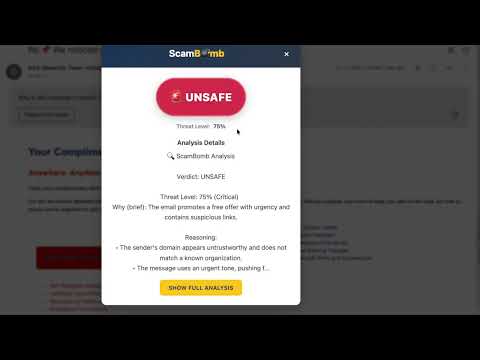
Instantly check if an email is a scam — right inside Gmail. One click, no copying, AI-powered. Free to try. Scam emails are getting harder to spot. They don't always look suspicious. They often sound urgent, personal, or official — and by the time you realize something is wrong, it's already too late. ScamBomb helps you check suspicious emails without leaving Gmail. No copying. No pasting. No guessing. How ScamBomb Works ScamBomb adds a simple scan button directly inside Gmail. When you click it: -The email is analyzed by a purpose-built AI engine — checking message content, sender identity, domain reputation, and behavioral patterns all at once -Emerging scam tactics and phishing techniques are detected, not just known templates -You receive a clear safety verdict: SAFE, UNSAFE, or UNKNOWN -You get a plain-English explanation of exactly why an email looks risky (or safe) -You can decide what to do next — before clicking links, replying, or sending money ScamBomb is designed to support better decisions, not replace your judgment. Built for Real People (Not Security Experts) Most scam detection tools assume technical knowledge. ScamBomb doesn't. You'll see: -Clear explanations in plain language -No technical jargon -No panic language -No fear-based alerts Whether you're protecting yourself or helping a family member, ScamBomb keeps things understandable and calm. Why One-Click Matters Many people know they should double-check suspicious emails — but in the moment, friction gets in the way. ScamBomb removes that friction. You don't have to: Copy text Open a new tab Search online Decide who to trust If an email feels "off," click once and get clarity. Who ScamBomb Is For Anyone who wants peace of mind before clicking or replying People who receive financial, delivery, or "urgent" emails Caregivers helping protect parents or grandparents Small business owners handling invoices and requests Anyone tired of guessing what's real Privacy & Security First ScamBomb was built with privacy in mind. Scans are encrypted in transit using HTTPS (TLS) Email content is analyzed in real time ScamBomb does not store your email messages Only basic usage data (like scan counts) is retained Scans happen only when you click — never automatically Your inbox stays yours. There are no surprise charges and no hidden behavior tracking. Free to Try, Upgrade When You're Ready Free users receive a limited number of scans Premium users get unlimited scans and priority access Billing and account management happen securely on ScamBomb.com Important Notes ScamBomb provides guidance, not guarantees. Some messages may be labeled UNKNOWN when there isn't enough information Always verify sensitive requests using official channels ScamBomb does not replace banks, governments, or law enforcement Think of ScamBomb as a second set of eyes — not a final authority. Supported Platform: Gmail (web version), desktop Chrome and Chromium-based browsers. Get Started in Seconds Install ScamBomb for Gmail Open Gmail in your browser Open any email that feels suspicious Click Scan with ScamBomb That's it. ScamBomb — One click. Clear answers. Peace of mind. Learn more or manage your account at https://scambomb.com
0 out of 5No ratings
Details
- Version0.2.0
- UpdatedMarch 3, 2026
- Offered byfeatherstone.george
- Size77.86KiB
- LanguagesEnglish (United States)
- DeveloperGeorge William Featherstone
3571 State Highway 155 South Gilmer, TX 75645 USEmail
thescambomber@gmail.comPhone
+1 903-239-1945 - TraderThis developer has identified itself as a trader per the definition from the European Union and committed to only offer products or services that comply with EU laws.
Privacy

ScamBomb Gmail Scanner has disclosed the following information regarding the collection and usage of your data. More detailed information can be found in the developer's privacy policy.
ScamBomb Gmail Scanner handles the following:
This developer declares that your data is
- Not being sold to third parties, outside of the approved use cases
- Not being used or transferred for purposes that are unrelated to the item's core functionality
- Not being used or transferred to determine creditworthiness or for lending purposes
Support
For help with questions, suggestions, or problems, visit the developer's support site