

Scam SafeGuard

Overview
AI-Powered Scam Defense
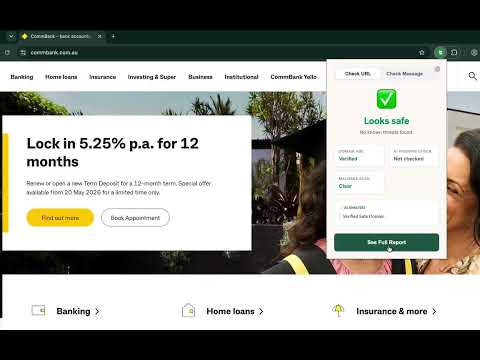
Spot dangerous links before you click. Most scam checkers make you copy and paste a suspicious message in after you've already seen it. Scam SafeGuard works the other way — it quietly checks every link in the background and warns you before dangerous sites load. No pasting. No extra steps. Just safer browsing. 🛡️ How it works Scam SafeGuard quietly checks links as you browse. It cross-references destinations against Google's Web Risk threat data and public scam blocklists, refreshed regularly. When a page looks dangerous, it warns you before it loads and explains — in plain English — why. The whole thing happens in seconds. You won't notice it working until it flags something. What Scam SafeGuard protects you from Scam links on social media Facebook, Instagram, and TikTok are now the most common source of scams. When you click a link from social media, Scam SafeGuard checks the destination before it opens. If it's a fake site, you'll see a warning — not a scam. Fake online shops A website that launched yesterday shouldn't be selling you a $400 handbag. Scam SafeGuard checks how long a site has been around, what it's selling, and whether it matches known scam patterns. Fake storefronts get flagged before you enter your card details. Scam messages (SMS, WhatsApp, email) Copy a suspicious text into the "Check a Message" tab and Scam SafeGuard will scan every link inside it in seconds. Useful for the AusPost parcel text, the myGov alert, or the Linkt toll notice that doesn't look quite right. Links inside your Gmail and Outlook Click the "Check Links" button that appears inside Gmail and Outlook to scan every web address in an email at once. We extract the links — nothing else. Your email stays in your inbox. We never see it. Known phishing and malware sites Scam SafeGuard checks sites against multiple threat databases, refreshed regularly. If a site is on a known threat list, you're warned immediately. We check your links, not your correspondence. This is the part we want to be very clear about — and it's specifically about the email and link scanner (the "Check Links" button and the check that happens when you click a link inside Gmail and Outlook, before it opens), not the separate "Check a Message" tool described above, which works on text you actively paste in. When you use the email scanner, our code extracts only the web addresses from your emails. It does not access your subject lines, your message content, your sender's name, or your attachments. This is how the email scanner is designed to work. Other browser security tools require Gmail access to do this. We don't. We only see the addresses on the envelope, never what's inside. Built for Australian scams Generic security tools are built for the US market. They don't know what a Linkt toll scam looks like. They've never seen a fake myGov refund notice or a spoofed Australia Post delivery text. Scam SafeGuard is built in Australia, tuned for the scams Australians actually receive — from ATO impersonators to Centrelink texts to fake Woolworths gift card giveaways. Perfect for protecting elderly parents Install it on Mum or Dad's laptop in 60 seconds. Scam SafeGuard runs quietly in the background and only alerts when it flags something as risky — no browsing history shared with anyone. With Premium or Family, you'll receive a weekly summary of what was checked and what was flagged, without needing to look over their shoulder. What powers Scam SafeGuard: Uses Google's Web Risk threat database ✓ Global scam blocklists (updated daily) ✓ AI-assisted detection for borderline cases ✓ Real-time domain age checking We are not affiliated with, or endorsed by, Google. Honest pricing — no surprises Free plan includes URL scanning, social media protection, and 10 message checks per month. 14-day trial of Premium — no card needed. Premium (AU$6.99/month or AU$59.99/year) adds unlimited checks, airlock protection for your social feeds and web-based inbox, deeper AI checks on suspicious shops, Maximum Protection — free for your first 14 days, then included with Premium — and the weekly Trusted Contact summary for one person. Family plan (AU$12.99/month or AU$129.99/year) covers up to 5 people, each with their own Trusted Contact summary. No auto-renew traps. Cancel any time. A voluntary 30-day refund — in addition to your rights under the Australian Consumer Law. Privacy by design → We check links, not inbox contents → We never sell your data → We never store the content of your messages → URLs are checked against threat databases — your browsing history is not logged → Australian Privacy Act compliant Scam SafeGuard is built and maintained by an independent Australian developer. We are not affiliated with any bank, telco, or government agency.
0 out of 5No ratings
Details
- Version1.0.14
- UpdatedOctober 25, 2026
- Offered byScam SafeGuard
- Size235KiB
- LanguagesEnglish (United Kingdom)
- DeveloperScam Safegauard PTY LTD
SUITE 2, 16-18 Spink Street BRIGHTON VIC, VIC 3186 AUEmail
support@scamsafeguard.comPhone
+61 490 398 137 - TraderThis developer has identified itself as a trader per the definition from the European Union and committed to only offer products or services that comply with EU laws.
- D-U-N-S781551293
Privacy

Scam SafeGuard has disclosed the following information regarding the collection and usage of your data. More detailed information can be found in the developer's privacy policy.
Scam SafeGuard handles the following:
This developer declares that your data is
- Not being sold to third parties, outside of the approved use cases
- Not being used or transferred for purposes that are unrelated to the item's core functionality
- Not being used or transferred to determine creditworthiness or for lending purposes
Support
For help with questions, suggestions, or problems, visit the developer's support site