


Overview
Edit Scaffold themes faster in HubSpot with direct content and style field navigation plus responsive preview controls.
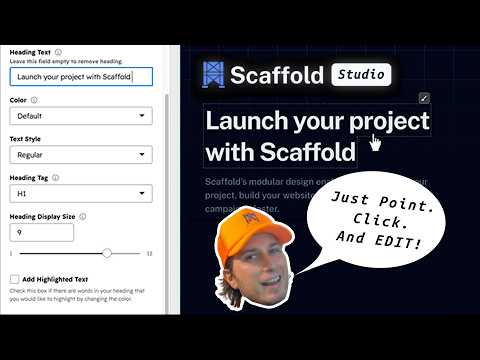
Scaffold Studio brings a faster, more intuitive editing experience to Scaffold websites built in HubSpot. Instead of searching through the HubSpot editor sidebar every time you want to change a heading, button, image, or other page element, Scaffold Studio connects the page elements you see in the preview directly to the fields that control it. Simply point, click, and edit. SPEND LESS TIME SEARCHING. MORE TIME BUILDING. HubSpot gives developers and marketers powerful tools for building websites, but navigating complex module fields can slow down the editing process. Scaffold Studio is designed to remove that friction. Click an element directly in the page preview and Scaffold Studio will navigate the HubSpot sidebar to the corresponding field automatically. No hunting through field groups. No manually opening repeaters. No trying to remember where a setting lives. DIRECT CONTENT NAVIGATION Click supported page elements to jump directly to their corresponding HubSpot content fields. Scaffold Studio supports standard fields, field groups, repeaters, nested repeaters, and multiple levels of nested fields. DIRECT STYLE NAVIGATION Need to change how something looks? Supported elements display a compact style control that takes you directly to the relevant styling options, whether they live in HubSpot's Style tab or within a nested content group. MODULE STYLE SHORTCUTS Quickly access common module-level design controls including Spacing & Alignment, Background, and Animation without searching through the editor. BETTER RESPONSIVE PREVIEWS Quickly preview your page at Mobile, Tablet, Laptop, and Desktop widths directly inside the HubSpot editor. Switch between viewport sizes with one click or clear the selected size to return to the normal editor preview. BUILT SPECIFICALLY FOR SCAFFOLD Scaffold Studio is designed specifically for websites using a Scaffold theme for HubSpot (Scaffold Lite or Scaffold PRO). Scaffold modules allow the extension to understand the relationship between elements rendered in the page preview and their corresponding HubSpot fields. This tight integration is what makes direct content and style navigation possible. DESIGNED TO STAY OUT OF YOUR WAY Scaffold Studio enhances the existing HubSpot editing workflow rather than replacing it. The extension works while you're editing supported Scaffold pages and can be enabled or disabled at any time from the extension popup. All page processing happens locally in your browser. Scaffold Studio does not send your HubSpot page content to a developer-controlled server and contains no analytics or advertising. A FASTER WAY TO BUILD WITH SCAFFOLD Click the element you want to change. Jump to the setting that controls it. Make your edit. Keep building. That's the workflow Scaffold Studio is designed for. Scaffold Studio is an independent product designed for use with the Scaffold theme on HubSpot. It is not produced, endorsed, or sponsored by HubSpot.
0 out of 5No ratings
Details
- Version1.0.1
- UpdatedSeptember 15, 2026
- Size87.31KiB
- LanguagesEnglish
- DeveloperTerrier Digital LLCWebsite
1527 W Thompson St Philadelphia, PA 19121 USEmail
support@getscaffold.appPhone
+1 862-222-2892 - TraderThis developer has identified itself as a trader per the definition from the European Union and committed to only offer products or services that comply with EU laws.
Privacy

Scaffold Studio has disclosed the following information regarding the collection and usage of your data. More detailed information can be found in the developer's privacy policy.
Scaffold Studio handles the following:
This developer declares that your data is
- Not being sold to third parties, outside of the approved use cases
- Not being used or transferred for purposes that are unrelated to the item's core functionality
- Not being used or transferred to determine creditworthiness or for lending purposes
Support
For help with questions, suggestions, or problems, please open this page on your desktop browser