

SayBrowse-Hands-Free Web Control
Overview
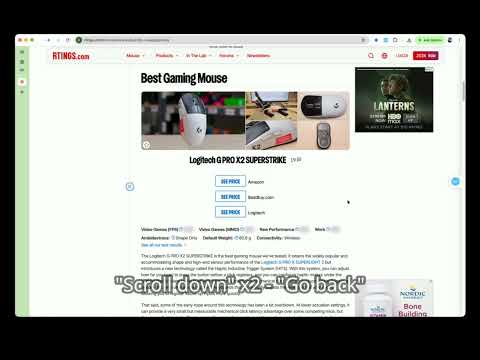
Browse hands-free. Click, type, search, scroll, navigate, and manage tabs with natural voice commands.
**Browse the web without reaching for your keyboard or mouse.** SayBrowse turns natural voice commands into actions on the webpage you are viewing. Start listening from the toolbar popup or the movable page-side control, then say what you want to do. **WHAT YOU CAN DO** - Click visible buttons and links - Enter text and submit searches - Scroll to the top or bottom of a page - Go back, go forward, and reload - Open, close, and switch browser tabs - Pause, resume, or stop a listening session - Choose a supported recognition language - Review recent operations **HOW IT WORKS** SayBrowse uses the controls visible on the current webpage to determine and perform the requested action. You stay in control and can pause or stop listening whenever you want. **BEFORE YOU INSTALL** - SayBrowse works on ordinary HTTP and HTTPS webpages. - Chrome internal pages and other protected browser pages cannot be controlled. - Some websites may expose controls in ways browser extensions cannot access. - A Google account is required. - SayBrowse is currently free. - Anonymous usage analytics can be disabled in Settings. For more information about data handling, permissions, and support, see the privacy policy and support links on this page.
0 out of 5No ratings
Details
- Version0.0.3
- UpdatedOctober 24, 2026
- Offered bysoymikey
- Size381KiB
- LanguagesEnglish
- Developer
Email
soymikey0717@gmail.com - Non-traderThis developer has not identified itself as a trader. For consumers in the European Union, please note that consumer rights do not apply to contracts between you and this developer.
Privacy

SayBrowse-Hands-Free Web Control has disclosed the following information regarding the collection and usage of your data. More detailed information can be found in the developer's privacy policy.
SayBrowse-Hands-Free Web Control handles the following:
This developer declares that your data is
- Not being sold to third parties, outside of the approved use cases
- Not being used or transferred for purposes that are unrelated to the item's core functionality
- Not being used or transferred to determine creditworthiness or for lending purposes
Support
For help with questions, suggestions, or problems, visit the developer's support site