

Saved Replies for AI Chats

Overview
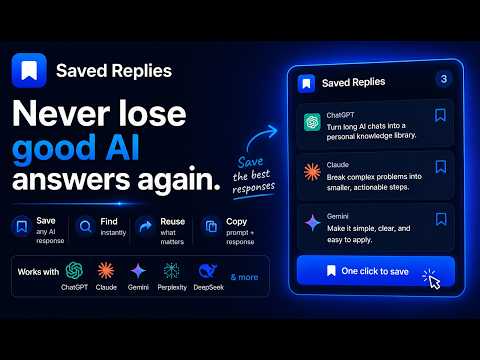
Save important AI responses, jump back to them later, and show only saved moments in long chats.
AI chats get long. You scroll past a brilliant explanation, a perfect code snippet, or a key insight — and it's buried forever. Saved Replies fixes that. Hover over any AI response and a bookmark icon appears. One click saves it. That's the whole flow. FEATURES ▸ Save any AI response instantly with the hover bookmark button ▸ Saved panel shows everything you've bookmarked in the current chat ▸ Click any saved item to jump straight back to it ▸ Copy the full response + your original prompt to clipboard in one click ▸ "Only saved" mode hides everything else — review just the good parts of a long chat ▸ Clear all saved responses at once when you're done works with every LLM you work with PRIVACY Everything is saved locally in your browser. No account. No sign-in. No data ever leaves your device.
0 out of 5No ratings
Details
- Version2.0.0
- UpdatedMay 12, 2026
- Offered byweenay
- Size29.19KiB
- LanguagesEnglish (United Kingdom)
- Developer
Email
vinayjjoshi.310@gmail.com - Non-traderThis developer has not identified itself as a trader. For consumers in the European Union, please note that consumer rights do not apply to contracts between you and this developer.
Privacy

This developer declares that your data is
- Not being sold to third parties, outside of the approved use cases
- Not being used or transferred for purposes that are unrelated to the item's core functionality
- Not being used or transferred to determine creditworthiness or for lending purposes