


Overview
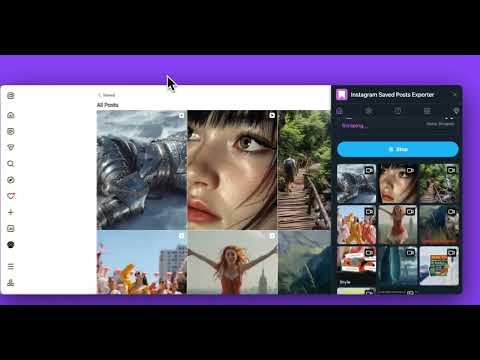
Instagram Saved Posts Exporter: instantly download all your saved Instagram photos and videos with one simple click.
📤 Instagram Saved Posts Exporter – Save & Download All Your Saved Posts Easily Tired of losing track of your favorite content? Saved Posts Exporter is the ultimate extension that lets you export, back up, and download all your saved photos, videos, and reels automatically with one click. Built for creators, marketers, and everyday users who want to organize and keep their saved posts offline, this tool is fast, secure, and user-friendly. 🌟 1. What Is Saved Posts Exporter? Saved Posts Exporter is a powerful Instagram downloader extension that helps you: 📁 Export your entire list of saved posts instantly 📸 Download all saved photos, videos, and reels 📊 Export post metadata (captions, likes, comments, timestamps) as CSV/JSON/Excel 🧩 Organize downloaded content into folders by username 💾 Save files in high resolution with original quality 🛡️ Enjoy 100% private, local-only processing — no data ever leaves your browser ⚡ 2. Key Features & Benefits 1️⃣ One-Click Export – 📤 Download all your saved posts instantly, no copying links or manual saves. 2️⃣ Metadata Export – 📊 Export post details (captions, likes, comments, user info, timestamps) as CSV, JSON, or Excel files. 3️⃣ Auto-Folder Organization – 🗂️ Files are neatly sorted by username so your saved collections stay organized. 4️⃣ High-Quality Downloads – 📷 Save images and videos in original, watermark-free quality. 5️⃣ Fast & Lightweight – 🚀 Works seamlessly on Instagram.com with no lag or popups. 6️⃣ Full Privacy Protection – 🔒 Local-only processing with no tracking, no analytics, and no data collection. 🎯 3. Who Can Benefit from Saved Posts Exporter 👩🎨 Creators & Influencers – Save creative ideas and inspiration, analyze engagement metrics for content strategy. 📈 Social Media Managers – Archive marketing visuals, export competitor insights with engagement data. 🛍️ Online Shoppers – Keep track of favorite product posts with captions and details. 🎓 Researchers & Educators – Collect examples and export metadata for analysis and documentation. 💾 Everyday Users – Back up your saved content with complete post information before it's gone. 🧭 4. How to Use Saved Posts Exporter 📌 Step 1: Install the extension. 📌 Step 2: Go to your "Saved" tab. 📌 Step 3: Click "Export Saved Posts" to download media files. 📌 Step 4: Click "Export posts metadata" to save post details as CSV/JSON/Excel. 📌 Step 5: Wait a few seconds — your content will download automatically! It's simple — no third-party sites, no login, and no technical setup required. 💎 5. Why Choose Saved Posts Exporter ✅ One-click export of all saved posts ✅ Export post metadata with engagement metrics ✅ Works directly on Instagram.com ✅ No login or registration required ✅ Ad-free, lightweight, and secure ✅ Perfect for productivity, creativity, data analysis, and backup With smooth integration and optimized performance, Saved Posts Exporter is the easiest way to download saved posts and their metadata safely and efficiently. 💎 6. Go Pro Upgrade to Pro and enjoy: - Unlimited images download - Unlimited videos download - Export posts metadata (CSV/JSON/Excel) - Priority support 🔐 7. Privacy & Security 💻 100% local processing inside your browser ❌ No cloud uploads or external servers ❌ No personal data collection or tracking ✅ Your privacy and saved content remain completely under your control ⚠️ 8. Legal Notice Saved Posts Exporter is an independent extension not affiliated with Instagram or Meta Platforms, Inc. Please follow Instagram’s Terms of Use and only export content you own or have permission to download. 🎉 9. Start Exporting Your Saved Posts Today! Whether you're saving inspiration, archiving marketing content, analyzing engagement data, or backing up memories — 📤 Saved Posts Exporter makes it quick, secure, and effortless. 👉 Install now and export all your saved posts with complete metadata in one click!
3.7 out of 514 ratings
Details
- Version2.8.0
- UpdatedSeptember 17, 2026
- Size292KiB
- Languages8 languages
- DeveloperWebsite
Email
voicehop@gmail.com - Non-traderThis developer has not identified itself as a trader. For consumers in the European Union, please note that consumer rights do not apply to contracts between you and this developer.
Privacy

Saved Posts Exporter has disclosed the following information regarding the collection and usage of your data. More detailed information can be found in the developer's privacy policy.
Saved Posts Exporter handles the following:
This developer declares that your data is
- Not being sold to third parties, outside of the approved use cases
- Not being used or transferred for purposes that are unrelated to the item's core functionality
- Not being used or transferred to determine creditworthiness or for lending purposes
Support
For help with questions, suggestions, or problems, visit the developer's support site