

SaveAnswer - Save AI Answers
1 rating
)
Overview
Save useful AI answers with one click, then organize them with tags and full-text search in your browser.
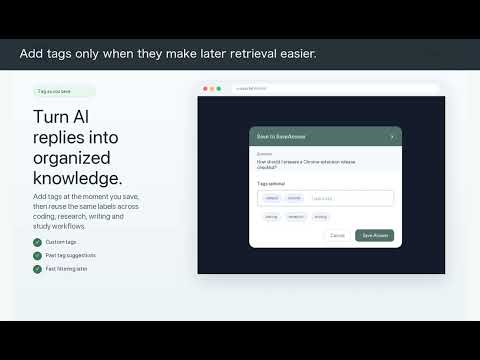
SaveAnswer adds a Save button to supported AI chat pages, helping you keep useful answers, organize them with tags, and find them when you need them. Your saved answers stay in your browser. No account, no cloud sync, and no usage tracking. What you can do with SaveAnswer: - Save useful AI answers with one click - Add tags while saving - Search saved questions and answers by keyword - Filter your library by tag - Preserve rich formatting, including headings, code blocks, lists, quotes, and tables - Reopen the original conversation from the saved source link - Export selected answers as Markdown, HTML, Word, or PDF - Save exports to Downloads or a folder you choose - Create shareable image cards with multiple visual themes - Build a private personal AI knowledge library across supported platforms Supported mainstream AI, such as ChatGPT and Gemini. Who it is for: - Developers saving code snippets, debugging notes, and architecture ideas - Students saving explanations, summaries, and study materials - Researchers collecting AI-generated notes and references - Writers saving outlines, drafts, and creative ideas - Anyone who uses AI chat tools regularly and wants to reuse their best answers Privacy: SaveAnswer is local-first. Saved content is stored in your browser through `chrome.storage.local`. The extension does not require an account, does not upload saved answers to a server, and does not track your usage. What’s new: - Improved DeepSeek support: every Save button is now attached to the correct AI answer instead of a following user message - Added stronger message detection and action-bar handling across supported AI platforms - Added shareable answer cards with theme, question, and tag options - Improved rich-content capture for code blocks, headings, lists, tables, and citations - Improved export workflows for Markdown, HTML, Word, and PDF - Added a welcome experience for new users - Improved storage reliability to prevent lost saves during concurrent actions - Refreshed the evergreen extension icon and product visuals
4 out of 51 rating
Details
- Version1.0.20
- UpdatedOctober 12, 2026
- Offered byLynn Zhuang
- Size69.41KiB
- LanguagesEnglish
- Developer
Email
flvictory@gmail.com - Non-traderThis developer has not identified itself as a trader. For consumers in the European Union, please note that consumer rights do not apply to contracts between you and this developer.
Privacy

This developer declares that your data is
- Not being sold to third parties, outside of the approved use cases
- Not being used or transferred for purposes that are unrelated to the item's core functionality
- Not being used or transferred to determine creditworthiness or for lending purposes