

Save2Plaud — Transcripts & Web Pages to Plaud

Overview
Save YouTube, TED & Spotify transcripts and any web page to Plaud. No middleman — your content never touches our servers.
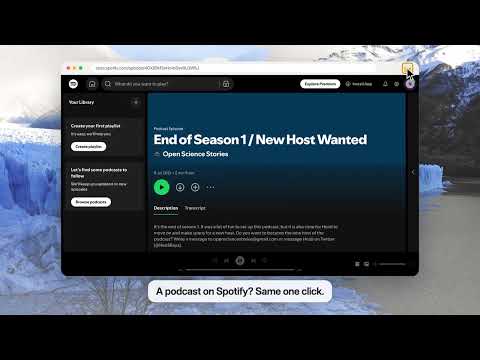
Save what you watch, hear and read into Plaud — in one click, straight from your browser. Save2Plaud turns a YouTube video, a TED talk, a Spotify podcast episode, any captioned video or any article page into a clean, timestamped Markdown document in your own Plaud account. No copying, no tab juggling, and nothing passes through a server of ours. Try it free for 7 days, then $2.99/month or $19.99/year. 🔒 No middleman — your content never touches our servers Save2Plaud is a courier, not a warehouse. Everything you save travels directly from your browser to your Plaud account. There is no Save2Plaud cloud holding a copy, no account to create with us, and no password to hand over: you sign in on Plaud's own login page and the extension uses the session your browser already has. What leaves your browser, and where it goes: • Your transcripts, articles and page URLs → your Plaud account. Only. • Your Plaud login → stays in your browser. We never see it. • Your Plaud account ID and email → our subscription check. Nothing else attached. • Anonymous usage counts → PostHog. No titles, URLs or content. Open DevTools → Network while you save. That is the whole story. On YouTube the extension checks whether a video has captions so it can show its button; everywhere else it reads only the tab where you click its icon, and only for that click. Nothing is saved or sent until you click Save. 🎯 What it saves • YouTube — any video with captions, in any subtitle language it offers (auto-generated included). A "Save to Plaud" button sits right under the video, next to Share. Each timestamp links back to the exact second. If YouTube's caption service is unavailable, the video's own "Show transcript" panel is read instead. • TED — every talk with a transcript. • Spotify podcasts — the episode's Transcript tab, or the captions of a video episode. • Any HTML5 video with a subtitle track, on any site. • Any article page — the main content as Markdown with headings, lists, links, tables and code kept, and the source URL at the top. Plaud 4.0 accounts. 📄 What lands in Plaud • A readable Markdown document: title, a Source line back to the page, then the transcript with a timestamp on every passage — rendered properly by Plaud's reader and ready for Plaud's AI. • Open a page you already saved and the extension tells you, with a link to the copy in Plaud. Save again only if you mean to. • Plaud 3.0 accounts receive transcripts as recordings with a Transcript tab, as before. 🚀 Who it's for • Researchers and students capturing lectures and talks for later review • Knowledge workers keeping long-form podcasts and interviews in one searchable place • Language learners pulling foreign-language transcripts to study inside Plaud • Anyone who watches and reads more than they have time to take notes on 💰 Pricing • 7-day free trial — every feature, no credit card • Monthly: $2.99 / month • Yearly: $19.99 / year (save 44%) • 30-day money-back guarantee 🔗 Links • Website: https://save2plaud.novabox.ai • Privacy: https://save2plaud.novabox.ai/privacy • Terms: https://save2plaud.novabox.ai/terms • Support: hi@novabox.ai ⚠️ Important Save2Plaud is an independent third-party extension built for Plaud users. Not affiliated with, endorsed by, or sponsored by Plaud, YouTube, TED, Spotify, or Google.
5 out of 51 rating
Details
- Version0.5.10
- UpdatedOctober 12, 2026
- Size118KiB
- Languages4 languages
- DeveloperWebsite
Email
hi@novabox.ai - Non-traderThis developer has not identified itself as a trader. For consumers in the European Union, please note that consumer rights do not apply to contracts between you and this developer.
Privacy

Save2Plaud — Transcripts & Web Pages to Plaud has disclosed the following information regarding the collection and usage of your data. More detailed information can be found in the developer's privacy policy.
Save2Plaud — Transcripts & Web Pages to Plaud handles the following:
This developer declares that your data is
- Not being sold to third parties, outside of the approved use cases
- Not being used or transferred for purposes that are unrelated to the item's core functionality
- Not being used or transferred to determine creditworthiness or for lending purposes
Support
For help with questions, suggestions, or problems, visit the developer's support site