


Overview
Save text, articles and whole ChatGPT, Claude or Gemini chats to your own Google Docs. Alt+S to choose a doc.
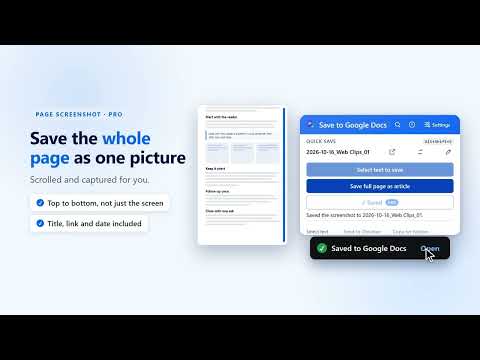
Copy any ChatGPT, Claude or Gemini conversation into your own Google Doc in one click. Headings, code blocks, tables and pictures come across, with clear You and assistant labels. No copy and paste, no broken formatting. Save to Google Docs also puts anything else you read on the web into your own Google Docs, in one click, one shortcut or one right-click. SAVE AI CHATS (FREE: 100 EVERY MONTH) - Open a chat on ChatGPT, Claude, Gemini or Perplexity, click the extension (or use the keyboard shortcut) and the whole conversation lands in a Google Doc. - Code blocks, tables, lists and pictures are kept, and each message is labelled You or the assistant. - Long chats work too: the extension writes them in parts, so a very long conversation still saves. - Only want one answer? Select it and save just that part. - 100 whole-chat saves every month per Google account are included free. Pro makes them unlimited. SAVE ANYTHING ELSE - Save a selection from the popup, the right-click menu or a keyboard shortcut. - Choose where it goes: a document you pick, your default document, or a new document for each save. Name new documents the way you like, for example 2026-10-16_Web Clips_01. - 100 page screenshots every month are included free: save a whole long page as a picture in your Google Doc, with the title, link and date above it. - Document templates: 15 free templates organise what you save under clear headings, and your text is never rewritten. - Routing rules send saves from the sites you choose to the documents you choose. - Capture history shows what you saved and where it went. - Capture inbox (optional): park snippets now, file them later. - Every save includes the page title, link and a timestamp. PRO: UNLIMITED CHATS, SCREENSHOTS AND LAYOUTS - Unlimited whole-chat saves and unlimited page screenshots. - All 130 document templates, including signature looks with cover pages and contents pages, and six chat layouts including Book, Report, Meeting notes and Study guide. - Save only the latest exchanges, send chats to project folders, and make PDF and Markdown copies. - Smart Save (optional, off by default): suggests the best document for what you select, within a monthly limit. - Pro is a subscription: $4 per month or $29 per year, billed by Stripe. Cancel any time online. 14-day money-back guarantee. A license works on up to 3 of your devices. PRIVATE BY DESIGN - Your saved text and chats go to your own Google Docs and Drive. Conversation text is never sent to our servers. - Smart Save is the one exception. It is Pro only, off by default and confirmed on each device. If you use it, the text you selected, the page title and your document titles are sent to our service and passed to an AI provider (Anthropic) to choose a document. We do not store or log that text. - Google access is limited to files this extension creates (the "drive.file" permission). It can't see your other Drive files. - To count the free chat saves and page screenshots, a one-way hash of your Google account ID is checked against our service. No name, email or document content is involved. - Anonymous usage counts (for example "a save worked" or "a save failed") are on by default. They contain no text, titles, links or emails, and you can switch them off in the popup under Privacy. - Full privacy policy: https://savetodocs.com/privacy HOW IT WORKS 1. Click the extension icon and sign in with Google once. 2. Open a chat and save the conversation, or select text and save it. 3. Open the document from the link in the confirmation. Questions or feedback: https://savetodocs.com/feedback or legal@savetodocs.com. Save to Google Docs is an independent tool. It is not affiliated with or endorsed by Google, OpenAI, Anthropic or Perplexity. Google Docs and Google Drive are trademarks of Google LLC. ChatGPT is a trademark of OpenAI. Claude is a trademark of Anthropic. Gemini is a trademark of Google LLC. Perplexity is a trademark of Perplexity AI, Inc. What's new in 2.27.1 (short) - Free: 100 whole-chat saves and 100 page screenshots each month. - Google sign-in keeps the account you choose when Chrome has several accounts. - Sign-out stays signed out; the popup no longer promotes article capture.
5 out of 51 rating
Details
- Version2.27.1
- UpdatedOctober 29, 2026
- FeaturesOffers in-app purchases
- Size370KiB
- LanguagesEnglish
- DeveloperWebsite
Email
archgyan@gmail.com - Non-traderThis developer has not identified itself as a trader. For consumers in the European Union, please note that consumer rights do not apply to contracts between you and this developer.
Privacy

Save to Google Docs has disclosed the following information regarding the collection and usage of your data. More detailed information can be found in the developer's privacy policy.
Save to Google Docs handles the following:
This developer declares that your data is
- Not being sold to third parties, outside of the approved use cases
- Not being used or transferred for purposes that are unrelated to the item's core functionality
- Not being used or transferred to determine creditworthiness or for lending purposes
Support
For help with questions, suggestions, or problems, please open this page on your desktop browser