


Overview
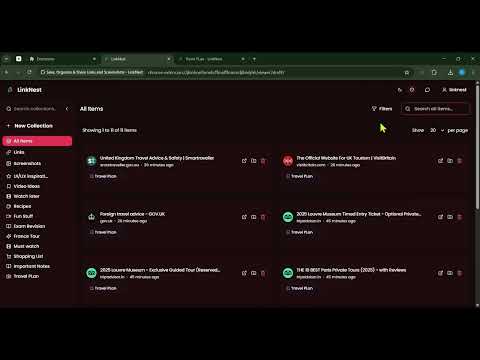
Save links & screenshots! Auto-organize into collections, customize themes, share with others. Boost your productivity!
Transform Your Web Research and Content Organization LinkNest is a powerful browser extension designed to help you capture, organize, and rediscover web content efficiently. Say goodbye to cluttered bookmarks and lost links. 🌟 ADVANCED SOCIAL MEDIA INTEGRATION ► Twitter Integration - Special capture support for tweets and threads ► YouTube Support - Save videos with thumbnails and descriptions ► Instagram Ready - Capture posts with rich previews ► Universal Support - Works seamlessly on all other websites 🤖 INTELLIGENT ORGANIZATION ► Smart Collections - Create nested folders that match your workflow ► Quick Access - Find any saved content in seconds ► Flexible Structure - Organize content your way ► Instant Search - Locate saved items instantly 🎨 VISUAL CUSTOMIZATION & THEMES ► Dark Mode - Easy on the eyes during night sessions ► Light Mode - Clean and crisp for daytime use ► Modern Interface - Beautiful, intuitive design ► Responsive Layout - Adapts to your browser perfectly 📸 POWERFUL SCREENSHOT TOOLS ► Full-Page Capture - Save entire webpages as screenshots ► Area Selection - Capture specific parts of any webpage ► Quick Access - Keyboard shortcuts for instant captures ► Visual Library - Browse your screenshots easily ⚡ SMART FEATURES ► One-Click Saving - Instantly save any webpage ► Keyboard Shortcuts - Power user efficiency ► Fast Performance - Lightweight and responsive ► Privacy Focused - Your data stays yours 👥 PERFECT FOR: ✓ Social media managers saving important posts ✓ Researchers collecting web resources ✓ Content creators gathering inspiration ✓ Students organizing study materials ✓ Professionals bookmarking important content 🏆 WHY CHOOSE LINKNEST: • Fast & Efficient - Save content in one click • Visual Organization - Clean, nested collections • Social Media Ready - Special platform support • Screenshot Power - Capture anything instantly
0 out of 5No ratings
Details
- Version1.0.5
- UpdatedJuly 4, 2025
- FeaturesOffers in-app purchases
- Size573KiB
- LanguagesEnglish
- DeveloperWebsite
Email
linknestext@gmail.com - Non-traderThis developer has not identified itself as a trader. For consumers in the European Union, please note that consumer rights do not apply to contracts between you and this developer.
Privacy

Save, Organize & Share Links and Screenshots - LinkNest has disclosed the following information regarding the collection and usage of your data. More detailed information can be found in the developer's privacy policy.
Save, Organize & Share Links and Screenshots - LinkNest handles the following:
This developer declares that your data is
- Not being sold to third parties, outside of the approved use cases
- Not being used or transferred for purposes that are unrelated to the item's core functionality
- Not being used or transferred to determine creditworthiness or for lending purposes
Support
For help with questions, suggestions, or problems, visit the developer's support site