

Save Emails as PDF by cloudHQ

Apžvalga
Export, convert and save Gmail™ emails as a PDF document
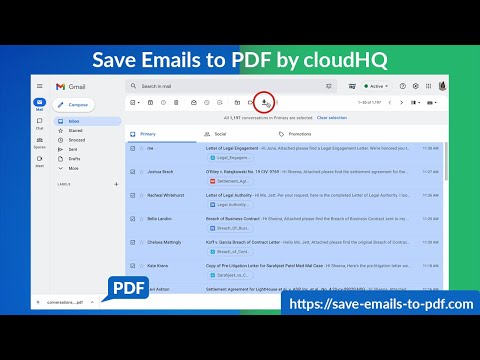
This extension lets you easily save Gmail emails and labels as a PDF document. Our service works in just 3 clicks, and you're done! With this extension you can: ✔️ Create a hard copy backup of messages for your own records ✔️ Merge multiple emails into one PDF ✔️ Backup multiple messages into separate PDFs ✔️ Save only the attachments of your Gmail messages into PDF ✔️ Great to upload your correspondence and: - Upload them into your CRM, like Salesforce, Zoho, etc. - Send it to your lawyer for legal proceedings - Send your bills, receipts, or invoices to your accountant - Send it to your human resources department for any internal issues This this extension is great for: 1. Real estate agents: 🏡Package all your Gmail messages regarding your sales transactions and upload them into SkySlope or another CRM that you're using. 2. Lawyers and legal professionals: ⚖️ Save, organize and sort all Gmail messages into one document and submit it to court. ⚖️ Convert all online conversations (sent documents, received documents, etc.) into a single file that you can then easily Clio or another CRM that you're using. 3. Project Managers and Team leads: 🚧 Archive all project communication as one document and keep it organized. 🚧 Setup an automatic saving of Gmail labels with project-related conversations to your Google Shared Drive for collaboration with your team. 4. Business owners: 💼 Get all your Gmail messages with receipts and organize them by date, customer, etc. 6. Contractors: 👩💻 Archive all communication with your clients. 7. Anybody who needs to convert, save and archive important online conversations, this is FOR YOU! 🕵️👮🏾♀️👨🎨🧑🎤👨💻🤵🏻♀️👩🔬🧕🏽🧑💼🧑🔧👩🏿🏫🧏👷 Here's everything you can do with this Convert Gmail to PDF Chrome extension: 1. You can save: - A single message or conversation - Multiple messages or conversations - An entire Gmail label - Messages and conversations matching filters - Your entire account 2. To any of these platforms: - A downloadable PDF to your local hard drive - Google Drive - Dropbox - Box - Egnyte - OneDrive 3. Feature Options you can choose to: * Include or exclude attachments * Append emails to an existing PDF document * Save your attachments only (not the body itself, but just the attachment) * Add page numbers * Condensed format (all signatures, quotations and other unnecessary data is removed) * Select an appropriate page size for printing purposes * Encrypt your file with password protection (highly encouraged for legal documents) * Forward your Gmail mails as a pdf attachment to someone else * Save your online conversation as one document with your selection * Convert and save your online conversation as a zip file with each Gmail message or conversation in separate PDF files * Convert and save your online communication one text (TXT) file * Convert and save your online communication as one HTML document * Share packages with your online conversations using secure share links We know that not one size fits all—especially when it comes to your Google e-mail, but with these flexible features, you should be covered with this extension. cloudHQ. Helping your productivity, 1 click at a time. cloudHQ website: https://www.cloudhq.net Website: https://www.save-emails-as-pdf.com Pricing: https://www.save-emails-as-pdf.com/pricing Support page: https://support.cloudhq.net/category/browser-extensions/save-emails-to-pdf/ Blog: https://blog.cloudhq.net Gmail, Google Calendar, and Google Workspace are trademarks of Google LLC. Use of these trademarks is subject to Google Permissions. cloudHQ is trademark of cloudHQ LLC. https://tsdr.uspto.gov/documentviewer?caseId=sn97775615&docId=ORC20250405001500&linkId=2#docIndex=1&page=1
4,3 iš 5611 įvertinimų
Išsami informacija
- Versija1.1.2.31
- Atnaujinta2026 m. rugsėjo 20 d.
- FunkcijosPirkinių programoje pasiūlymai
- Dydis1.96MiB
- KalbosKalbų: 11
- KūrėjascloudHQ LLCSvetainė
2247 29th Ave San Francisco, CA 94116-1738 USEl. paštas
support@cloudhq.netTelefonas
+1 415-509-6721 - Komercinės veiklos subjektasPagal šią Europos Sąjungos pateiktą apibrėžtį šis kūrėjas prisistato kaip prekiautojas ir įsipareigoja siūlyti tik tuos produktus ar paslaugas, kurie atitinka ES įstatymus.
- D-U-N-S064785518
Privatumas

„Save Emails as PDF by cloudHQ“ paskelbė toliau nurodytą informaciją dėl jūsų duomenų rinkimo ir naudojimo. Išsamesnės informacijos galima rasti peržiūrėjus kūrėjo privacy policy.
Save Emails as PDF by cloudHQ tvarko:
Šis kūrėjas pareiškia, kad jūsų duomenys yra
- Neparduodama trečiosioms šalims su patvirtintais naudojimo atvejais nesusijusiais tikslais
- nenaudojami ir neperkeliami su elemento pagrindinėmis funkcijomis nesusijusiais tikslais;
- nenaudojami ir neperkeliami, siekiant nustatyti kreditingumą, arba skolinimo tikslais.
Palaikymas
Jei turite klausimų, pasiūlymų arba problemų, apsilankykite kūrėjo palaikymo svetainėje.