


Overview
Proof of Human verification for SanctifAI Trust platform
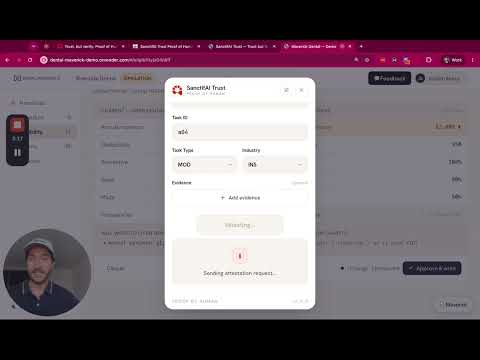
SanctifAI Trust — Proof of Human SanctifAI Trust lets workers cryptographically attest that a real human performed a task. With a single confirmation from your device biometric (Touch ID, Windows Hello, or a platform passkey), the extension mints a tamper-evident "seal" — an independently verifiable certificate that a human stood behind the work. How it works - Open the extension on the page where you did the work. - The first time you attest on a domain, register your device with a quick biometric confirmation. - Enter the task details and select Attest. Confirm with your biometric to seal the task. - You receive a verifiable certificate with a QR code and a public verification link. Key features - Device-bound biometrics: attestation is tied to a passkey on your device. Your biometric never leaves your device and is never shared. - Verifiable seals: every attestation produces a certificate that anyone can verify. - No separate sign-in: configure your tenant ID, API key, and email once in Settings. - Per-domain trust: the relying-party domain tracks the site you are working on. - Clean, focused interface designed for fast, repeated attestation. Privacy The extension does not collect or transmit your biometric data. Biometric verification happens locally on your device through the platform authenticator (WebAuthn). Only the resulting cryptographic attestation is sent to SanctifAI Trust. Requires a SanctifAI Trust tenant ID and API key.
0 out of 5No ratings
Details
- Version2.0.4
- UpdatedJuly 10, 2026
- Size107KiB
- LanguagesEnglish
- DeveloperNathaniel GatesWebsite
9510 San Lucas Road Austin, TX 78737 USEmail
support@sanctifai.comPhone
+1 512-827-7575 - TraderThis developer has identified itself as a trader per the definition from the European Union and committed to only offer products or services that comply with EU laws.
Privacy

This developer declares that your data is
- Not being sold to third parties, outside of the approved use cases
- Not being used or transferred for purposes that are unrelated to the item's core functionality
- Not being used or transferred to determine creditworthiness or for lending purposes
Support
For help with questions, suggestions, or problems, please open this page on your desktop browser