


Overview
Organize, back up, and manage your ChatGPT conversations with SameWindow.
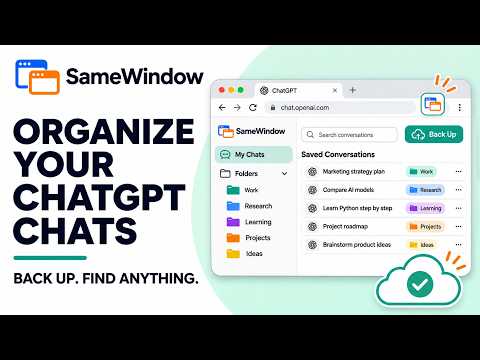
Keep your ChatGPT conversations organized and easy to find. SameWindow for ChatGPT adds folders and subfolders to the ChatGPT sidebar, so you can group saved conversations by project, topic, client, or any system that works for you. Find the chats you want, keep useful conversations close at hand, and back up your organization for later. ORGANIZE YOUR CHATS • Create folders and subfolders directly in the ChatGPT sidebar. • Save conversations to a folder and move them between folders. • Reorder folders and saved chats with drag and drop. • Select multiple chats and organize them together. • Search your folders and saved chats. • Choose folder icons to make projects easier to recognize. WORK WITH CHATGPT YOUR WAY • Copy the latest response or a complete conversation when you need it. • Use keyboard shortcuts for common actions: – Alt+C: copy the latest response – Alt+Shift+C: copy a conversation – Alt+W: toggle wide mode – Alt+N: start a new chat • Choose from available appearance themes, including default, terminal, black and white, parchment, and psychedelic styles. BACK UP AND RESTORE Your folder and saved-chat organization is stored in Chrome. You can download a JSON backup and restore it later. SameWindow Free includes manual backup and restore for files up to 5 MB. After restoring a backup, refresh ChatGPT to display the restored folders. Paid SameWindow for ChatGPT and All Access plans include Google Drive backup and restore. Drive backups are saved in Google’s private app-data area. The extension can’t browse or modify your other Google Drive files, and it uploads a backup only when you choose a backup action. SAMEWINDOW ACCOUNT Sign in with your SameWindow account to see your account status and use plan features. Sign up or compare plans at samewindow.com. Paid plans are managed on the SameWindow website. PRIVACY SameWindow stores folder names, folder icons, saved conversation titles, and conversation links in Chrome so it can organize your saved chats. Backup files contain this organization data, not the text of your ChatGPT conversations. The extension does not send conversation contents to SameWindow for organization or backup. When you sign in, your account is verified securely by SameWindow. The extension stores the sign-in tokens needed to keep you connected; it does not save your password. Google Drive access is requested only when you choose to connect Drive. This extension works with the ChatGPT website. SameWindow is an independent product and is not affiliated with, endorsed by, or sponsored by OpenAI. Support: support@samewindow.com Privacy Policy: https://www.samewindow.com/privacy Plans: https://www.samewindow.com/pricing
0 out of 5No ratings
Details
- Version1.2.0
- UpdatedNovember 3, 2026
- Size51.5KiB
- LanguagesEnglish
- DeveloperPAMARTHI KRISHNA SAYEEWebsite
3-177/B/23 Sri malyadri nilyam 1st floor balaji hills road-2 Nizampet rangareddy hyderabad, Telangana 500090 INEmail
support@nndigitals.comPhone
+91 76720 22484 - TraderThis developer has identified itself as a trader per the definition from the European Union and committed to only offer products or services that comply with EU laws.
Privacy

SameWindow for ChatGPT has disclosed the following information regarding the collection and usage of your data. More detailed information can be found in the developer's privacy policy.
SameWindow for ChatGPT handles the following:
This developer declares that your data is
- Not being sold to third parties, outside of the approved use cases
- Not being used or transferred for purposes that are unrelated to the item's core functionality
- Not being used or transferred to determine creditworthiness or for lending purposes
Support
For help with questions, suggestions, or problems, visit the developer's support site