

Salesforce UI Data Inspector
1 件の評価
)
概要
DevTools panel to inspect Salesforce network calls and SOQL.
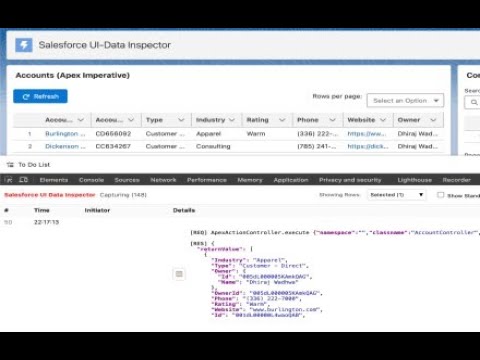
Chrome DevTools extension to inspect Salesforce network calls and parse SOQL network requests that are made by UI components. Includes sophisticated row filtering and data highlighting. ## Features - **Smart Filtering**: Filter rows by number, URL, or hide standard UI/empty calls. - **Deep Inspection**: Decodes complex Aura and UI-API payloads automatically. - **SOQL Detection**: Extracts and displays SOQL queries visible in network traffic. ## Usage - Open any Salesforce Lightning page, open DevTools, switch to **Salesforce UI Data Inspector** panel. - Click **Start Capturing** to begin. - Filter by URL or SOQL using the filter box. - Requests are shown with a contextual interaction (last click within ~1.5s). The 'Initiator' column doesn't always bring the component names, I'm working on that. Row numbers might not come in a normal order and that's because there might be a lot of unnecessary rows that are fetched in the background which are caused by system UI components. These are visible when you click on 'Show Standard UI Calls' or 'Show Empty Calls' checkboxes. Please share your feedback\suggestions on how this can be improved and made more exciting for you!
5 点満点で 51 件の評価
詳細
- バージョン0.1.0
- 更新:2026年1月1日
- 提供元wadhwadhiraj72
- サイズ294KiB
- 言語English
- デベロッパー
メール
dhirajw27@gmail.com - 非取引業者このデベロッパーは取引業者として申告していません。EU 加盟国の消費者とこのデベロッパーとの間に締結された契約には、消費者の権利が適用されません。
プライバシー

このデベロッパーは、お客様のデータについて以下を宣言しています
- 承認されている以外の用途で第三者に販売しないこと
- アイテムの中心機能と関係のない目的で使用または転送しないこと
- 信用力を判断する目的または融資目的で使用または転送しないこと
サポート
質問や提案、問題がある場合は、パソコンのブラウザでこのページを開いてください