

Salesforce Mirror
4 ratings
)
Overview
Shape your Salesforce org from one workspace: code, metadata, tests, debug logs, APIs, validation, and deployment.
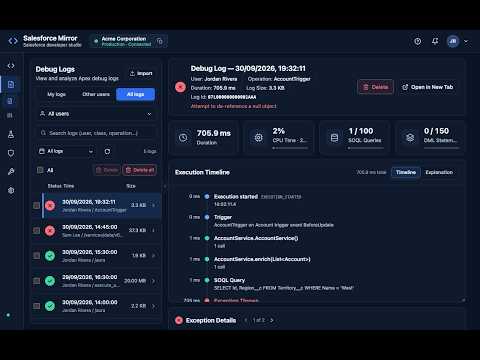
Salesforce Mirror is a developer workspace for working with Salesforce organizations directly from Chrome. Connect to a Salesforce org and use one interface to browse and edit metadata, run Anonymous Apex, build SOQL queries, analyze debug logs, execute Apex tests, review code coverage, build package.xml manifests, explore REST and GraphQL APIs, inspect user access, compare files, and validate or deploy changes. Key features: • Browse and edit Apex, Lightning Web Components, Aura, Visualforce, and metadata, with a full code editor • Create a package.xml manifest from your components: pick by type or name, use * wildcards, then copy or download • Debug Logs: see all logs in the org, filter by your logs, other users, or a specific user, and open a log to see a timeline, errors, governor limits, and a plain-English explanation • Filter log events by category, including Methods (method entry/exit and variable values), SOQL, DML, errors, and more • Jump from a log's exception location straight to the source, then return with one click • Run Anonymous Apex with execution logs and governor-limit details • Build SOQL queries by selecting an object and fields • Run Apex tests and inspect code coverage • Access Assistant: see what a user can access and why, including object and field permissions, system permissions, roles, groups, and sharing defaults; compare two users; and run a risk scan with evidence-based findings • Explore Salesforce REST and GraphQL APIs • Compare, format, validate, and deploy source changes • A flexible workspace: collapse, resize, and maximize side panels, with your layout remembered • A read-only Connected Org display showing the org, its type, and connection status; the org stays fixed for the window and never switches when you change browser tabs • Connection information is stored locally in the extension Salesforce Mirror is intended for Salesforce developers and administrators. A Salesforce account and the appropriate organization permissions are required. Salesforce Mirror is an independent developer tool and is not affiliated with, endorsed by, or sponsored by Salesforce.
4.8 out of 54 ratings
Details
- Version1.1.1
- UpdatedOctober 13, 2026
- Offered byzariva
- Size3.95MiB
- LanguagesEnglish
- Developer
Email
zariva.stores@gmail.com - Non-traderThis developer has not identified itself as a trader. For consumers in the European Union, please note that consumer rights do not apply to contracts between you and this developer.
Privacy

Salesforce Mirror has disclosed the following information regarding the collection and usage of your data. More detailed information can be found in the developer's privacy policy.
Salesforce Mirror handles the following:
This developer declares that your data is
- Not being sold to third parties, outside of the approved use cases
- Not being used or transferred for purposes that are unrelated to the item's core functionality
- Not being used or transferred to determine creditworthiness or for lending purposes